.webp)

Enterprise Service Management
Overview
HR Service Management and Delivery
HR Automation Best practices
Employee Experience Management Strategies
Onboarding Software
Employee Experience Platforms
Onboarding Workflow
Employee Onboarding Checklist
What is a Service Request in ITSM?
Employees often need routine help or access to tools and services that enable them to work smoothly. This is where the concept of a service request comes in. It’s not about fixing something that's broken; that would be an incident. A service request is a formal, often pre-approved request for something that the organization has already agreed to offer.
“As per Rezolve AI, a service request is a request raised by an organization’s end user for support from a concerned department like IT, HR, accounts, etc.”
A service request is a structured way for employees to ask for what they need. Whether it’s getting access to a new software application, resetting a password, ordering a laptop, or asking for company policy documents, a service request helps standardize how these needs are met.
For instance, requests can include, but are not limited to;
- Requesting software/tool access
- Requesting hardware like laptop, charger, peripherals, etc.
- Requesting policy documents, payslips, etc.
These requests are generally low in complexity but high in volume. Unlike emergencies or outages, service requests are part of the regular rhythm of business operations. And when managed well, they help keep that rhythm steady.
What is Service Request Management?
Service Request Management is the process of handling user-initiated requests for information, access, or standard services through a structured and repeatable workflow.
Unlike incident management, which deals with unplanned service disruptions, service request management focuses on fulfilling predefined needs efficiently. A well-implemented service request system improves user satisfaction, reduces response times, and enhances IT productivity.
A service request is a formal, pre-approved employee request for access to tools, services, or information available for an enterprise and its operations.
What is Request Fulfillment?
Once a service request is submitted, it enters the request fulfillment process. This process governs how the request moves through the system, like who sees it, who handles it, what steps are followed, and how it eventually gets resolved.
Request fulfillment ensures that each request is acknowledged, evaluated, approved (if needed), fulfilled, and closed in a systematic manner.
For example, if someone requests a new piece of software, the fulfillment process might include verifying the user’s eligibility, securing manager approval, installing the software, and confirming the completion.
The benefit of this structure is its predictability. Since most service requests are repetitive in nature, fulfillment workflows can be standardized and even automated. This makes everything more efficient for both the employee and the support team.
Incident Management vs. Service Request Management
It’s easy to assume that every employee issue is an “incident,” but that’s not always the case. There’s a clear and important distinction between incident management and service request management.
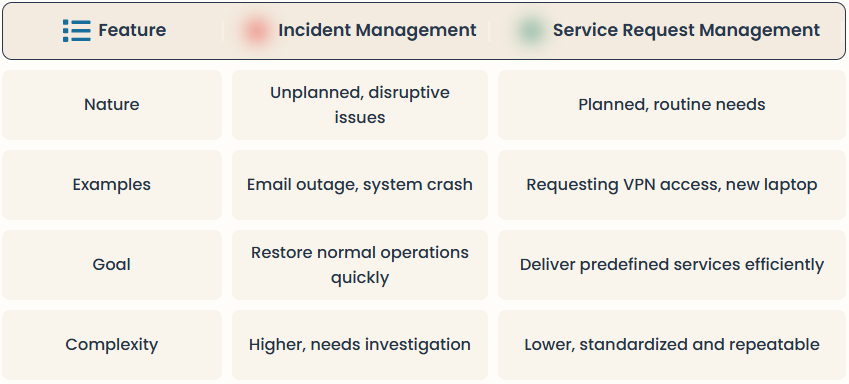
Incidents are unexpected problems. E.g., when your email suddenly stops working, or a system crashes. They require investigation and troubleshooting, often under time pressure.
Service requests, on the other hand, are pre-defined needs. These might include things like requesting VPN access, asking for a device replacement, or seeking help with software usage.
In a nutshell, incidents are unplanned and disruptive. Service requests are planned and routine.
However, combining the two creates inefficiencies. When service requests are treated like incidents, they end up clogging the helpdesk, slowing down urgent fixes, and frustrating users. Separating the two allows support teams to route and resolve each type more appropriately and improve both speed and user satisfaction.
“Incidents are unplanned and disruptive. Service requests are planned, and are a part of routine workflows.”
Why is Service Request Management Important for Businesses?
Effective service request management can have a surprisingly big impact on both the IT team and the wider organization. It creates a consistent, reliable way to meet employee needs without chaos or confusion.
· First, it improves speed. When requests like password resets or app installations are standardized and automated, users get what they need faster, and support teams can focus on higher-level problems.
· Second, it brings down operational costs. Manual fulfillment of repetitive tasks wastes time and money. Automating those workflows helps optimize resources.
· Third, it makes life easier for everyone. When employees know where to go and how to get help, their experience improves—and so does their productivity.
· Finally, there’s compliance. Structured workflows and approval steps mean every request is logged, auditable, and accountable. That’s good for security, data governance, and peace of mind.
Service request management ‘keeps the lights on’ (KTLO) for most organizations. Try Automated Service Requests with Rezolve.ai - see demo
The Service Request Management Workflow
A typical service request journey moves through a series of predictable steps. This workflow creates transparency and ensures that nothing slips through the cracks.
It usually starts when an employee submits a request, either through a self-service portal, a chatbot, or by email. From there, the request is automatically categorized and routed to the right team or system. In some cases, an approval step kicks in, especially requests involving budgets, security, or policy exceptions.
Once approved (if required), the request is fulfilled by either a support agent or an automated workflow. After fulfillment, the ticket is closed, and the user is notified. Feedback may be collected to measure satisfaction and improve the process.
This end-to-end approach reduces friction and helps create an IT support system that scales well.
Service Request Management Priorities
Not all service requests are created equal. Some are time-sensitive, while others can wait. That’s why prioritization matters.
Priorities are typically based on the impact of the request on business operations. For example, a sales executive requesting urgent access to a CRM system may need a quicker response than a general request for a desk upgrade.
Some organizations also prioritize requests based on the requester's role. Senior leaders or customer-facing employees may be granted faster turnaround times. In other cases, the priority may depend on the request type—password resets may be fulfilled instantly through automation, while software installations might follow a queue.
Defining and enforcing clear Service Level Agreements (SLAs) for different request types helps manage expectations and maintain consistency.
Service Request Management Best Practices
To truly unlock the benefits of service request management, organizations need more than just a ticketing tool. They need smart practices that ensure every request is handled smoothly and predictably.
1. The first step is building a service catalog. It is essentially a structured list of the services employees can request. This helps standardize the support experience and reduces ambiguity.
2. Next, automate the simple processes. Password resets, access to common tools, or document delivery can all be fulfilled using bots or rule-based automation. This reduces the load on IT agents and ensures faster delivery.
3. It also helps to create standardized request templates. When forms are clear and consistent, employees know exactly what information is needed, and agents spend less time chasing clarification.
4. Monitoring performance is critical. Track metrics like resolution time, first contact resolution rate, and user satisfaction. These insights help identify gaps and fine-tune the process over time.
5. Lastly, meet users where they are. If your workforce spends most of its day inside MS Teams or Slack, make sure requests can be raised and tracked within those platforms. Reducing support friction boosts adoption and overall productivity
Types of Service Request
“Service request management is one of the most common shared service management capability among enterprises” - Itsm.tools
Service requests come in many shapes and sizes, depending on the organization’s operations. Some are simple and frequent, while others require approval and manual intervention.
A few common categories include:
· Access-related requests, such as logging into business applications, shared folders, or VPNs. These often follow strict access policies and may require multiple approvals.
· Hardware and software requests are also typical. This might involve requesting a new laptop, upgrading a device, or installing licensed software.
· Then there are information requests, where employees seek internal knowledge—like policy documents, product manuals, or procedural guides.
· Some requests involve administrative actions, such as updating user roles, changing team memberships, or modifying system settings.
· Lastly, there are exceptional approvals, where users request flexible work arrangements, special permissions, or non-standard resources.
Each of these categories can be managed more effectively when mapped to a standardized fulfillment workflow and linked to automation where possible.
How Does Rezolve.ai Handle Service Request Management?
Rezolve.ai reimagines the entire process of service request management by embedding it inside tools your employees already use, like starting Microsoft Teams and Slack. Instead of forcing users to log into a portal or send lengthy emails, Rezolve.ai allows them to simply open a chat window, ask for what they need, and get help instantly.
Rezolve.ai’s Agentic AI SideKick 3.0 understands the request context and automatically initiates the appropriate workflow. If it’s a common request, it may be resolved right away like resetting a password or delivering a policy document. For more complex needs, the system gathers the required information, creates tickets, triages and troubleshoots, triggers any approval steps, and routes the request to the appropriate team if necessary.
Rezolve.ai also brings a visual service catalog directly into the Microsoft Teams interface, making it easy for users to browse and select what they need. Smart forms adapt to the user’s context, asking only relevant questions to reduce friction and speed up submission.
Behind the scenes, Rezolve.ai integrates with key enterprise systems like HRIS, ITSM platforms, identity providers, and more, to execute the requested action automatically or notify the right agent. Everything is tracked, measurable, and easy to audit. Users receive real-time updates on their request status, and IT teams benefit from detailed analytics on volumes, performance, and satisfaction. Rezolve.ai simplifies service requests, automates them, and brings them closer to the employee experience.
FAQ
1. What is a request in service management?
A request in service management is a formal user-initiated inquiry for access, information, or standard services, such as software installation, password reset, or hardware upgrade. These are typically low-risk, pre-approved, and handled through standardized workflows.
2. What is the purpose of the service request management practice?
The purpose is to efficiently handle and fulfill service requests in a consistent, reliable manner. It ensures that users get timely access to the resources and services they need while minimizing manual effort and delays.
3. How to improve service request management?
Improvements can be made by automating routine tasks, using self-service portals, integrating workflows with enterprise tools, and continuously reviewing performance metrics. Clear categorization, defined SLAs, and knowledge base support also enhance efficiency.
4. What is the difference between a service request and an incident?
A service request is a planned, routine user need, like requesting software access. An incident is an unplanned interruption or issue with a service, such as a system crash or connectivity problem.
5. Who is responsible for handling service requests?
Service requests are typically handled by the service desk team or a designated fulfillment group, depending on the type of request. Roles and responsibilities are defined in the workflow to ensure timely and accurate resolution.
6. Why is standardization important in service request management?
Standardization ensures consistency, reduces errors, and speeds up fulfillment by using predefined processes for common requests. It also improves user satisfaction and allows IT teams to scale support more efficiently.