AI Cost Management: What We Learned From Metering Our Own AI Spend
We built a spend tool for ourselves because AI is our main cost of goods. Here is what it found, and what it keeps finding for everyone else.


Key takeaways
- AI, cloud and SaaS spend are almost always managed separately, so the total does not exist until someone assembles it by hand.
- AI spend needs breaking down to the model and token class, not just the provider — cache reads bill at a fraction of fresh input, and that gap is usually the first optimization anyone finds.
- Attribution comes before optimization. Until spend is broken out by model, project and user, any cut is a guess.
- Most organizations find their first savings in dormant SaaS licenses rather than in AI, because seat data is unambiguous and the evidence is easy to produce.
- A great deal of enablement spend buys the same capability three times — enterprise search, a Copilot add-on and a separate assistant contract, all doing one job.
- If you cannot see which spend produced a result, you cannot cut the part that did not or defend the part that did, so everything gets frozen together.
For the past two years the instruction from the top of most organizations has been some version of "use AI." Not a business case, not a target — an instruction. Teams were told to experiment, licenses were bought in bulk, and nobody wanted to be the executive explaining why their function was the slow one.
The pendulum swung faster than anyone expected. The question coming down from the executive floor is no longer whether people are using AI. It is what all of this is costing, and what came back. CFOs are asking for the spend broken out, the value attached to it, and a reason the line item should grow again next year.
Most IT organizations cannot answer. Not because the answer is bad, but because the data does not exist in one place. AI spend sits with three or four providers. Cloud spend sits with the hyperscaler. License spend sits in procurement's spreadsheets. Nobody owns the total, so the total does not exist until someone spends a fortnight assembling it by hand.
We know this because we had the problem before our customers did.
We were the first victim of our own consumption
AI is our main cost of goods. That is the nature of the business — every conversation an agent resolves consumes tokens, and when customer consumption climbs, that is growth showing up as a cost line. We welcome that curve.
What we did not expect was the other curve. Internal consumption exploded. Engineering was building against multiple model providers. Teams were running experiments nobody had cataloged. Different projects were hitting different APIs under different keys, and the monthly bill arrived as one number with no way to attribute it to a team, a product or a decision.
Meanwhile the SaaS estate was doing what SaaS estates do. Seats bought during a hiring push, never reclaimed after the people who needed them moved on.
We looked at the tooling available and found the same split everywhere. Cloud cost tools that were excellent at cloud and blind to AI. SaaS management tools that tracked subscriptions but not token consumption. AI observability tools built for engineers debugging latency, not for a finance conversation. Nothing that put the three together and answered the only question that mattered: where is the money going, and which part of it is producing nothing?
So we built it for ourselves.
What the tool does
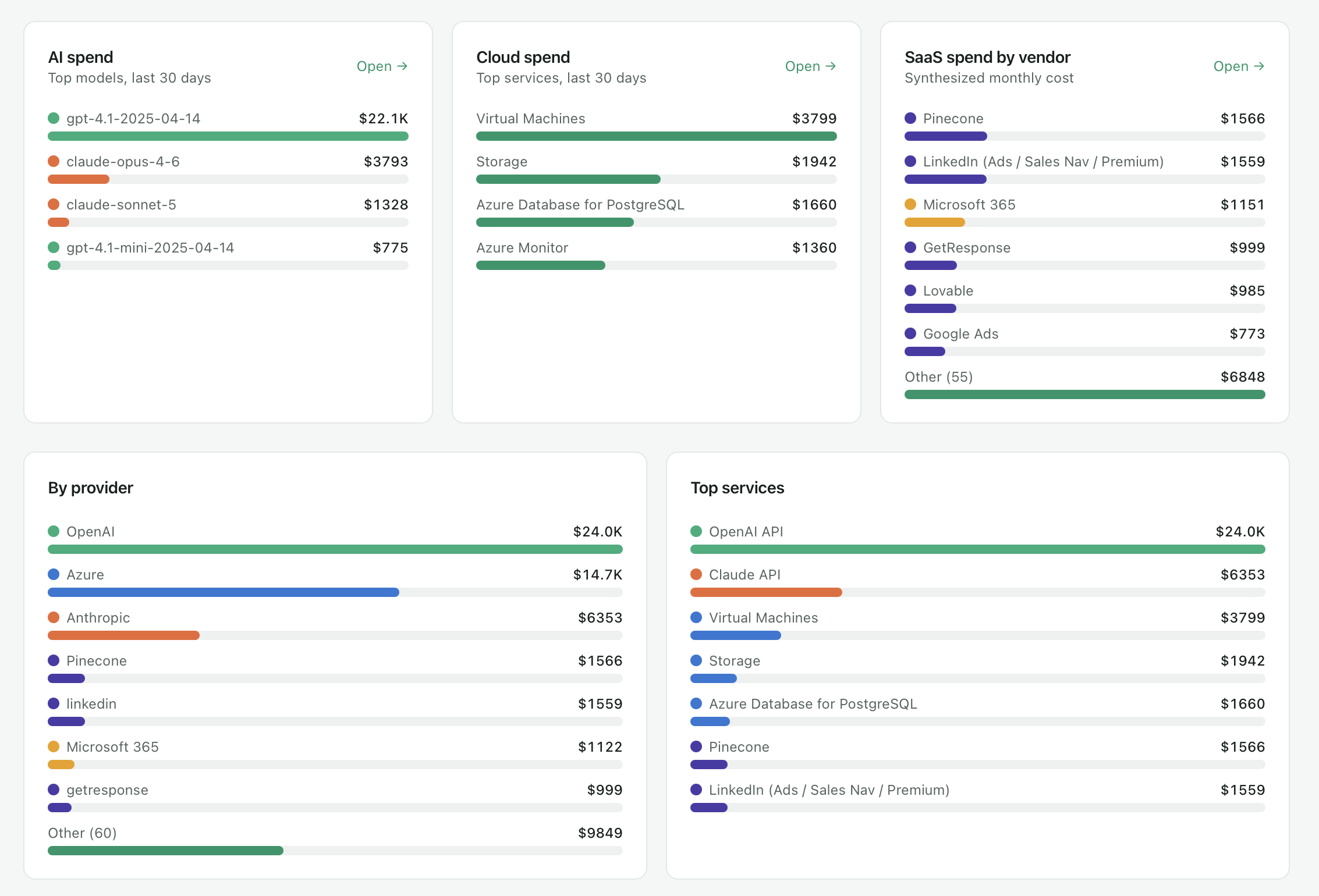
SpendIQ consolidates technology spend across three categories that are almost always managed separately — AI, cloud infrastructure, and SaaS licensing — and puts them on one dashboard with month-to-date figures for each.
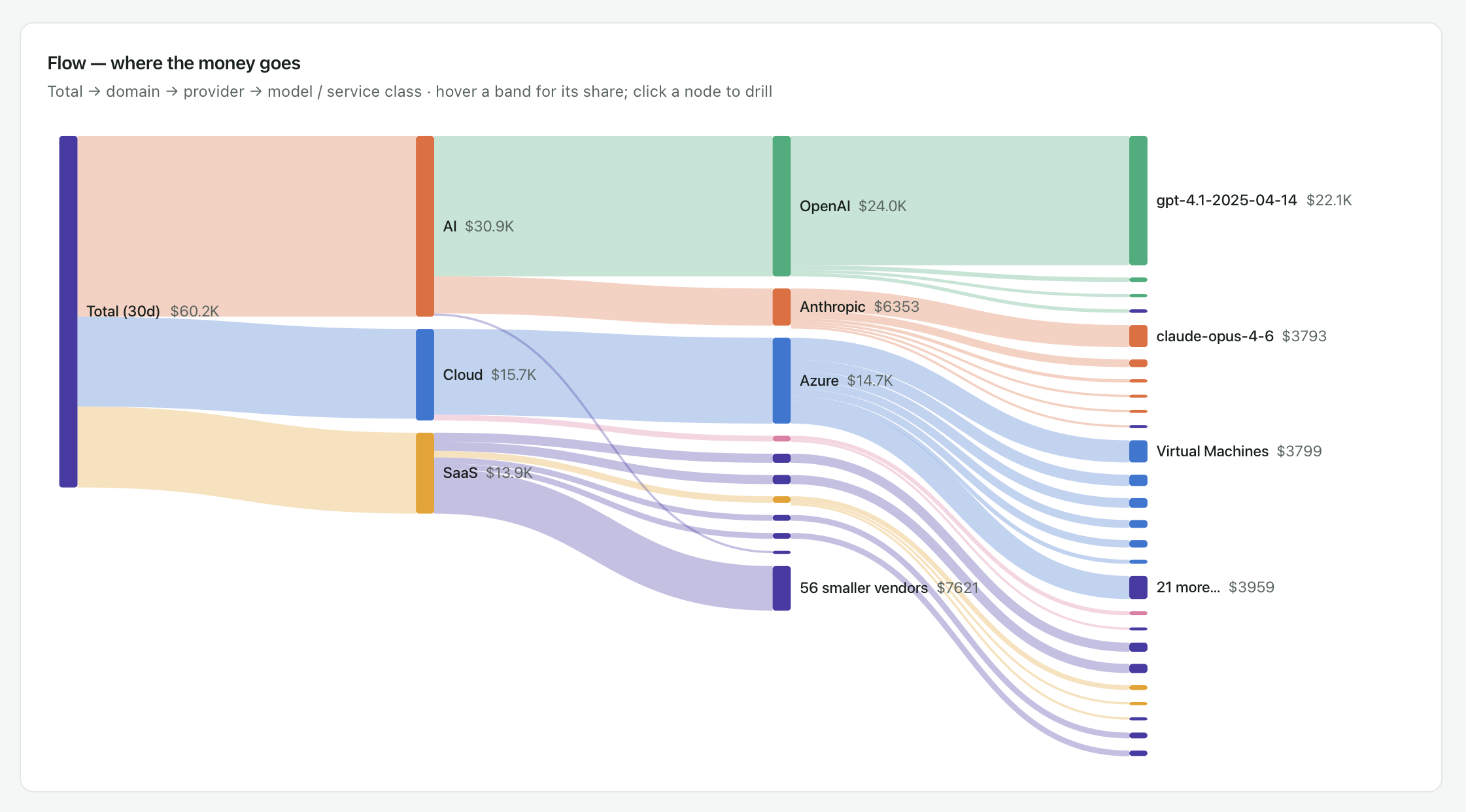 Where technology spend goes—from the total across AI, cloud and SaaS to the individual provider, model or service.
Data arrives two ways. Where a provider exposes a billing API, the connection is live and updates on its own. Where it does not, you import the invoice or a CSV, and the system reads it and categorizes it. It also flags which of your manual imports could be automated, so the manual list shrinks over time rather than calcifying.
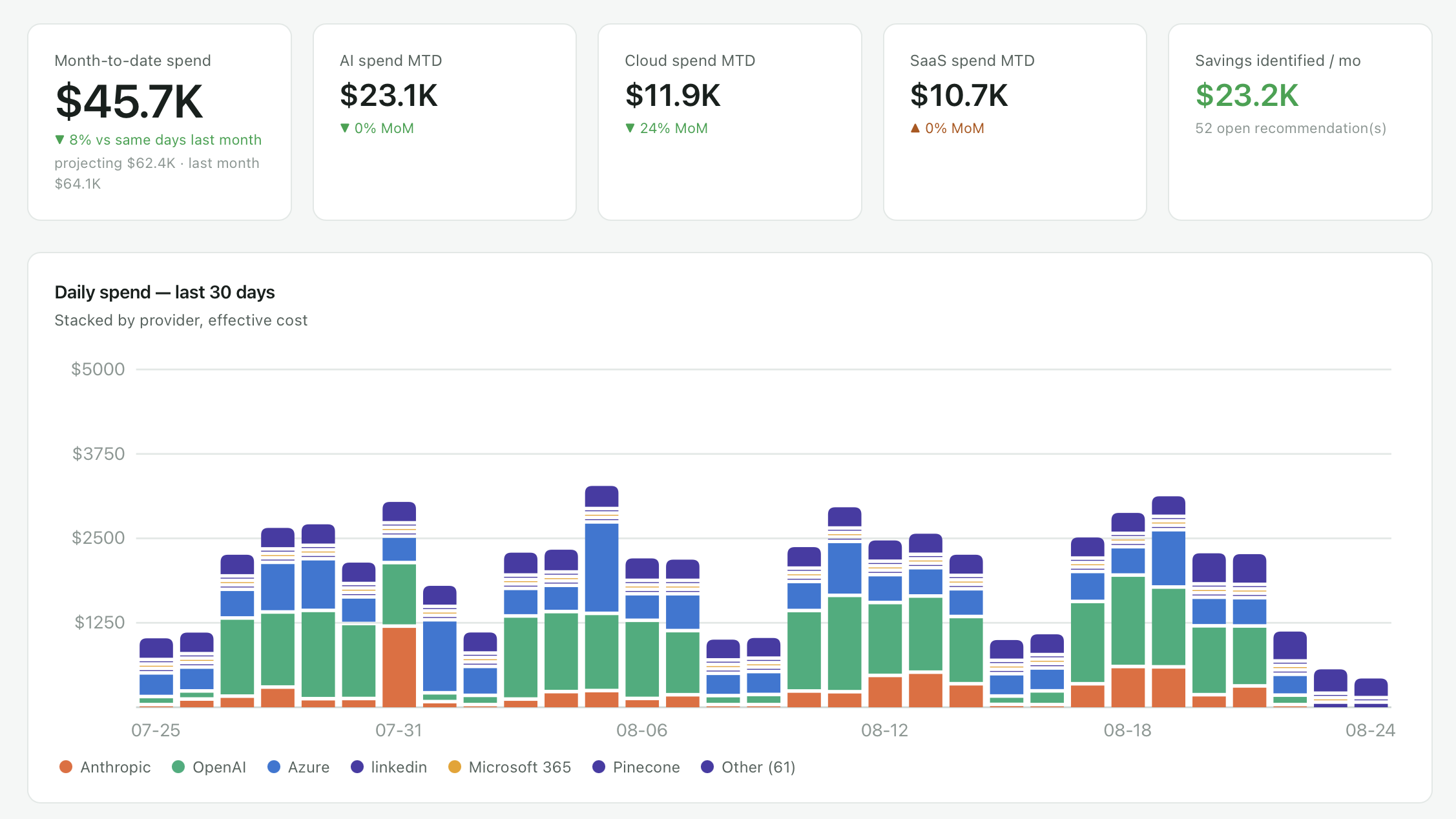 AI, cloud and SaaS spend in one view, with daily movement underneath.
AI spend, down to the model
This is the part that did not exist elsewhere when we went looking.
Spend breaks out by provider, then by individual model within that provider — so you can see not just what you spent on a vendor but which model consumed it. Underneath that sits the token economics: input, cached input, cache reads, output, cache writes, and non-token services, with volume alongside cost. Cache reads bill at a fraction of fresh input, and seeing that gap is often the first optimization anyone finds.
There is an effective price view that gives you cost per million tokens, and a comparison that explains why the bill moved — what you spent in the last thirty days against the thirty before, attributed to the specific model and token class responsible. When a bill jumps, you get the reason rather than the number.
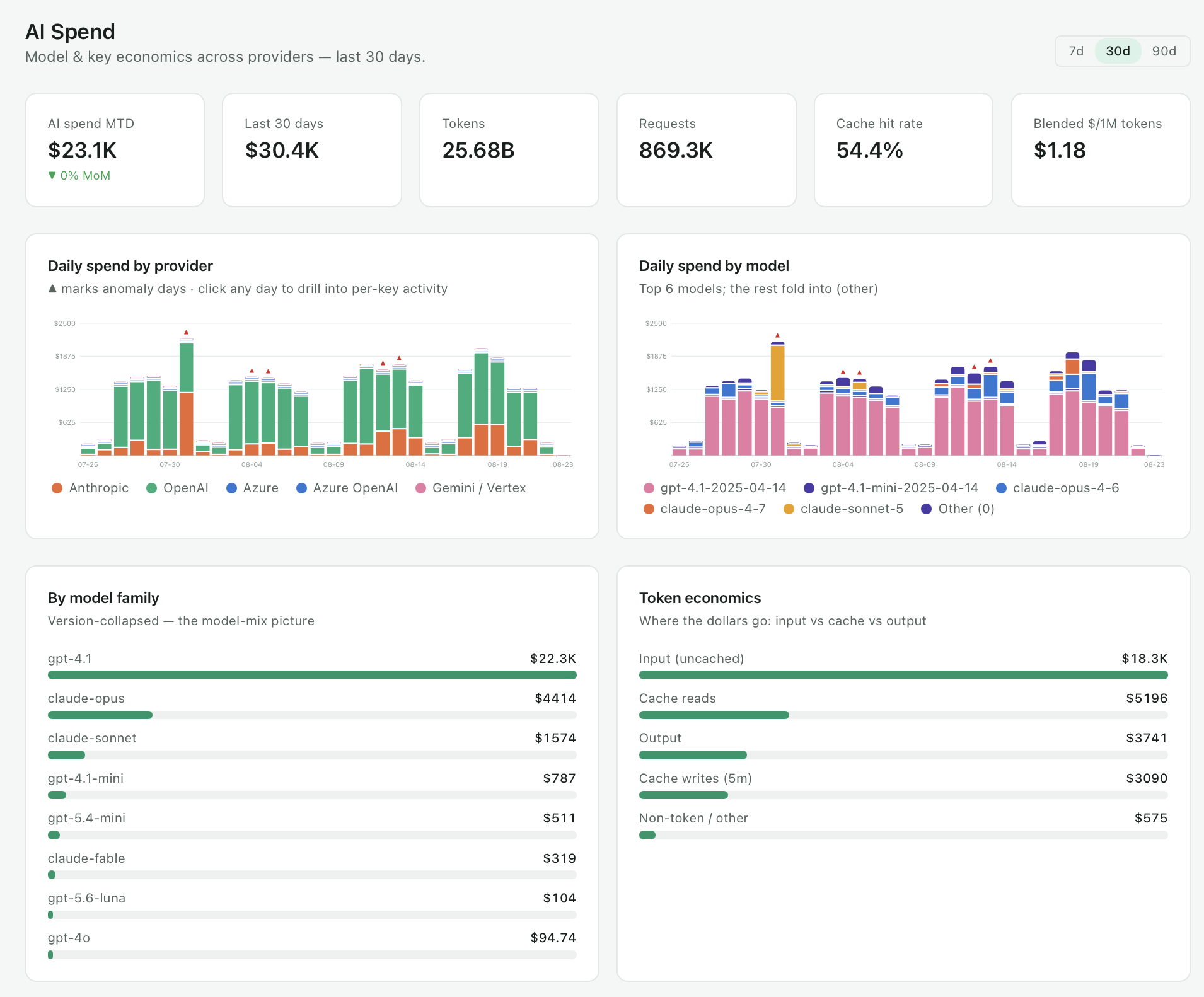 Spend by provider and by model, with the token classes that drive it.
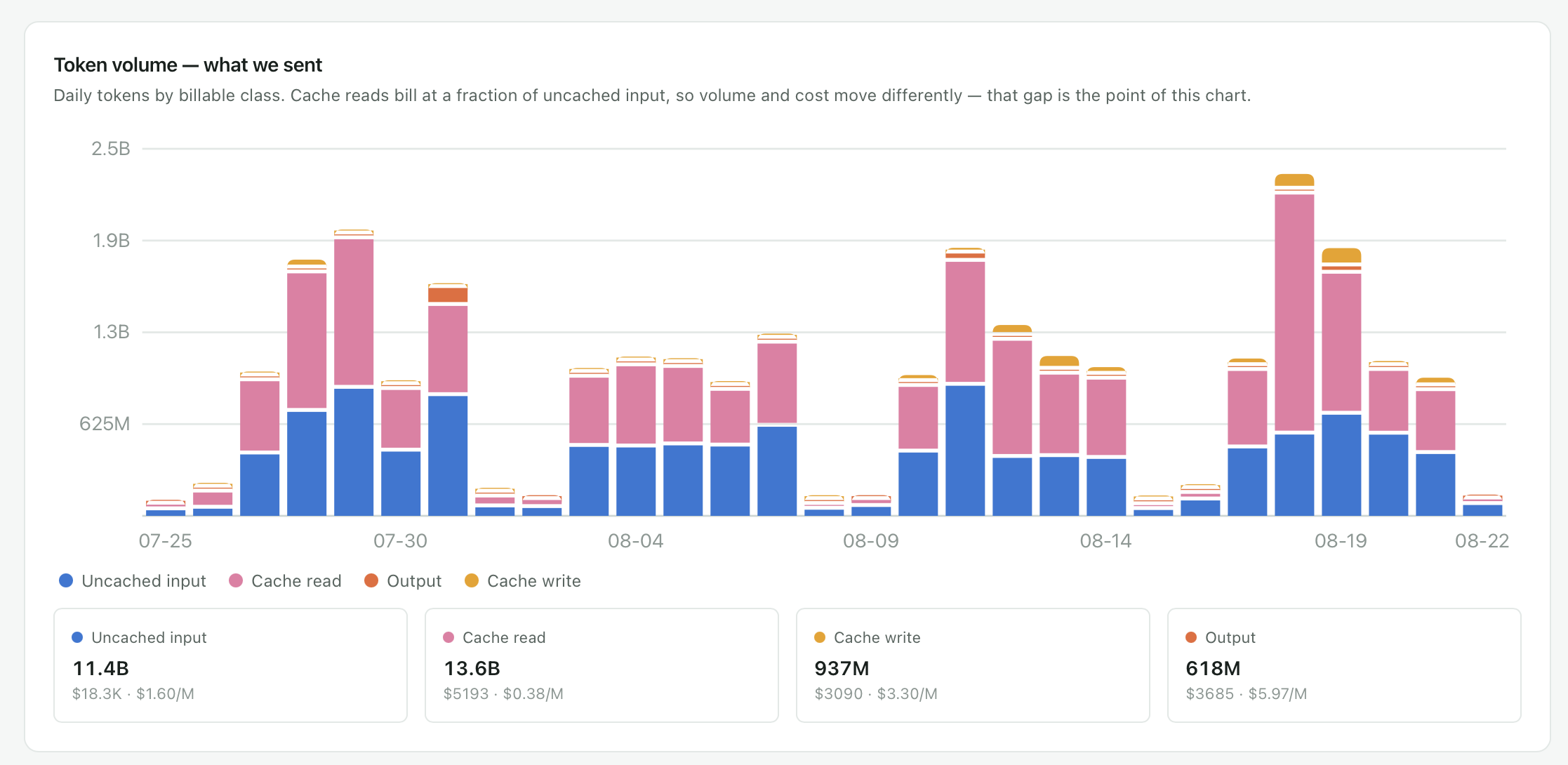 Daily token volume by billable class separates uncached input, cache reads, cache writes and output.
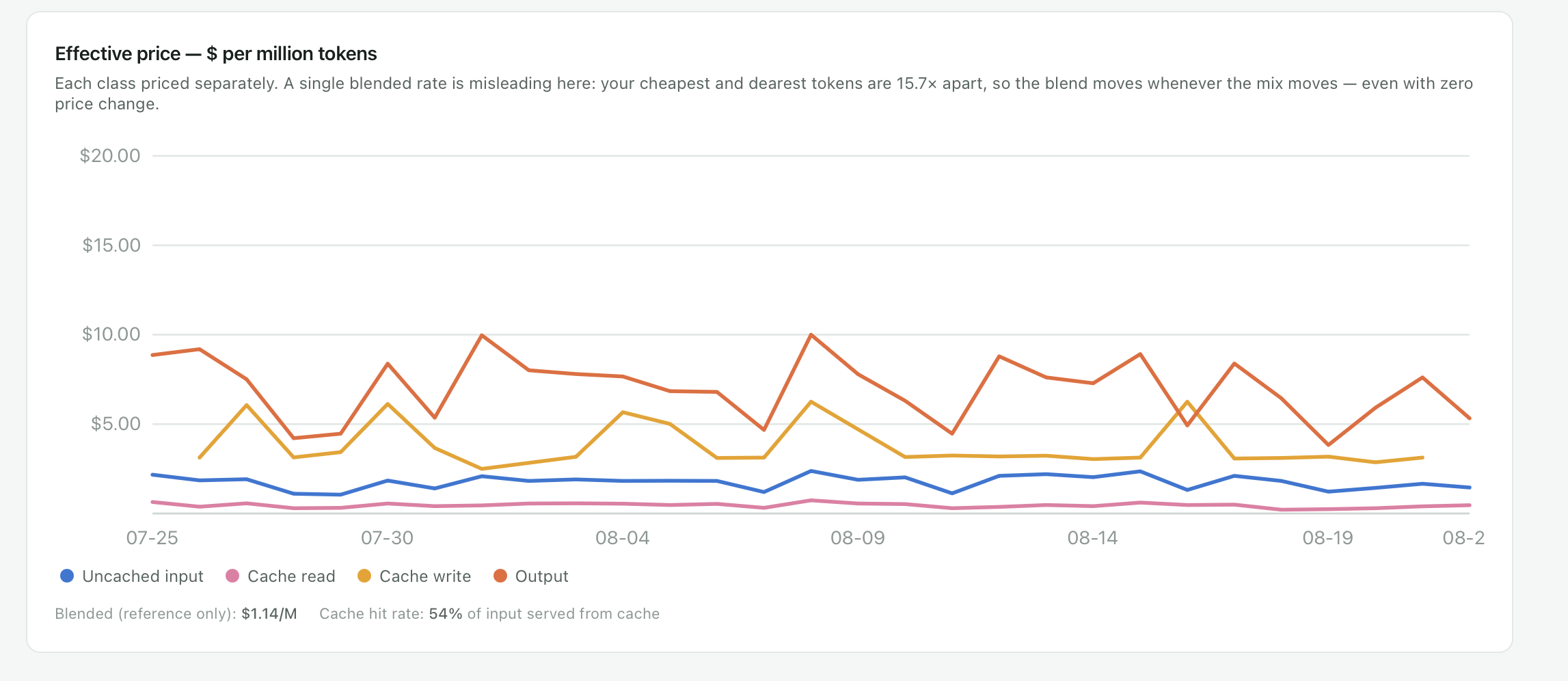 Effective price per million tokens by class shows why a single blended rate can mislead
Spend is also attributed by API key, by project and by individual user. That is what converts a bill into a conversation. "AI cost us this much" is not a discussion anyone can act on. "This project cost this much, and here is the model driving it" is.
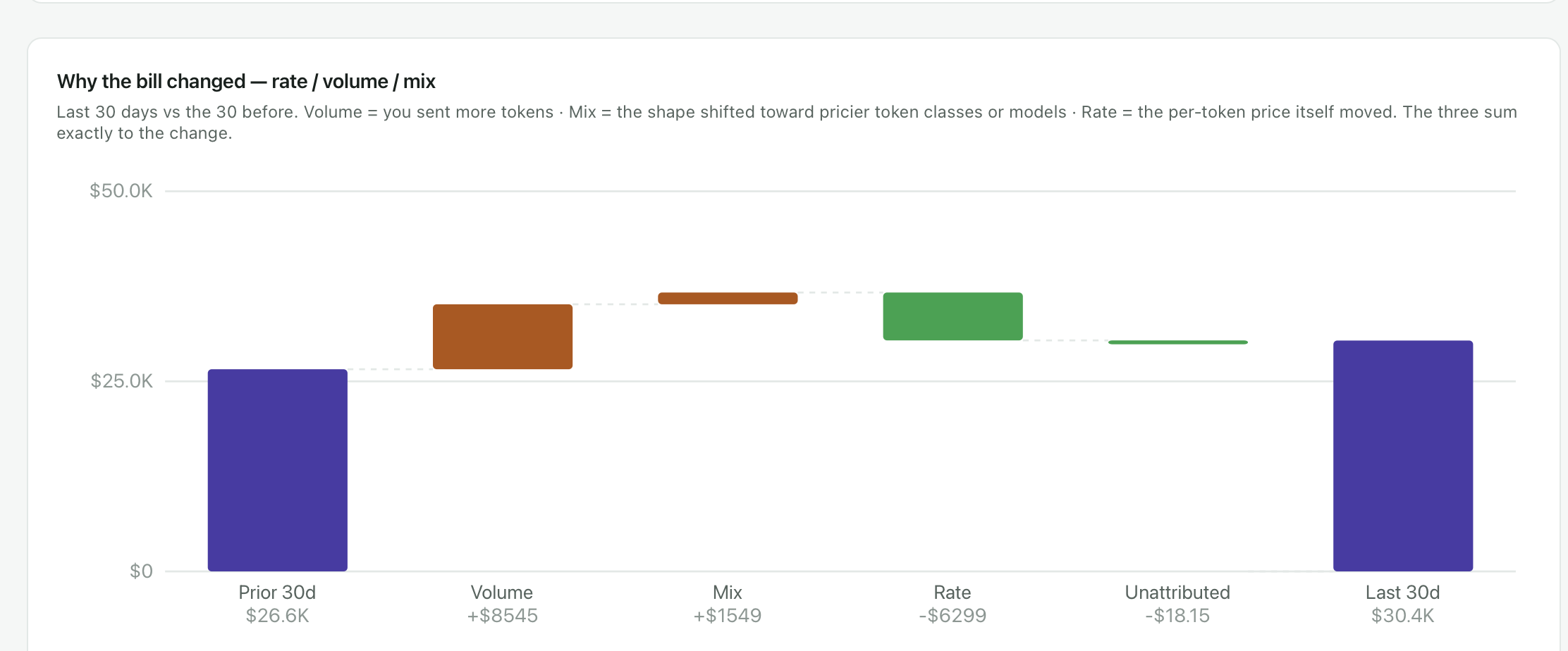 When the bill moves, the change is attributed to rate, volume or mix.
Cloud infrastructure
The cloud section covers the familiar ground — spend by provider, by service, by category, with identified savings opportunities and idle capacity stated as monthly figures.
The view we use most is cost against utilization. Every resource is a point on a chart, plotted by what it costs and how hard it works. Anything sitting high and to the left is capacity you are paying for and not using. Anything high and to the right is expensive because it is busy, which is a defensible reason to be expensive. Two axes, and the argument about whether a resource is oversized resolves itself.
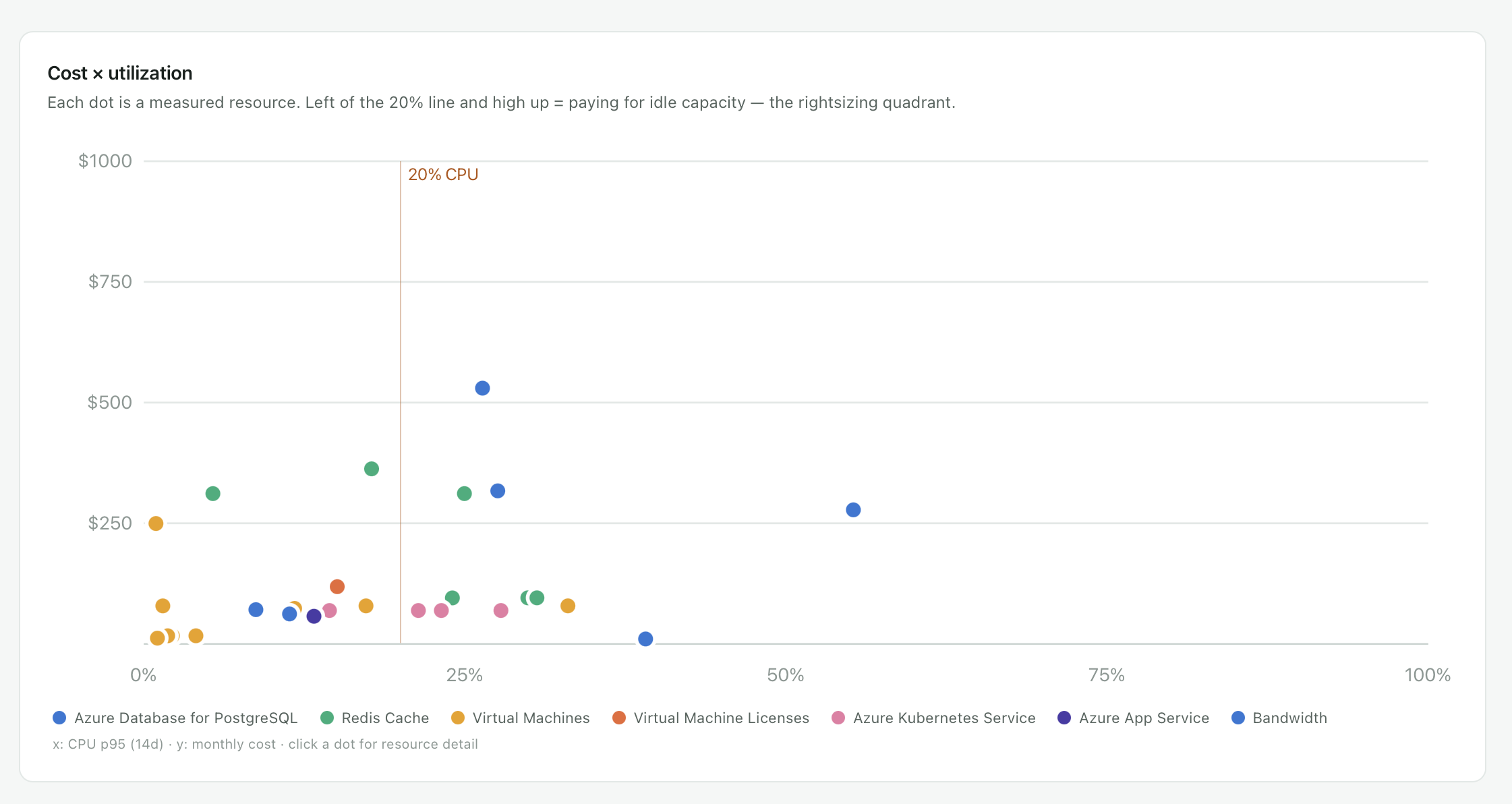 Every dot is a resource. High and to the left is capacity you are paying for and not using.
SaaS and Microsoft 365 licenses
This is the section customers reach for first, and Microsoft 365 is usually where they start.
With the M365 connection live, you see seats purchased against seats assigned, then assigned against actually used — activity in the last thirty days, and inactivity beyond sixty. That last column is where the money is. An assigned license looks like a legitimate cost right up until you notice the person holding it has not signed in for two months.
Cost per seat defaults to list price, which is almost never what you pay. You override it with your negotiated rate and every estimate recalculates against what the license actually costs you.
The output is a report naming the users, their last activity date and the license attached to each — the evidence you need before anyone reclaims anything.
 Seats purchased, seats assigned, and seats nobody has signed into for sixty days.
Recommendations, with the evidence attached
Findings surface as recommendations rather than dashboards you have to interpret. Each one carries a confidence level and the evidence behind it, and you approve, defer or dismiss it.
Approving can be the end of it, or the start. An agent can execute the reclamation — pulling back the dormant seats and returning them to the pool for reassignment — so the finding does not sit in a report waiting for someone to find an afternoon.
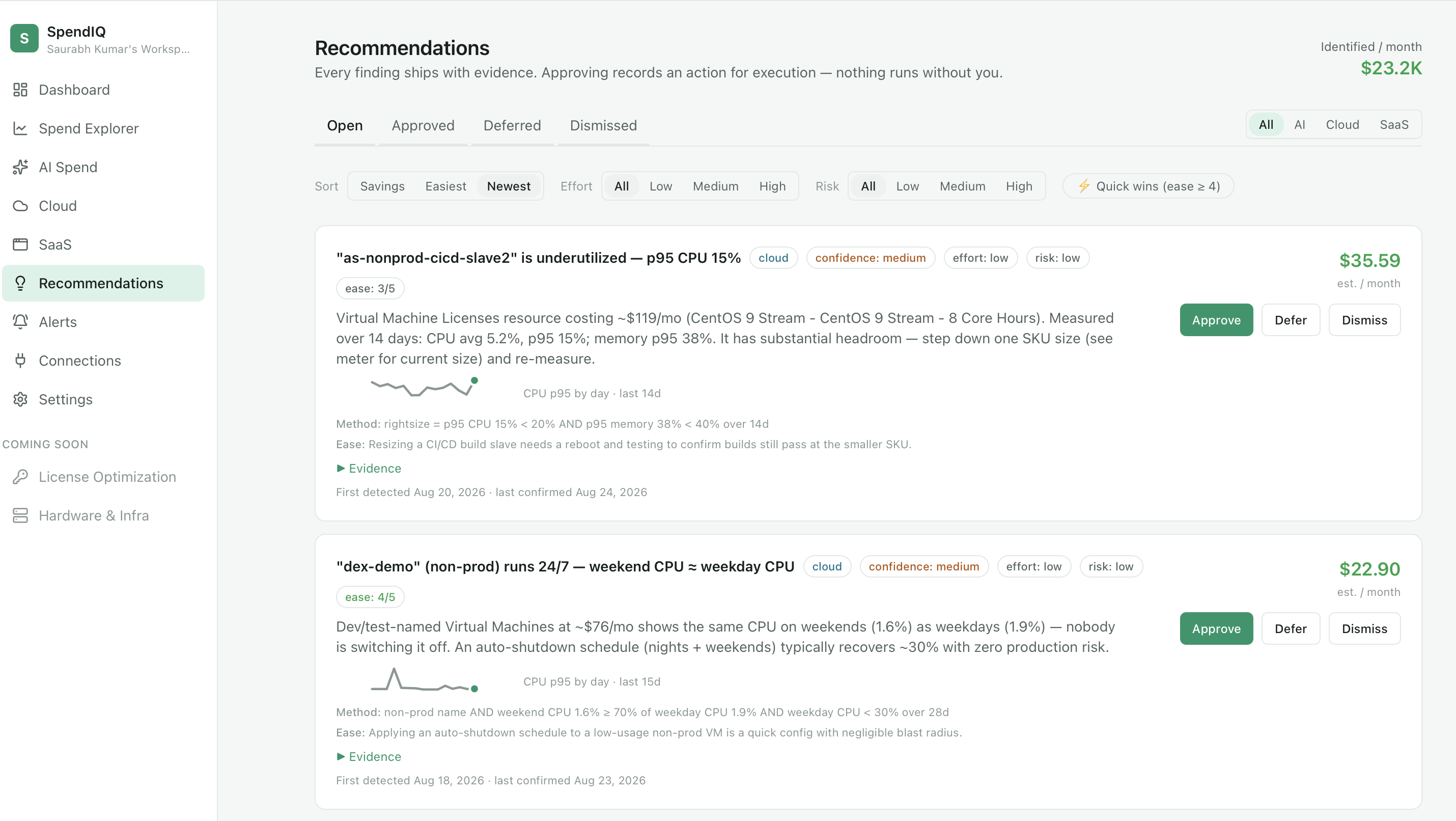 Every finding carries its evidence, and nothing executes until someone approves it.
Alerts run alongside: a spike in daily spend against a trailing average, a monthly trajectory running ahead of last month, a single provider moving sharply. Configurable, and delivered before the invoice rather than after.
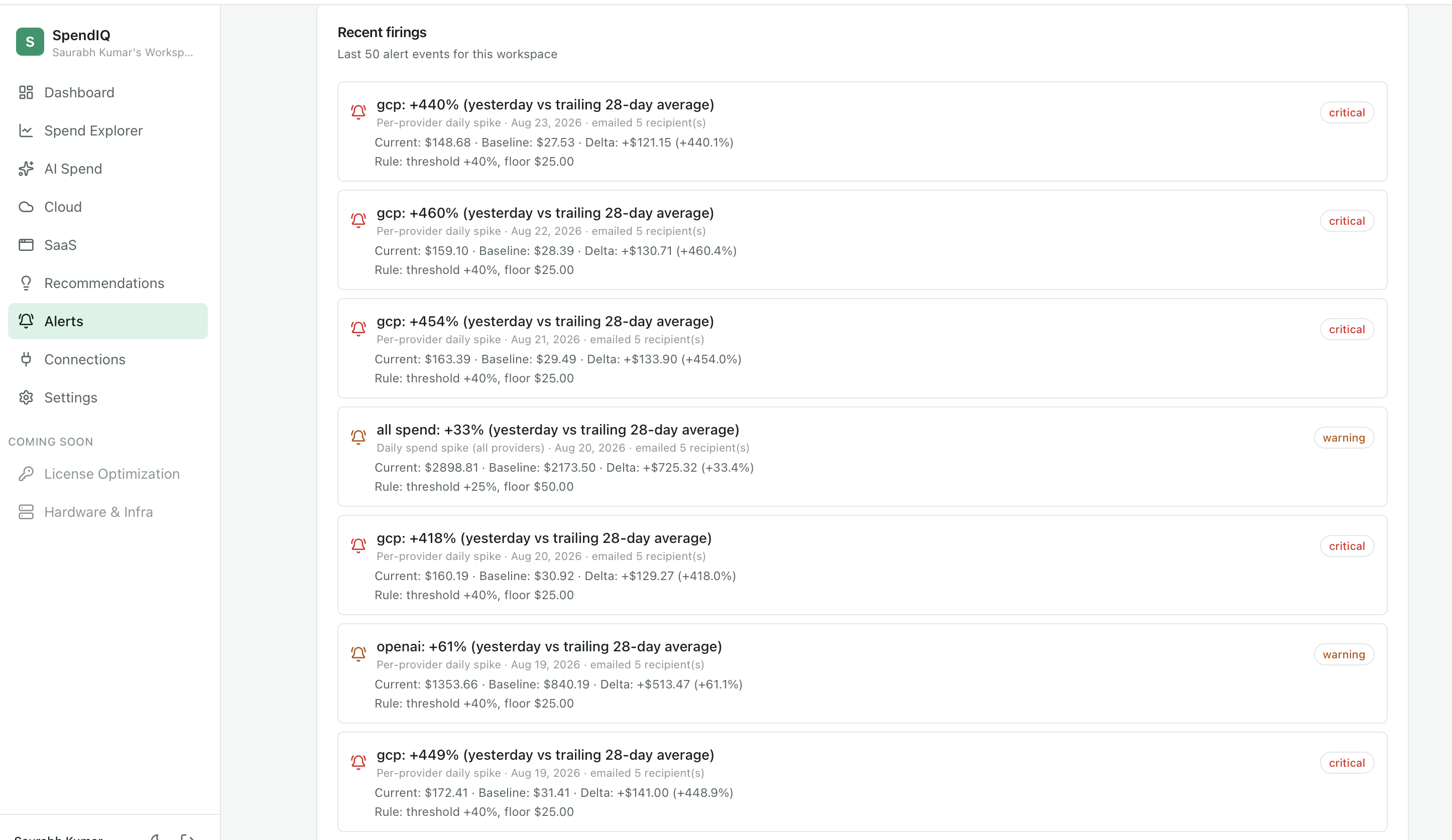 Alerts surface provider-level and total-spend spikes against trailing baselines before the invoice arrives.
Why a service desk company built a cost tool
The short answer is that we needed it. But it turned out to belong here for a reason we only saw afterwards.
We already argue that what an AI agent actually costs must be defensible to a CFO before an IT leader can scale it. That argument is hard to make when the numbers live in four systems. The gap between "our agents deflected this many tickets" and "here is what that cost and what it saved" is exactly the gap this closes.
It also sits in our lane. We are an IT product for IT organizations, and technology spend is an IT problem before it is a finance one. The people who need this are the people already using us.
The arithmetic nobody wants to do
Here is the pattern we keep seeing, and it comes in two forms.
The pilots that never ended
A great deal of enterprise AI spend is producing nothing measurable. Pilots that never left pilot. Teams building something that a product already does. Experiments that ran, taught somebody something, and kept billing afterwards. None of it was unreasonable at the time — it was the cost of finding out. But the finding-out phase is over and the billing continues.
The enablement spend that nobody audits
The second form is larger and gets far less scrutiny, because it was bought with good intentions: tools rolled out to the whole workforce to "enable people with AI."
Start with the gap between seats bought and seats used. On its January 2026 earnings call Microsoft reported around 15 million paid Copilot seats against a commercial base of more than 450 million Microsoft 365 users — roughly 3% penetration. That is the adoption story. The utilization story sits underneath it, and it is less comfortable: a Recon Analytics survey of more than 150,000 US paid AI subscribers found that when employees have access to Copilot, Gemini and ChatGPT, about 70% make ChatGPT their primary tool, 18% choose Gemini, and 8% choose Copilot. If your organization is paying for all three, you are funding three seats per person and getting one used.
Then there is the shape of the pricing. Microsoft 365 Copilot lists at $30 per user per month on an annual term, but it cannot be bought on its own — it requires a qualifying base license, so the real per-seat cost is the add-on plus whichever base suite sits underneath it. The add-on you approved is frequently the smaller half of what you are actually paying.
And then the overlap, which is the expensive one. Consider a common stack. A dedicated enterprise search product, licensed per user with a seat floor and a further charge for the generative layer. Microsoft 365 Copilot on top of the base license. An enterprise assistant contract, custom-quoted. Three products, three contracts, three renewal cycles — and one job description shared between them, which is find the answer that already exists somewhere in this company and give it to the person asking.
Most organizations did not decide to buy that capability three times. They bought it once from IT, once from a business unit that moved faster, and once as a feature of something else.
The comparison worth running
This is where we have an interest, so take it as an argument rather than a neutral observation.
If the objective behind any of that spend is getting enterprise knowledge to employees, it is worth asking what you are paying per employee for it — and what you get back for the money. A general assistant answers a question. It does not resolve the request, action the change, provision the access, or close the loop with the system of record. The employee still files a ticket afterwards.
Rezolve.ai does the whole service desk, for the whole workforce, at a per-employee cost well below what a stacked assistant license costs before you add the base license underneath it. Same objective — get people what they need without a human in the middle — with the resolution attached rather than just the answer.
That is the part that stings when it shows up in a spend report. The tools producing nothing measurable are consuming the budget that the tools producing a measurable result are being denied.
Both halves, one missing capability
If you cannot see which spend produced a result, you cannot cut the part that did not, and you cannot defend the part that did. Visibility is what separates them, and until you have it everything gets treated the same way — which in practice means everything gets frozen.
The organizations getting this right are not spending less on AI. They are spending the same amount on fewer things, and they can say why.
Where to start
You do not need a program for this. Connect Microsoft 365 first, because the API is live and the seat data is unambiguous, and look at the sixty-day inactive column. Most organizations find something there in the first hour.
Then add your model providers and let a month of data accumulate before you draw any conclusions. The first month tells you where the money goes. The second tells you whether anything changed.
We built this because our own AI bill demanded it. If yours is heading the same way, the tooling exists now, and the first look is usually the uncomfortable one.
Last updated on September 16, 2026
Get summary with:
See the agentic service desk in action
Watch Rezolve.ai autonomously resolve real IT and HR tickets: governed, auditable, glass-box.
Frequently asked questions
What is AI cost management?
The practice of tracking, attributing and optimizing what an organization spends on AI — model API consumption, AI-enabled SaaS licenses, and the infrastructure underneath. It differs from traditional cloud cost management because AI spend is consumption-based and varies by model and token class, so the same workload can cost very different amounts depending on how it is built.
How is AI spend different from cloud spend?
Cloud spend is largely capacity you provision. AI spend is consumption you trigger, priced per token, with different rates for input, output and cached content. A single change in how an application handles caching can move the bill significantly without any change in usage.
What is a good first step in reducing AI costs?
Attribution before optimization. Until spend is broken out by model, project and user, any cut is a guess. Most organizations find their first savings not in AI at all but in dormant SaaS licenses, which are easier to identify and reclaim.
Does AI cost management cover SaaS licenses?
It should. AI capability increasingly arrives as a feature of software you already license, so treating AI spend and SaaS spend as separate problems leaves the overlap invisible — which is where a good deal of duplicated cost lives.
Can inactive licenses be reclaimed automatically?
Yes, once you accept the finding. The identification is data; the decision is yours; the execution can be handed to an agent that reclaims the seats and returns them to the pool.