Act 1 · Resolve the tickets that never happen: Most of your queue disappears.

Sidekick answers and executes on every channel your people already use: grounded only in knowledge you approve, with Rezolve VoiceIQ on the phones and every decision reviewable in the glass-box Explainability view.
See the demos for:
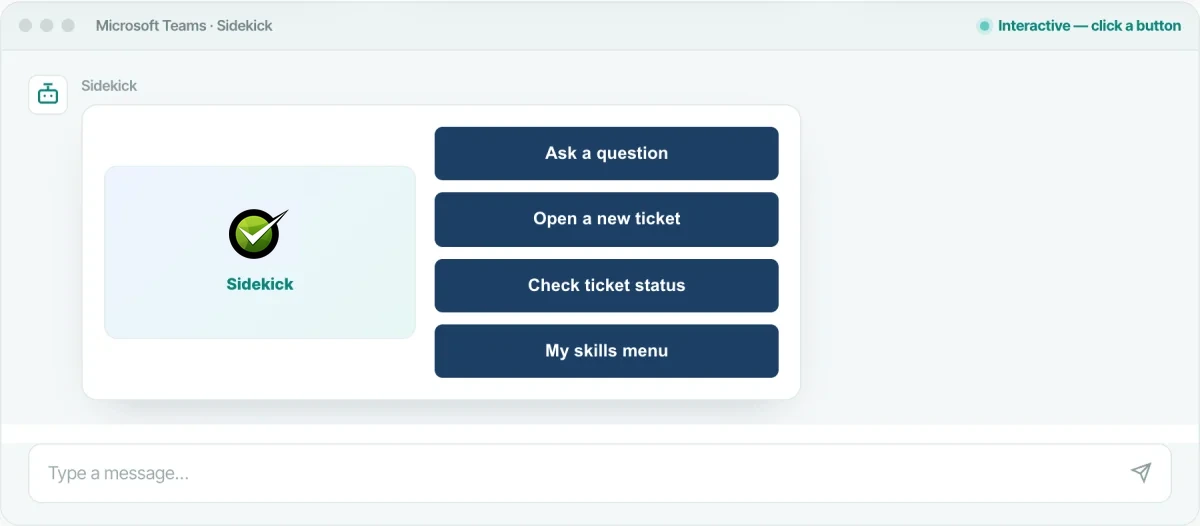
Microsoft Teams · SidekickInteractive below Resolve, Sidekick resolves requests in Teams chat before they become tickets

Sidekick · Conversational AI Assistant: The AI your employees actually talk to.

Sidekick is the agentic AI front door to the service desk. It answers questions from your knowledge and executes IT automations (reset a password, unlock an account, provision software, onboard a hire), so the request is done, not just answered, and never becomes a ticket for your team.

Multimodal AI help desk on every channel your people already use
Microsoft Teams
The desk lives where they already work, no new app to adopt.
Slack
Ask in any channel or DM: no portal, no login.
Email
Email the desk: auto-triaged and answered, no form.
Mobile app
Self-service in their pocket, the frontline isn’t chained to a desktop.
Embedded web chat
Drops into any portal, meet people where they already land.
Voice
Call in and Rezolve VoiceIQ resolves it, even the people who’ll never open a chat window.
Microsoft Teams · SidekickInteractive: click a button, watch it resolve
Type a message…
Governed & reviewable. Every Sidekick conversation, answer and executed action is captured: open any one in the glass-box Explainability view, so you can defend an autonomous action to an auditor or a skeptical stakeholder instead of reconstructing it after the fact.
See Explainability
Ingested from the systems you already use

Rezolve ingests and keeps your knowledge in sync from the tools your teams already maintain, so answers stay current, with nothing to copy-paste or re-upload.

SharePointConfluenceServiceNowGoogle DriveNotionFreshservice+ more
Grounded only in knowledge you approve

Every answer comes from your curated, approved sources, your KBs and the specific websites you choose, and cites where it came from. Never Reddit, never the open web, never invented.

Approved KBsSpecified websitesEvery answer citedNo open-web guessing

Explainable AI · interactive: Open the box. See every decision.

This is how you govern and review everything Sidekick does: the real glass-box view from the console, rebuilt so you can click through it. Take one IT question, why does Excel keep freezing?, and follow exactly how the agents understood it, routed it, searched your knowledge, and grounded the answer. It’s the record that lets you put an autonomous agent into production and defend every action it takes: to an auditor, a skeptical stakeholder, or your own risk team.

redwood.virtualpeople.ai/console · Explainable AIInteractive, click any stage
Explainable AI
Knowledge Response, It keeps freezing when I try to open an Excel spreadsheet
Answer Preferences:Answer Strategy: balancedBot Tonality: elsie
User Query
It keeps freezing when I try to open an excel spreadsheet
View chat history
Action Agents Reasoning Agents
Action Analysis
Context Enriched Query
Explicit Query
Search Phrase: “My computer freezes when I open an Excel spreadsheet”
Related Query
Search Phrase: “Excel freezing issues on computer”
Routing Agent
1
Understanding your problem
You explained that your computer freezes specifically when you try to open an Excel spreadsheet. This means you are reporting a technical issue affecting your computer’s performance related to Excel.
2
Identifying your request type
Since you are describing a problem and likely want help to fix it, your message is a problem report rather than a request for information or an action to be performed for you.
Knowledge routed to Knowledge Agent
Selection Analysis
Search Results
Knowledge Results7
Offer Results8

One hybrid search ran across your knowledge base and your guided actions: 15 candidates retrieved and ranked, closest match to the request wins.

Synthesis Agent
1
Composing the answer
Selected the highest-ranked knowledge matches and composed a single, grounded answer in plain language: keeping only steps that are safe and relevant, and discarding lower-confidence candidates.
Web Search
1
Checking trusted external sources
Approved external sources were available as a fallback to corroborate guidance, used only where your own content didn’t fully cover the question. Your trusted content always comes first.
Bot Response
When your computer freezes while opening an Excel spreadsheet, it can be frustrating, but there are some safe and simple things you can check that often resolve the problem:
  1. Check if the file is locked. Excel files can be locked for editing if they’re already open on another device or didn’t close properly. Make sure the file is closed everywhere else and give it a minute before trying again.
  2. Try Safe Mode in Excel. Running Excel in safe mode starts it without extra add-ins or custom settings, which can sometimes cause issues, a gentle way to see if something extra is interfering.
  3. Look for add-in problems. If Excel works in safe mode, an add-in may be the culprit. Turn add-ins off from Excel’s menu to see if the freezing stops: just a few clicks, no technical skills required.
User marked this answer as helpful: the loop closed, captured on the record

A faithful, clickable recreation of the live Explainable AI view, Review Conversations → Queries → Explainable AI.

redwood.virtualpeople.ai/console · Explainable AIInteractive, click any stage
Explainable AI
Knowledge Response: How much PTO do I get, and how do I request time off?
Answer Preferences:Answer Strategy: balancedBot Tonality: elsie
User Query
how much PTO do I get and how do I request time off
View chat history
Action Agents Reasoning Agents
Action Analysis
Context Enriched Query
Explicit Query
Search Phrase: “Annual PTO entitlement and how to request time off”
Related Query
Search Phrase: “Book time off / submit a leave request”
Routing Agent
1
Understanding your question
You asked two things: how much paid time off you’re entitled to, and the steps to request it. This is a question about company policy plus a how-to.
2
Identifying your request type
You’re asking for information grounded in your HR policy, not an action to perform right now, so this is a knowledge request, with a guided “Request Time Off” action offered alongside the answer.
Knowledge routed to Knowledge Agent
Selection Analysis
Search Results
Knowledge Results6
Offer Results3

One hybrid search ran across your HR knowledge base and your guided actions, the Leave & Time-Off Policy and the “Request Time Off” action ranked highest of 9 candidates.

Synthesis Agent
1
Composing the answer
Pulled the entitlement and request steps straight from your Leave & Time-Off Policy, quoted only what the policy actually states, and attached the “Request Time Off” guided action, no figures were invented.
Web Search
1
External sources not needed
Your own Leave & Time-Off Policy fully answered the question, so no external sources were used. When your approved knowledge covers it, the agent never reaches outside it, and if it hadn’t, it would say so rather than guess.
Bot Response
Great question: here’s what your company’s Leave & Time-Off Policy says, and how to book it:
  1. Your entitlement. Full-time employees accrue 20 days of paid time off a year, plus recognized public holidays. Up to 5 unused days can carry into the next year.
  2. How to request it. Open Request Time Off, pick your dates and leave type, and submit. It routes to your manager automatically for approval.
  3. Check your balance. Ask me “how many PTO days do I have left?” any time and I’ll pull your current balance.
User marked this answer as helpful: the loop closed, captured on the record

The same glass box, on an HR question. The answer is grounded strictly in your policy, so it won’t invent a number, the wrong figure never reaches an employee or your books, and it shows the guided action it attached, every step there if an auditor asks.

redwood.virtualpeople.ai/console · Explainable AIInteractive, click any stage
Explainable AI
Knowledge Response, How do I get reimbursed for a client dinner?
Answer Preferences:Answer Strategy: balancedBot Tonality: elsie
User Query
how do I get reimbursed for a client dinner
View chat history
Action Agents Reasoning Agents
Action Analysis
Context Enriched Query
Explicit Query
Search Phrase: “Reimbursement process for a client dinner expense”
Related Query
Search Phrase: “Expense policy, meal limits and client entertainment”
Routing Agent
1
Understanding your question
You’re asking how to be reimbursed for a business meal with a client: a request for information about the expense process, not a transaction to run right now.
2
Identifying your request type
You’re asking for information grounded in your travel & expense policy, so this is a knowledge request, with a guided “Submit an Expense” action offered alongside the answer.
Knowledge routed to Knowledge Agent
Selection Analysis
Search Results
Knowledge Results6
Offer Results5

One hybrid search ran across your finance knowledge base and your guided actions, the Travel & Expense Policy and the “Submit an Expense” action ranked highest of 11 candidates.

Synthesis Agent
1
Composing the answer
Pulled the meal limit and submission steps straight from your Travel & Expense Policy, quoted only what the policy actually states, and attached the “Submit an Expense” guided action, no figures were invented.
Web Search
1
External sources not needed
Your own Travel & Expense Policy fully answered the question, so no external sources were used. When your approved knowledge covers it, the agent never reaches outside it, and if it hadn’t, it would say so rather than guess.
Bot Response
Great question: here’s what your company’s Travel & Expense Policy says, and how to file it:
  1. Check the policy limit. Client meals are reimbursable up to the per-attendee limit set in the travel & expense policy.
  2. Keep the itemized receipt. Submit it within 30 days, with the attendees listed on the expense.
  3. Submit it right here. I can file the expense from this chat and route it to your manager, reimbursement lands with the next payroll run.
User marked this answer as helpful: the loop closed, captured on the record

The same glass box, on a finance question. The answer is grounded strictly in your expense policy, so it won’t invent a number, the wrong figure never reaches an employee or your books, and it shows the guided action it attached, every step there if an auditor asks.

Rezolve VoiceIQ · Intelligent Voice AI: Pick up the phone. It just gets handled.

A conversational voice layer that answers every call 24/7, resolves the issue on the line (password resets, ticket logging, status checks), and warm-transfers to a person with full context when human expertise is needed. Here’s a real call, start to finish.

voiceiq.rezolve.ai · live callInteractive, tap to start the call
Conversation
A sample call, start to finish, tap the call button and the voices play with the transcript appearing live.
Tap to start call
Caller
Rezolve VoiceIQ
Real speech-to-speech voices · a recorded sample, not a live line.

A clickable sample call · real speech-to-speech voices · in-call identity check & password reset · warm transfer to a human
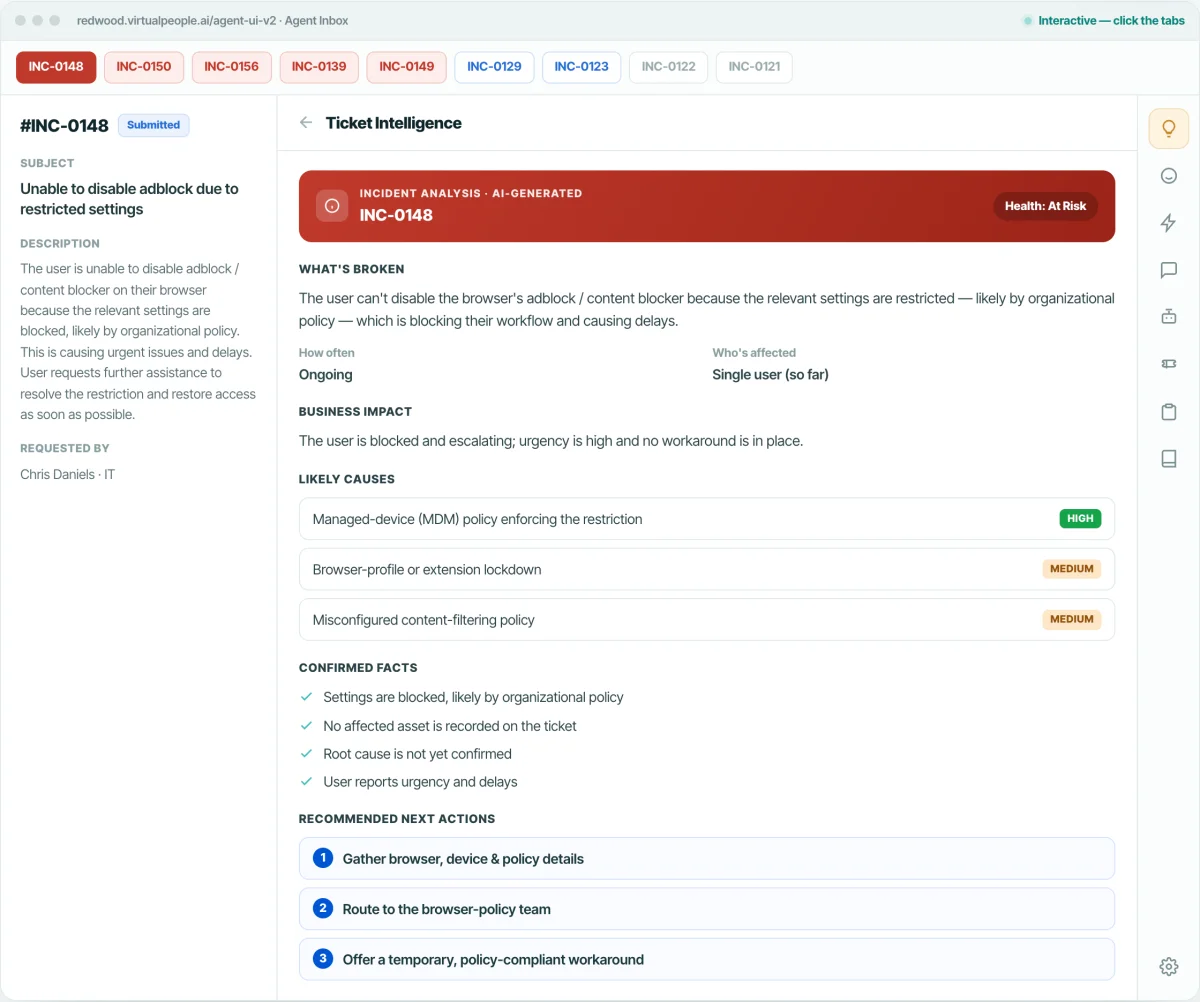
First-call resolution
Reset passwords (Okta / Entra ID), raise tickets (Rezolve · ServiceNow · Jira), book meetings (Calendly): live, on the call.
No hold, no IVR maze
Real-time speech-to-speech, natural conversation with zero transcription delay.
Warm human handoff
Seamless transfer via Teams CCaaS with a full context briefing and voicemail fallback.
Verified & safe
Optional identity verification before sensitive actions; full transcript & sentiment logged.

Ready when you are: Start resolving tickets autonomously.

Trusted from JLL’s ~100,000-employee Ask Ethics rollout to TotalEnergies Denmark, Gesa Credit Union and Black Angus Steakhouse, and rated 4.8/5 on G2. See the same platform run your own IT, HR or Finance scenarios end-to-end: autonomous, governed, and fully explainable.

Bring twelve months of ticket history to the demo. DeskIQ ranks your top five automation opportunities on your own queue, with the projected hours next to each — you leave with the roadmap, not a slide about one.