AI endpoint troubleshooting: how an agentic investigator works through device issues
AI endpoint troubleshooting lets a technician ask a device what is wrong. Here is how Rapport investigates slow, printing and low-disk issues, why every change waits for approval, and what to measure in a pilot.

Key takeaways
- AI endpoint troubleshooting connects an AI agent to a managed device so it can form a hypothesis, run checks, read the results and propose a fix.
- Unlike a generic chatbot, it works from live device evidence; unlike a fixed script, it can handle faults nobody predicted.
- In Rapport, read-only checks run on their own, changes wait for a technician's approval, destructive commands are refused and every step is recorded.
- Pilot it on real tickets and measure evidence-gathering time, approvals, whether the employee's task works afterward and whether the issue returns.
A laptop is slow. A printer will not print. A disk is almost full. Every IT team knows these tickets by heart, and they are still some of the hardest to close quickly. The same complaint can come from a dozen different causes, and the evidence sits on a device that is often in someone's home.
AI endpoint troubleshooting changes where that work starts. Instead of scheduling a remote session or pasting logs into a chatbot, a technician asks the device what is wrong. An agent on the endpoint runs checks, reads the results and proposes a fix, and anything that would change the machine waits for a person to approve it.
Rezolve.ai demonstrated exactly that workflow when it launched Rapport, its agentic investigator for endpoints. This guide uses that launch demonstration to explain how AI endpoint troubleshooting works, where the technician stays in control and what to measure if you try it.

The Rapport launch webinar walked through live investigations on three demo devices at once. Watch the full recording.
What is AI endpoint troubleshooting?
AI endpoint troubleshooting is the use of an AI agent, connected to a managed device, to investigate a fault on that device. The agent forms a hypothesis, runs a diagnostic check, reads the result and decides what to check next. When it finds a likely cause, it proposes a fix for a technician to review, approve and verify.
It sits between two approaches IT teams already use, and it is different from both.
| Generic AI chatbot | Fixed remediation script | AI endpoint troubleshooting | |
|---|---|---|---|
| Starts from | The technician's description of the problem | A condition someone predicted in advance | The affected device and the employee's symptom |
| What it can see | Only what is pasted into the chat | The values the script was written to check | Live device evidence: processes, services, logs, disk and network state |
| Works best for | General explanations | Known, repeatable faults | Faults nobody has written a script for yet |
| Changes to the device | None; the technician runs everything by hand | Run automatically once deployed | Proposed with a plain-English explanation and held for approval |
Joshua O'Brien, Head of Applied AI at Rezolve.ai, described the workaround many technicians use today. They ask a general chatbot why a device is failing, get a list of generic checks, ask it to write a script, paste that script into their management tool, then paste the output back into the chat. The loop is slow, it happens outside a system IT controls, and the advice may not even fit the hardware: troubleshooting steps for one manufacturer's laptop are no help on another's. A device-connected investigation already knows which machine it is looking at.
Why device issues are so hard to troubleshoot
Saurabh Kumar, CEO of Rezolve.ai, pointed to two reasons in the launch webinar. The first is variation. A slow or crashing device can be a driver, an application, a patch, the network or failing hardware, and that range cannot be covered by deterministic "if this, then that" logic. The second is time. Fixing these problems usually means a technician sets aside a block of time to look at one machine, often through a scheduled remote session, before moving on to the next.
Remote and hybrid work made both harder. Devices that once sat on a managed office network now connect through home Wi-Fi and consumer internet providers that IT does not control. When an employee's printer or connection fails at home, there is often nobody nearby who can look at it.
That is the gap AI endpoint troubleshooting is meant to close: less time gathering evidence by hand, so engineers can spend their time on decisions.
How an investigation works in Rapport
Rapport installs a lightweight agent on each Windows or macOS device. The agent is a harness, the local software that gives the AI access to diagnostic tools and enforces what it is allowed to run. The language model itself runs in the cloud, and the agent only needs outbound HTTPS on port 443, so nothing inbound has to be opened.
Figure 1. An investigation moves from symptom to evidence to an approved, verified fix.
Before an investigation starts, the device page gives the technician context. In the demonstration, it showed a digital experience score from 0 to 100, built from stability, responsiveness and connectivity, alongside hardware details, free disk space, top processes, patch status, installed software and a timeline of recent events. On one device, the score explanation pointed to low free disk space and two recent system crashes, and recommended a software fix rather than replacing the laptop.
From there, the technician opens a chat with the device and describes the problem in plain English. A useful starting brief names the device and the symptom, says when the problem began, and asks for the evidence before any change. Rapport builds the next steps from the conversation and from what it finds on the device, and each investigation lives in its own chat, so several can run side by side without mixing their evidence.
Three tickets, three investigations at the same time
In the launch demonstration, Josh opened chats with three staged demo devices at once: one reported as slow, one that could not print and one running out of disk space.
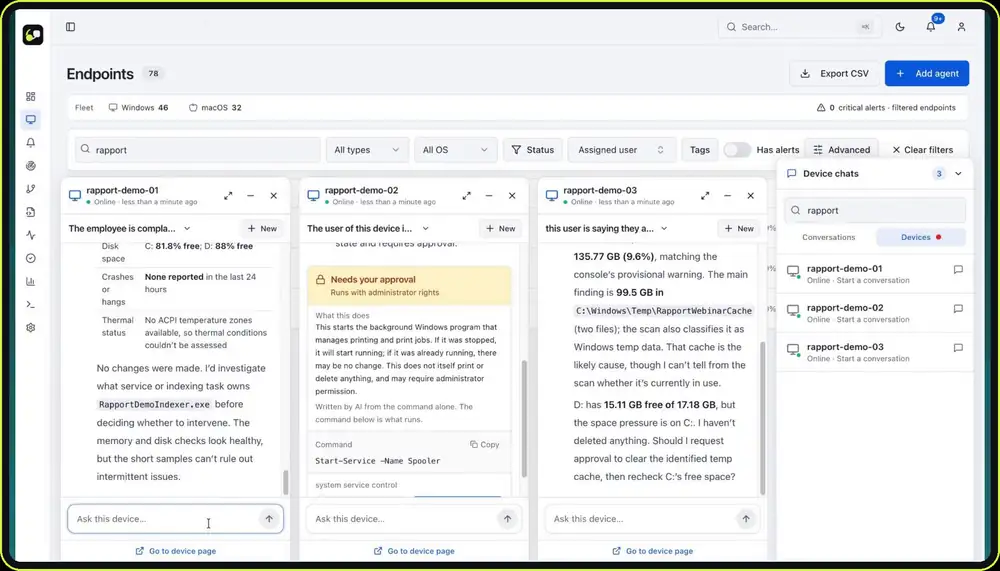
Figure 2. Three investigations in progress at once: a CPU lead on the slow device, a held approval on the printing device and a temp cache finding on the low-disk device.
The slow device: a busy process is a lead, not a verdict
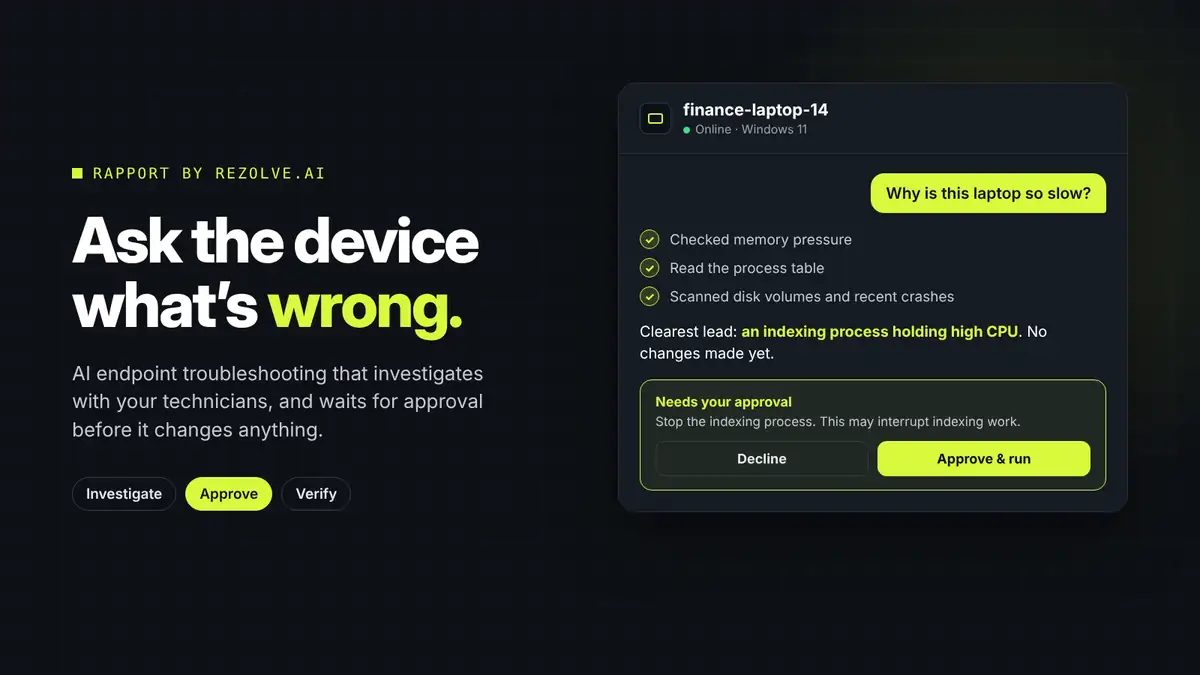
On the first device, Rapport checked memory pressure, the process table, disk volumes and recent crashes. Its clearest lead was high CPU use by a demo indexing process across two short samples. It also said what it could not rule out: the memory and disk checks looked healthy, but short samples cannot prove there is no intermittent problem. It made no changes and suggested finding out what owned the process before intervening.
When the technician asked to close the process, Rapport explained that the command would forcibly stop the program and could interrupt indexing work, then held it for approval. After the approved change, a follow-up sample confirmed the process had stopped, and Rapport noted that this alone did not prove the employee's slowdown was gone. That is the right level of caution: a busy process name is not a reason to end it until you know what it does.
The printing device: read the change before you approve it
On the second device, Rapport checked the Windows services and found the Print Spooler stopped. It proposed a single command to start it, flagged that it would run with administrator rights and explained what it would and would not do.
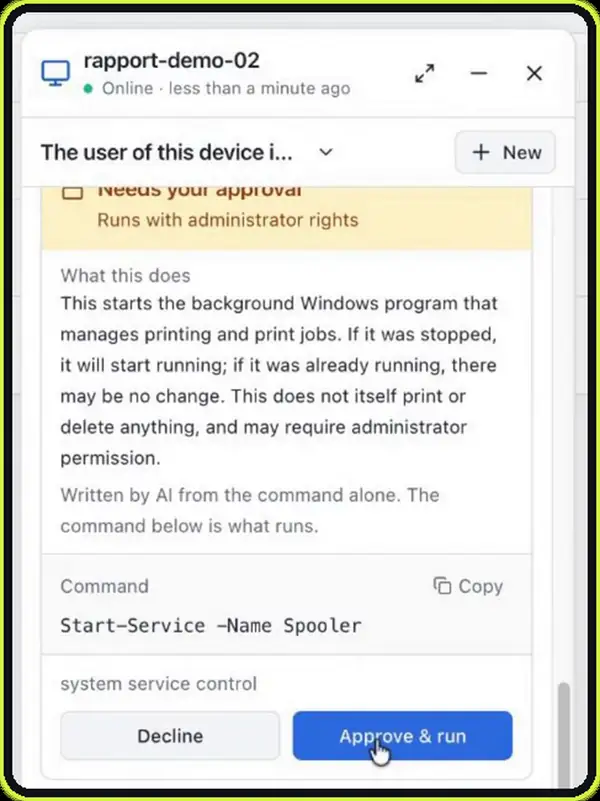
Figure 3. A proposed fix shows the exact command, a plain-English explanation and Decline or Approve and run controls.
Josh explained why the plain-language description matters. This command is easy to read, but real fixes often chain several commands together, and the explanation helps any technician understand what they are approving. The exact command is still shown, because the command is what actually runs. After approval, Rapport confirmed the service was running and asked the employee to try printing again, with the printer connection and print queue as the next checks if it still failed.
The low-disk device: find what is safe to remove
On the third device, Rapport found nearly 100 GB in a Windows temp cache folder on the C: drive, where the space pressure was, and noted a second drive that had room. It said it had not deleted anything, could not tell from the scan whether the files were in use, and asked for approval to clear the cache and then recheck free space.
The pattern was the same in all three cases: describe the problem, gather evidence, review the proposed action and verify the outcome. Saurabh, who previously ran an IT service organization, said three tickets like these could easily take an engineer a full day, especially if one meant sending someone to look at a printer in person. Josh was clear that these were simple, staged examples. The point is not the stopwatch. It is that one technician can keep several investigations moving without mixing their evidence.
When the investigation corrects the technician
The webinar also covered an investigation on a real employee device, a MacBook belonging to an automation engineer at Rezolve.ai. Its experience score was low because of frequent app crashes, so Josh asked Rapport why Node had crashed so many times.
Rapport read the crash reports first and corrected the count in the question before going further. It then worked through running processes and file activity, with a few approved commands along the way, and traced the crashes to a custom Node add-in the engineer had built himself. Once the cause was clear, the fix was straightforward.
That is a more useful behavior than agreement. A technician's first description can be wrong, an alert can be noisy and a health score points to a category, not a cause. A good investigation should be able to narrow, qualify or reject the starting assumption, and say what it still does not know.
Read-only by default, changes by approval
The line between investigating and changing a device is the core design decision in Rapport. Saurabh called it a deliberate choice rather than a technical limit: the agent could be allowed to restart services and delete files on its own, but enterprise environments are complex, and the extra seconds it takes a technician to read and approve a change prevent problems nobody saw coming.
Figure 4. The AI can propose changes, but it cannot make them on its own.
Approvals are managed in the console. Pending requests from every investigation appear on an approvals page, so a technician can read the background in each chat and approve or decline from one place. Every prompt, tool call, result and approval is recorded in the device's chat history and in the audit log, and administrators can adjust how long that data is kept.
Read-only does not mean risk-free, so a few other boundaries matter for security and privacy reviews:
- Data sent to the model is limited. The AI receives only the context and tool results needed for the investigation in hand, and Clocked, a redaction layer developed and hosted by Rezolve.ai, removes sensitive information it detects before anything reaches the model.
- Customer data is not used for training. Rapport uses large language models from a third-party provider under an enterprise agreement, and neither the provider nor Rezolve.ai uses customer data to train models.
- Rapport is not employee monitoring. Routine collection never includes keystrokes, screen content, browsing history or the content of documents and messages.
- Employees are not notified automatically. Starting a device chat does not alert the employee, so any fix that could interrupt their work should still be coordinated with them.
The Rapport security page lists the documents a security team will want during review.
Investigations that start before anyone asks
Traditional monitoring tells you something is wrong and leaves the investigation for later. Rapport's detections can start that work as soon as an alert fires. The demonstration showed a detection configuration page with checks such as a nearly full disk, a stuck OneDrive sync, a process that is not responding and a battery near its cycle limit. Each detection has a severity and an "Investigate with AI" option.
When that option is on, an alert triggers an investigation that gathers read-only evidence before a technician opens the device, so they come back to work already underway. Any change still needs approval, and the option is off by default, so teams choose which detections to trust with automatic investigation. Rezolve.ai has said connecting Rapport to service desk ticketing, so an unresolved issue can become a ticket with its evidence attached, is on its roadmap.
One agent instead of several tools
Most IT teams run separate products for device health monitoring, endpoint management, scripting and patching, each with its own agent, contract and console. Saurabh argued that this fragmentation is the deeper problem: besides the cost and overhead, no single tool ever gives a unified view of what is happening on a device.
Rapport puts those capabilities into one agent. Inventory, digital experience scoring, detections, remote management with scripts and software deployment, and patching all sit alongside the AI investigation, with patching currently in controlled release. Rapport does not take over the user's screen, so teams can keep their existing remote support tool for the occasions when they need to see it, and it works alongside device management platforms such as Microsoft Intune rather than replacing them.
Saurabh framed the bigger picture as the second half of the support equation. Most AI for IT support so far has focused on requests: knowledge questions, access and software from a catalog. Device incidents, from a broken VPN to a printer that will not connect, have largely been left behind. We have written more about why digital employee experience needs agentic AI rather than more dashboards.
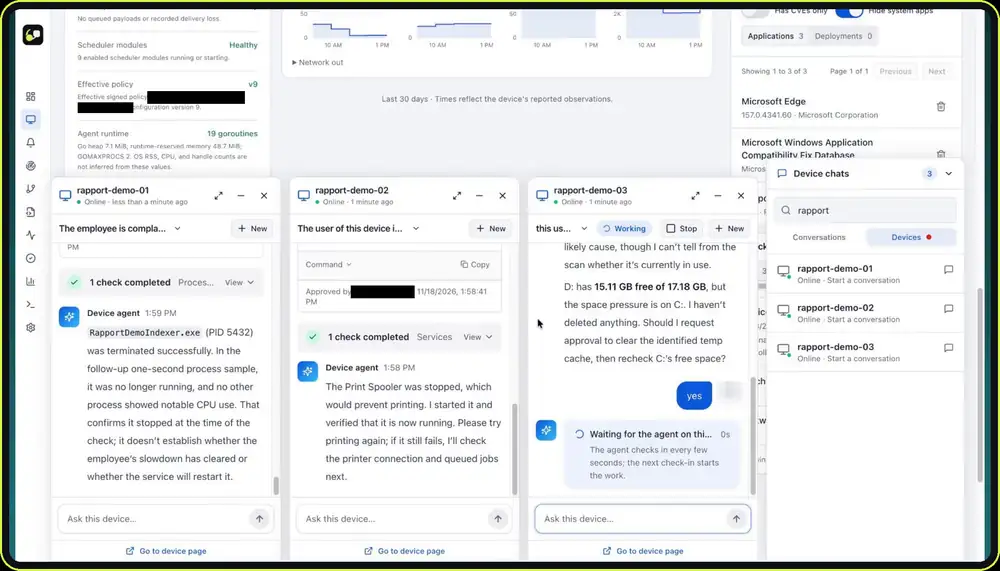
Figure 5. Follow-through after approval: the process stopped, the Print Spooler restarted with a request to test printing, and the disk cleanup queued for the agent.
What to measure in a pilot
A useful pilot shows whether investigations become easier to review and whether employees get back to work. Start with a small set of representative tickets and record:
- Time spent gathering device evidence, separate from total ticket time.
- Whether each finding includes clear supporting evidence and states what is still unknown.
- Which proposed changes were approved, declined or escalated.
- Whether the employee's original task worked afterward, and whether the issue came back.
- Whether the record is clear enough for another technician to pick up the work.
Include difficult and inconclusive cases, not just easy wins. The staged demonstration is a workflow example, not evidence of a guaranteed time saving or resolution rate, and your permissions, connectivity and device conditions will shape what an investigation can do. Rapport's free trial covers up to 5 devices for 30 days with no card required, which is enough to run a small pilot on real tickets. The Rapport documentation covers deployment and setup.
Better evidence, the same accountability
The strongest case for AI endpoint troubleshooting is practical: less manual evidence gathering, more device-specific context and a better-supported decision about what to do next. Engineers stay responsible for interpreting uncertainty, approving changes within their authority and confirming the employee's problem is actually solved. If you are deciding how much an endpoint agent should be allowed to do on its own, our guide to what autonomous endpoint management can decide without asking covers the policy side.
To see the full demonstration, including the device page and the detection setup, watch Introducing Rapport: The First Agentic Investigator for Endpoints.
Last updated on November 26, 2026
Get summary with:
See the agentic service desk in action
Watch Rezolve.ai autonomously resolve real IT and HR tickets: governed, auditable, glass-box.
Frequently asked questions
What is AI endpoint troubleshooting?
AI endpoint troubleshooting uses an AI agent connected to a managed laptop, desktop or server to investigate a fault on that device. The agent forms a hypothesis, runs diagnostic checks, reads the results and proposes a fix, which a technician reviews, approves and verifies.
Can AI fix device issues without IT approval?
In Rapport, no. Read-only checks can run on their own within the limits your settings allow, but any command that modifies the device or needs elevated rights is held for a person to approve, destructive or disallowed commands are refused, and administrators can switch execution off entirely while still getting the diagnosis.
How is AI endpoint troubleshooting different from asking a general chatbot?
A general chatbot only sees what you paste into it and gives generic advice that may not fit the hardware. A device-connected investigation reads the actual state of the selected endpoint, such as processes, services, logs, disk and network, and runs inside a system IT controls, with every step recorded.
Does Rapport replace Microsoft Intune or remote support tools?
No. Rapport works alongside device management platforms such as Microsoft Intune, and its fixes run through its own agent rather than Intune remediation jobs. It does not take over the user's screen, so teams can keep their existing remote support tool for the times they need to see it.
Does an AI model run on the device?
No. The Rapport agent is a harness that gives the AI access to diagnostic tools and enforces what it may run. The language model runs in the cloud, the agent only needs outbound HTTPS on port 443, and sensitive information it detects is redacted before anything reaches the model.
Can an AI investigation start automatically from an alert?
Yes. Rapport detections, such as a nearly full disk or a stuck sync, can be set to investigate with AI, so read-only evidence is gathered before a technician opens the device. The option is off by default, and any change still requires approval.
How can I try Rapport?
Create an account at rapport.rezolve.ai, install the agent on a device and ask it what is wrong. The free trial covers up to 5 devices for 30 days with no card required.