

Freshservice pricing starts at $19 per agent/month (billed annually) for the Starter plan and goes up to $119 per agent/month for the Enterprise plan. However, the sticker price doesn't tell the full story — additional costs for AI add-ons ($29/agent/month for Freddy Copilot), asset management packs ($75 per 500 assets), and orchestration overages can increase your total cost by 30-50% depending on usage. Here's a quick snapshot of Freshservice pricing in 2025:
Best for small IT teams that need basic ticketing and core service desk functionality.
Ideal for growing SMBs looking to manage assets, improve onboarding, and add more structure to IT operations.
Designed for mid-to-large organizations that require full ITIL maturity and advanced ITSM capabilities.
Built for large enterprises needing sandbox environments, high-volume automation, and enterprise-grade controls.
*All prices are billed annually. Monthly billing is available at higher rates.*
In this guide, we break down what each Freshservice plan includes, the hidden costs most buyers miss, how it compares to alternatives, and whether it's actually worth the investment for your organization.
TL;DR
- Freshservice pricing ranges from $19 to $119 per agent/month, billed annually.
- There is no free plan — only a 14-day free trial.
- AI features (Freddy Copilot) cost an extra ~$29/agent/month and are not included in any standard plan.
- Asset management is not available on the Starter plan and is capped at 100 assets on the Growth plan.
- Problem Management and Change Management require the Pro plan ($95/agent) or higher.
- Automation (orchestration) is capped by plan tier, which can force costly upgrades for busy teams.
- Total cost of ownership is typically 30-50% higher than the base per-agent price after add-ons.
What is Freshservice?

Freshservice is a cloud-based IT Service Management (ITSM) platform developed by Freshworks. Launched in 2014, it is designed to help organizations manage internal IT support operations — from handling employee service requests and tracking IT assets to managing incidents, problems, and changes across the IT environment.
Freshservice is built around ITIL best practices and targets mid-market to enterprise IT teams looking to modernize their service desk. It integrates with MS Teams and Slack for employee-facing support and offers AI capabilities through its Freddy AI suite, though most advanced AI features are available as paid add-ons rather than included in the base plans.
As of 2025, Freshservice serves over 60,000 customers globally and is recognized in analyst reports from Gartner and Forrester as a notable ITSM platform — though it typically ranks below market leaders like ServiceNow in enterprise capabilities.
Features of Freshservice
Freshservice ITSM comes with the following features:
1. Integrated Service Channels: This feature streamlines communication by consolidating communication channels creating a unified platform. It provides a single channel for employees to interact with IT support teams. It integrates with MS Teams and Slack, offering seamless support for deflecting tickets and encouraging self-service.
2. Incident Management: This feature helps manage any unplanned disruptions which allows your IT team to identify, log and resolve incidents. It helps in restoring service operations and minimizes impact on business using AI.
3. Service Request Management: This simplifies submitting service requests for IT services. It offers a service catalog for end users to self-serve and uses workflow automation to speed up the service request fulfillment process. It creates a systematic process of categorized issues, contributing to a seamless service delivery.
4. Problem management: This feature helps the IT team find the root cause of recurring problems and find solutions to them. It leverages automation to find rapid remedies to issues and prevent future similar incidents. This helps reduce the frequency of disruptions and create a reliable IT infrastructure.
5. Change and Release Management: This feature facilitates planned change management in the IT environment from approval to implementation, everything. It pulls contextual information from CMDB and the service desk to manage, plan and leverage change automation to speed up the change process.
6. Workload management: This optimizes workload management by providing a complete view of workload assigned to teams and managers. It ensures tasks are assigned based on expertise and capacity. You can track the availability of team members to plan incoming projects for easy workload management and timely delivery.
Pricing
How Much Does Freshservice Actually Cost? Total Cost Breakdown for 2026
The per-agent price is only part of your Freshservice bill. Below is what a realistic Freshservice deployment looks like for a mid-sized IT team of 15 agents on the Pro plan.
Base cost
- 15 agents × $95 per month = $1,425 per month
Common add-ons
- Freddy Copilot (GenAI): 15 agents × $29 per month = $435 per month
- Additional Asset Pack (500 assets): $75 per month
- Freddy Insights (AI analytics): priced as an additional add-on
Realistic monthly total
- Approximately $1,935 per month
- Approximately $23,220 per year
This is roughly 36 percent more than the base sticker price of $17,100 per year.
For comparison, Rezolve.ai includes GenAI capabilities, agentic automation, and unlimited knowledge management natively, with no per-feature add-on fees. This means the quoted price is the actual price, making budgeting significantly simpler for IT leaders.
Freshservice Pricing by Team Size (Base Costs Only)
5 agents
- Starter: $95 per month
- Growth: $245 per month
- Pro: $475 per month
- Enterprise: $595 per month
15 agents
- Starter: $285 per month
- Growth: $735 per month
- Pro: $1,425 per month
- Enterprise: $1,785 per month
50 agents
- Starter: $950 per month
- Growth: $2,450 per month
- Pro: $4,750 per month
- Enterprise: $5,950 per month
100 agents
- Starter: $1,900 per month
- Growth: $4,900 per month
- Pro: $9,500 per month
- Enterprise: $11,900 per month
Prices shown are base costs only and billed annually. Add-ons, asset packs, and orchestration overages are additional.
Which Freshservice Pricing Plan is Right for You? (Quick Verdict)
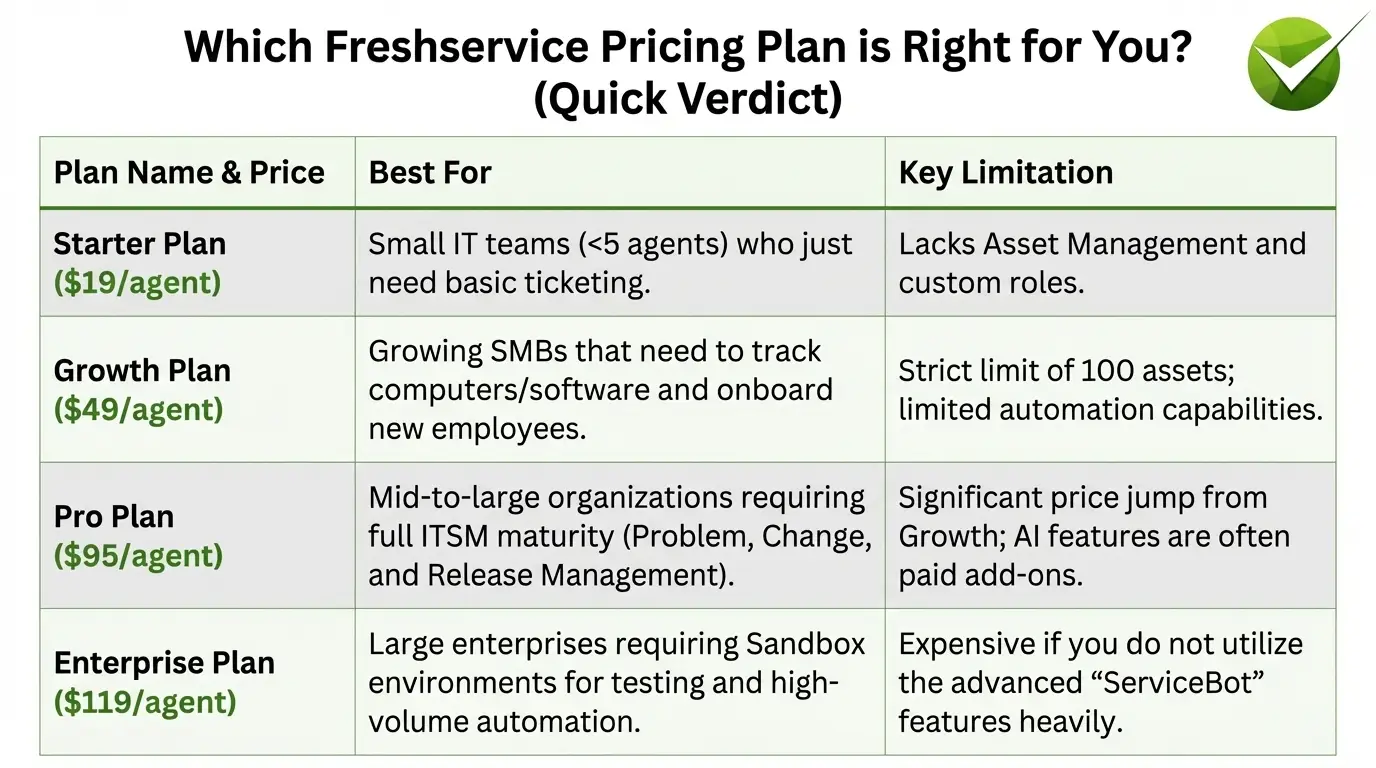
Before diving into the feature lists, here is a quick breakdown of which plan suits your specific business stage:
- The Starter Plan ($19/agent): Best for small IT teams (<5 agents) who just need basic ticketing.
- Limitation: Lacks Asset Management and custom roles.
- The Growth Plan ($49/agent): Best for growing SMBs that need to track computers/software and onboard new employees.
- Limitation: Strict limit of 100 assets; limited automation capabilities.
- The Pro Plan ($95/agent): Best for mid-to-large organizations requiring full ITSM maturity (Problem, Change, and Release Management).
- Limitation: Significant price jump from Growth; AI features are often paid add-ons.
- The Enterprise Plan ($119/agent): Best for large enterprises requiring Sandbox environments for testing and high-volume automation.
- Limitation: Expensive if you do not utilize the advanced "ServiceBot" features heavily.
Freshservice comes with 4 pricing plans
1. Starter Plan
For starting out
Price: starts $19 per agent/month, billed annually
Features included:
- Workspaces
- Incident Management
- Knowledge Base
- Self-Service Portal
- SLA Management
- Workflow Automator
- Orchestration
- ServiceBot on Microsoft Teams and Slack
- Access Controls
- Analytics Starter
- Multiple Portal Languages
- Custom SSL
- Marketplace Apps
- Mobile Apps
- 1000 Orchestration transactions/mo/account
2. Growth Plan
For growing businesses across their LOBs
Price: $49 per agent/month, billed annually
Features included:
- Includes everything in Starter plan
- Service Catalog
- Asset Management (Includes 100 managed assets)
- Purchase Order Management
- Employee Onboarding
- On-call Management
- Portal Customization
- MSP Mode
- Multiple SLAs
- Business Rules
- Approval Workflows
- Business Hours
- Cloud Management
- 2000 Orchestration transactions/mo/account


3. Pro Plan
ITSM + ITOM + Project Management for large organizations
Price: $95 per agent/month, billed annually
Features included:
- Includes everything in Growth and additional:
- Freddy Copilot ADD-ON
- Freddy insights ADD-ON
- Problem Management
- Change Management
- Release Management
- Project Management
- SaaS Management ADD-ON
- Software License Management
- Contract Management
- Major Incident Management
- Status Page
- Alert Management
- Service Health Monitoring
- Analytics Pro
- Team Dashboards
- IP Range Restrictions
- 5000 Orchestration transactions/mo/account
- Workload Management
- Custom Objects
4. Enterprise Plan
Service management solution for enterprises
Price: $119 per agent/month, billed annually
Features included:
- Includes everything in Pro and additional:
- ServiceBot With Virtual Agent on Microsoft Teams and Slack BETA
- Sandbox
- Audit Logs
- 20,000 Orchestration transactions/mo/account
Freshservice Plan Comparison: Key Feature Differences
It can be difficult to spot what is missing from the lower-tier plans. Here is a breakdown of the key feature differences:
- Incident Management: Available on All Plans.
- Asset Management:
- Starter: Not included.
- Growth: Included (up to 100 assets).
- Pro & Enterprise: Unlimited managed assets (subject to asset pack fees).
- Problem & Change Management:
- Starter & Growth: Not included (This is a major specific limitation for ITIL adherence).
- Pro & Enterprise: Fully included.
- Project Management: Only available on Pro and Enterprise.
- Sandbox (Test Environment): Exclusive to the Enterprise plan.
Freshservice Hidden Costs and Limits You Should Know
While the per-agent pricing looks transparent, scaling with Freshservice often incurs additional costs that buyers miss during the evaluation phase:
- Asset Management Packs: The standard plans have limits. If you have 200 employees with laptops and mobiles, you will likely need to purchase additional "Asset Packs" (approx. $75 for 500 assets), which raises your monthly bill.
- Orchestration (Automation) Ceilings: Freshservice limits the number of "actions" (automations) you can run per month.
- Starter Limit: 1,000 transactions/month.
- Pro Limit: 5,000 transactions/month.
- The Risk: A busy IT team automating password resets and software installs can hit this ceiling quickly, forcing an expensive upgrade.
- Freddy AI Add-Ons: The advanced Generative AI features (Freddy Copilot) are not always standard. They are often sold as paid add-ons (approx. $29/agent/month extra) on top of your Pro or Enterprise subscription.
Freshservice Business Agent Add-On Pricing
Freshservice offers a Business Agent add-on for non-IT departments such as HR, Finance, Facilities, and Legal. This add-on allows these teams to use the service desk without purchasing full IT agent licenses.
Business Agent Pricing
- Available as an add-on for Growth, Pro, and Enterprise plans
- Priced lower than full agent licenses
- Exact per-agent pricing varies by contract size and requires contacting Freshservice sales
- Not available on the Starter plan
What Business Agents Can Do
- Raise and track service requests
- Access the self-service portal
- View and respond to tickets assigned to their department
- Use basic workflow automations
What Business Agents Cannot Do
- Access advanced ITSM modules such as Change Management, Problem Management, and Release Management
- Configure automations or workflows
- Access full analytics and reporting dashboards
The Trade-Off
Business Agent licenses lower per-seat costs for non-IT teams, but they introduce meaningful feature limitations. If HR or Facilities teams require automation capabilities or need to manage their own workflows, full agent licenses are often still required, increasing overall costs.
Freshdesk vs Freshservice Pricing
Since both products are built by Freshworks, buyers often confuse Freshdesk and Freshservice pricing. Below is how they differ.
Purpose
- Freshdesk is designed for customer support helpdesks
- Freshservice is designed for internal IT service management
Free Plan Availability
- Freshdesk offers a free plan for up to 2 agents
- Freshservice does not offer a free plan and only provides a 14-day free trial
Starting Price
- Freshdesk starts at $15 per agent per month
- Freshservice starts at $19 per agent per month
Top-Tier Pricing
- Freshdesk Enterprise plan costs $79 per agent per month
- Freshservice Enterprise plan costs $119 per agent per month
AI Add-Ons
- Freshdesk uses Freddy AI as a paid add-on
- Freshservice uses Freddy Copilot as a paid add-on
Asset Management
- Freshdesk does not include asset management
- Freshservice includes asset management starting from the Growth plan
ITIL Compliance
- Freshdesk does not support ITIL workflows
- Freshservice supports ITIL compliance from the Pro plan onward
Target Users
- Freshdesk is intended for customer-facing support teams
- Freshservice is built for internal IT and enterprise service desk teams
Key Takeaway
If you are managing external customer tickets, Freshdesk is the right product. If you are managing internal IT support, employee service requests, and IT assets, Freshservice is the better fit.
Common Mistake
Some organizations choose Freshdesk for internal IT support because it is cheaper and includes a free tier. This approach often fails once asset management, change management, or ITIL-compliant workflows are required, since Freshdesk does not support these capabilities.
Pros and Cons of Freshservice
Even though Freshservice is a popular tool, it has its own advantages and disadvantages. We have listed some of the user pointed pros and cons below to help you understand its usefulness for your organization.
Pros
- Easy to deal with large number of tickets which helps in improving response time
- Easy to use and intuitive UI
- The ticket management system is good and works best with workflow automation
- It offers a large number of features at fair price
Cons
- The initial setup is complex and non-intuitive and requires support guide to do the setup
- Users report the need for the tool to be more adaptable and offer more useful features for task automation and creating custom fields.
- The tool has confusing category names and labels that makes it difficult to perform simple tasks like converting issues to change requests which leads to recreation of the entire task. Transferring tickets from one instance to another is difficult.
- Mobile app is a let down according to users as it doesn’t have a dashboard, making it difficult to look up ticket queues.
- The knowledge base requires refinement. According to users, you cannot create more than 2 category levels
- It only integrates with some other tools
- Customer Support services need improvement. Users also feel the need of on site support services for better product understanding.
Final Verdict: Is Freshservice Worth the Investment?
- Yes, if: You are a traditional IT team looking for a legacy ITSM structure. If your goal is strictly organizing tickets and you have the budget for the Pro Plan ($95/agent) to access Change/Problem management, Freshservice is a polished choice.
- No, if: You are looking for AI-first automation. If your goal is to deflect tickets automatically using GenAI rather than just managing them, Freshservice can become expensive due to add-on fees.
This brings us to the question: Is there a tool that includes GenAI natively without the add-on fees?


Freshservice Pricing vs Competitors 2026
How does Freshservice pricing compare to other ITSM tools?
Below is a side by side comparison across key features
Starting Price
- Freshservice Pro: $95 per agent per month
- ServiceNow: Custom pricing typically $100 or more per agent per month
- Jira Service Management: Free for up to 3 agents
- Rezolve.ai: Contact for pricing
GenAI Included
- Freshservice: No available as a paid add on
- ServiceNow: Partial via Now Assist with limited capabilities
- Jira Service Management: No via Atlassian Intelligence with limited scope
- Rezolve.ai: Yes native with no add on required
Microsoft Teams Native Experience
- Freshservice: Integration only
- ServiceNow: Integration only
- Jira Service Management: Integration only
- Rezolve.ai: Fully deployed inside Microsoft Teams
Asset Management
- Freshservice: Available from the Growth plan at $49 and above
- ServiceNow: Included
- Jira Service Management: Limited
- Rezolve.ai: Included
Auto Resolution
- Freshservice: Not available
- ServiceNow: Limited
- Jira Service Management: Not available
- Rezolve.ai: Yes with more than 65 percent auto resolution rate
ITIL Compliance
- Freshservice: Available on Pro plan and above
- ServiceNow: Full
- Jira Service Management: Partial
- Rezolve.ai: Full
Hidden Add On Costs
- Freshservice: High due to AI assets and orchestration add ons
- ServiceNow: High with modules priced separately
- Jira Service Management: Moderate
- Rezolve.ai: Low with inclusive pricing
Key Takeaway
Freshservice sits in the mid range for ITSM pricing but can approach ServiceNow level costs once AI capabilities are added and usage scales beyond basic ticketing. Rezolve.ai takes a fundamentally different approach by offering GenAI native automation that resolves issues before they become tickets, with transparent pricing that does not inflate through add ons.
Alternative that offers better features than Freshservice
While Freshservice pricing is competitive, it clearly lacks the capability to go in detail when trying to solve your problems. For any organization, ITSM plays a crucial role and requires a huge investment. Which means that you need alternatives to compare Freshservice and find out if it is really worth it for you to invest in it. Let’s check out one such alternative–Rezolve.ai.
What is Rezolve.ai?

Rezolve.ai is a GenAI powered AITSM that aims to alleviate your IT support services by seamlessly blending in your ticketing and employee support operations. It is deployed via MS Teams to help employees with personalized and instant assistance. It offers advanced automation features and auto-resolves 65% of employee queries saving time and effort of both employees and IT teams. It is one good alternative to Freshservice and traditional service desks.
Key Features of Rezolve.ai
GenAI powered service desk: ChatGPT-like chatbot on MS Teams replaces the traditional emails, calls, etc., with easy-to-use chat inside the familiar interface of MS Teams.
1. GenAI-enabled knowledge management: The GenAI-enabled knowledge management trains itself using website, SharePoint folders, PDFs, URLs, and offline documents, creating a robust knowledge base for users enabling self-service.
2.No-code Process orchestration: Rezolve.ai simplifies your support processes by automating everything from employee onboarding to project management software configuration, software installation, password resetting, and others.
3. Conversational ticketing: The GenAI-powered ticketing system works on MS Teams as a conversational bot. You can create a ticket by requesting it in the chat itself. It is auto-assigned to the right agent and pushes notifications as the ticket matures through the pipeline.
4. Human-in-the-loop live chat: The live chat support helps auto-resolve queries and allows intervention from service desk agents upon user request. It auto-summarizes the chat and creates tickets for you.
5. Desktop automation: Rezolve.ai automates routine tasks like software installation, cache cleaning, troubleshooting, new laptop setup and many more.
6. Modern dashboard and reporting: You get a modern dashboard offering a comprehensive view of service delivery and SLAs and robust reporting features.
7. Multilingual and multi-department platform: Rezolve.ai supports multiple languages and works within multiple departments, creating a cohesive platform within MS Teams for issue resolution.
8. Incident management, change management, problem management: Rezolve.ai offers all the features required for a seamless management of problems, change and incidents that impact the functioning of your IT environment.
Pricing
Pricing plans of Rezolve.ai are provided upon request.
Freshservice vs Rezolve.ai A Detailed Comparison
If you are evaluating Freshservice, below is how it compares with Rezolve.ai across the criteria that matter most to IT leaders.
Approach to IT Support
- Freshservice
Ticket centric. Designed to manage, categorize, and route tickets after employees submit them. The primary goal is efficient ticket resolution. - Rezolve.ai
Resolution centric. Designed to auto resolve employee issues before they become tickets. Agentic AI handles more than 65 percent of queries instantly through Microsoft Teams, reducing ticket volume at the source.
AI and Automation
- Freshservice
AI via Freddy Copilot is a paid add on at approximately $29 per agent per month. Basic workflow automation is included, but orchestration is capped by plan tier, typically between 1,000 and 20,000 transactions per month. - Rezolve.ai
GenAI is built into the core platform at no extra cost. No code process orchestration handles tasks ranging from password resets to software installations, with no transaction caps.
Employee Experience
- Freshservice
Employees submit tickets through a separate self service portal or email. Microsoft Teams and Slack integrations are available but function as add ons rather than native experiences. - Rezolve.ai
Employees interact with a conversational, ChatGPT like assistant directly inside Microsoft Teams, where they already work. There is no portal switching and no email back and forth.
Knowledge Management
- Freshservice
Uses static knowledge base articles that employees must search manually. User feedback indicates the structure is limited to two category levels. - Rezolve.ai
Uses GenAI powered knowledge management that continuously learns from SharePoint, PDFs, URLs, and internal documents. Answers are generated dynamically instead of relying on manual search.
Total Cost of Ownership
- Freshservice Pro with 15 agents and AI
Approximately $1,935 per month or $23,220 per year - Rezolve.ai with 15 agents and all features included
Contact for pricing. With no AI add ons, no asset pack fees, and no orchestration caps, the total cost is typically lower and more predictable.
Verdict
Freshservice works well for traditional IT teams that are comfortable with portal based ticketing and have the budget to support multiple add ons. Rezolve.ai is built for organizations that want to reduce ticket volume through AI first automation and deliver employee support directly inside Microsoft Teams.
.avif)
Conclusion
Freshservice is a fine tool with features that can help you streamline your process. But it comes with shortfalls that cannot be neglected.
At times when the world is running on modern technologies, it lacks to capitalize on them. Rezolve.ai on the other hand is backed by GenAI and leverages its power to help you automate many routine tasks; make ticketing extremely easy and push self-service among employees through GenAI-enabled knowledge base.
To try for yourself, how Rezolve.ai is a better alternative to Freshservice, take a demo today!
Freshservice Pricing FAQs in 2026
1. Is Freshservice free?
Freshservice is not free. It offers a 14-day free trial with limited features, but all production use requires a paid subscription starting at $19 per agent per month, billed annually. Unlike Freshdesk, which offers a free plan for up to 2 agents, Freshservice has no permanent free tier.
2. How much does Freshservice cost per year?
Freshservice costs between $228 and $1,428 per agent per year depending on the plan. For a team of 10 agents on the Pro plan, that is approximately $11,400 per year in base costs, before add-ons like Freddy Copilot AI at $29 per agent per month and asset management packs.
3. Does Freshservice offer monthly billing?
Yes, Freshservice offers both monthly and annual billing. However, the prices listed on the website ($19, $49, $95, $119) apply to annual billing. Monthly billing is available at a higher per-agent rate. Annual billing typically saves 15 to 20 percent compared to monthly.
4. What is the Freshservice Business Agent add-on?
The Business Agent add-on is a reduced-cost license for non-IT departments such as HR, Finance, and Facilities that need basic access to the Freshservice portal. It is priced lower than a full agent license but comes with limited functionality, including no access to ITSM modules like Change Management or Problem Management. It is available only on Growth, Pro, and Enterprise plans.
5. What is the difference between Freshdesk and Freshservice pricing?
Freshdesk starts at $15 per agent per month and includes a free tier, and it is designed for external customer support. Freshservice starts at $19 per agent per month with no free tier and is designed for internal IT service management with ITIL-compliant features such as asset tracking, change management, and incident management.
6. How many assets can you have in Freshservice?
The Starter plan does not include asset management. The Growth plan includes up to 100 managed assets. Pro and Enterprise plans offer unlimited assets, although additional asset packs priced at $75 per 500 assets may be required depending on your volume. If you manage more than 500 devices, this should be factored into your budget.
7. Is Freddy AI included in Freshservice pricing?
No. Freddy Copilot, Freshservice’s generative AI assistant, is a paid add-on priced at approximately $29 per agent per month on top of Pro or Enterprise subscriptions. Freddy Insights, which provides AI-powered analytics, is also an additional paid feature. GenAI is not included in any standard Freshservice plan.
8. Does Freshservice offer discounts for nonprofits or startups?
Freshworks occasionally offers discounted pricing for eligible nonprofits and startups through its Freshworks for Startups program. Eligibility and discount structures vary, so organizations must contact the sales team directly.
9. Can I switch between Freshservice plans?
Yes, Freshservice plans can be upgraded at any time. Downgrades are typically processed at the end of the current billing cycle. Downgrading from Pro to Growth removes access to Change Management, Problem Management, and Project Management modules.
10. What is Freshservice used for?
Freshservice is a cloud-based IT Service Management platform used by internal IT teams to manage incidents, service requests, IT assets, changes, and problems. It automates IT workflows, tracks SLAs, and provides a self-service portal for employees to submit and track IT issues.


.webp)

.webp)