12 Best IT Asset Management Tools: Features, Pricing, and Benefits
Compare the best IT asset management tools with Rezolve.ai to track, manage, and optimize hardware, software, and cloud assets across your organization.
.png)

Key takeaways
- Automated, real-time discovery of hardware, software and cloud assets is the foundation. You can't manage what you can't see.
- AI features such as predictive maintenance and licence optimisation now separate modern ITAM from simple inventory tracking.
- A standalone ITAM tool just creates another data silo, so integration with ITSM and help desk systems is non-negotiable.
- Managing the full asset lifecycle from procurement through disposal is where the return on investment comes from.
As businesses expand their technology footprint, the complexity of managing hardware, software, and cloud assets grows exponentially. Manual tracking in spreadsheets is no longer a viable option, leading to security risks, compliance issues, and wasted spending. This is where a robust IT Asset Management (ITAM) strategy, powered by the right tools, becomes essential for lifecycle management and cost optimization.
Modern ITAM has evolved beyond simple inventory lists. Today's leading solutions are AI-powered, automating discovery, ensuring compliance, and providing predictive insights. For organizations using collaborative hubs like MS Teams, integrated ITAM tools can streamline requests and management into the natural flow of work. This guide explores the best ITAM tools for 2025, helping you find the right fit to master your IT ecosystem.
What is IT Asset Management?
IT Asset Management (ITAM) is the strategic approach to tracking, managing, and optimizing all technology resources within an organization, from laptops and servers to software licenses and cloud subscriptions.
The goal of ITAM is to:
-
Maximize value from IT investments
-
Reduce costs and eliminate waste
-
Ensure compliance with regulations and licenses
-
Minimize operational and security risks
Core activities in the IT asset lifecycle include:
-
Acquisition – Procuring hardware, software, or services
-
Deployment – Assigning and configuring assets
-
Maintenance – Performing updates, patches, and repairs
-
Upgrades – Enhancing capabilities or replacing outdated assets
-
Decommissioning – Securely retiring assets
Modern ITAM tools automate these processes, integrating with IT service management (ITSM) platforms to ensure a single source of truth for all asset data. This shift transforms ITAM from a basic inventory function into a business-critical discipline for cost optimization and operational resilience.
What is AI-Powered ITAM?
While traditional ITAM focuses on tracking assets, AI-powered ITAM focuses on optimizing them. It uses artificial intelligence and machine learning to automate discovery, predict maintenance needs, identify cost-saving opportunities, and ensure compliance proactively. Furthermore, conversational AI interfaces allow IT staff to manage assets through simple conversations, eliminating the need to navigate complex dashboards for routine tasks.
Benefits of Using ITAM Tools in 2025
.avif)
The role of ITAM tools will be more applicable than ever in 2025. The rapid pace of change in technology and digital transformation is leading to immense investments in IT assets by organizations. If not properly managed, this investment may turn unwieldy. Here are some of the most valuable benefits of using ITAM tools in 2025:
Better Asset Tracking and Visibility
ITAM tools bring complete visibility of all assets in an organization. Be it hardware or software, it caters to tracing the whereabouts of an asset, by and to whom, and if it is working at its best. This visibility cannot allow mismanagement, loss, or theft of the assets.
Cost Efficiency
ITAM tools have been very instrumental in helping the organization avoid duplication of software licenses and other purchases not needed. This contributes to improved efficiency and cost reductions by way of maximizing asset utilization for the identification of underutilized assets.
Compliance and Risk Management
With increasing organizational size, they ought to comply with certain rules and regulations regarding the base of digital assets. ITAM tools allow the proper tracking of software licenses to ensure the organizations avoid non-compliance costs. They guarantee another level of safety by tracing the weaknesses of their property to ensure it is well managed and patched.
Case Snippet
A healthcare provider used its new ITAM tool to run an automated audit of all devices handling patient data. The tool flagged 15 laptops that were missing a required security patch, allowing the IT team to remediate the vulnerability immediately and prevent a potential compliance violation.
Improved Decision Making
Informed decision-making requires accurate asset data. ITAM tools allow organizations to make intelligent decisions on when to upgrade or retire assets, saving on unnecessary investments. This will also aid in setting up realistic budgets for IT projects and ensuring that IT investments align with organizational goals.
Improved IT Support and Maintenance
ITAM tools provide detailed records of each asset, showing maintenance schedules and support needs of equipment. This will allow for a proactive approach to maintenance, preventing breakdowns and reducing downtime to improve the overall productivity of the IT teams.
Streamlined Audits
IT asset auditing may indeed be very time-consuming, especially in large organizations. ITAM tools ease the process of an audit in that they automate tracking and provide reports on asset status, location, and history that otherwise involve so much manual checking.
Impact of AI on ITAM
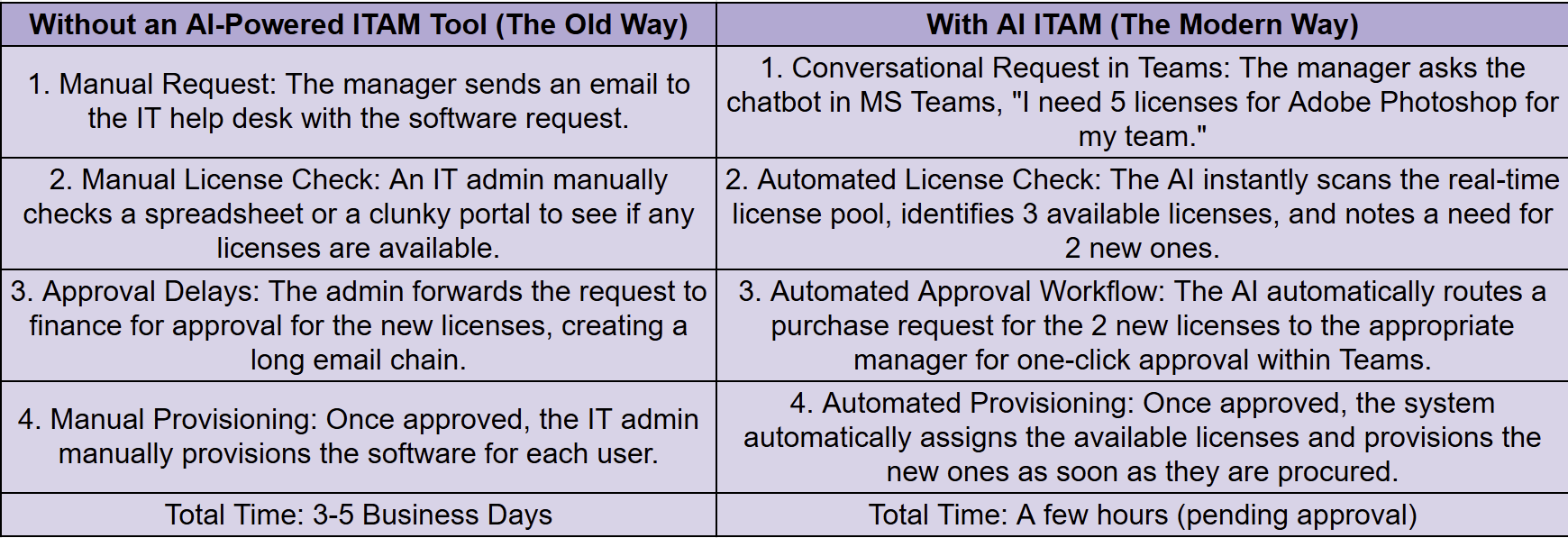
To understand the real-world impact, let's compare a common ITAM task performed with and without a modern AI-powered tool.
Scenario: A marketing manager requests a new licensed software for their team.
AI and Automation in ITAM: The 2025 Advantage
AI-driven ITAM isn’t just about tracking assets. It’s about predicting needs, preventing problems, and optimizing spend.
Examples:
-
Predictive Maintenance: AI models forecast hardware failures weeks in advance, reducing downtime.
-
License Optimization: Automated analysis spots underused SaaS subscriptions, recommending cancellations to save costs.
-
Conversational AI: Platforms like Rezolve.ai allow IT teams to assign, track, and audit assets through natural language in MS Teams or Slack, no complex dashboard navigation required.
What are the Key Features to Look for in ITAM Tools? (Tool Selection Framework)
.avif)
When considering ITAM tools for 2025, the following features could determine the success or failure of the tool in effectively managing your assets:
Asset Discovery and Inventory Management
A capable ITAM tool should automatically discover and track all assets throughout the entirety of your IT infrastructure. It should provide real-time information on the status of all assets, including software, hardware, and network equipment.
Lifecycle Management
IT assets undergo different stages starting from acquisition until decommissioning. ITAM tools should offer lifecycle management features to ensure that assets are utilized efficiently, maintained appropriately, and replaced whenever necessary.
Software License Management
Managing software licenses is critical concerning compliance and avoiding over-purchasing. Such ITAM tools as offer software license tracking will provide detailed information on the number of licenses, their validity, and usage.
Reporting and Analytics
Advanced reporting and analytics capabilities allow businesses to gain insights into asset performance, utilization, and lifecycle status. Such insights help organizations optimize the IT asset portfolio and improve decision-making.
Integration Capabilities
ITAM tools should integrate with other enterprise systems such as IT Service Management (ITSM), Enterprise Resource Planning (ERP), and Configuration Management Database (CMDB). This will facilitate the free flow of asset data across platforms for a single view of the organization’s IT ecosystem.
Cloud and mobile access
In a hybrid work environment, ITAM tools that support cloud and mobile access are essential to ensure asset information is available from any location and real-time decision-making can be facilitated.
What are the Top 12 IT Asset Management Tools for 2025?
1. Rezolve.ai

Overview: Rezolve.ai offers light IT asset management capabilities that integrate within existing IT ticketing systems and Microsoft Teams. The new Agentic SideKick 3.0 enables tracking IT assets and managing approvals via a user-friendly conversational interface - without redirecting to another portal.
Key Features
-
Agentic AI for asset tracking and approvals within MS Teams, Slack and legacy ticketing system.
-
Seamless integration with ITSM workflows
-
Enables light IT asset management within employee support and ticketing workflows
Pricing: Custom subscription model based on business requirements; competitively priced considering its range of features.
Pros
-
Agentic SideKick 3.0 enables asset tracking and approvals through conversational AI.
-
Strong integration capabilities with collaboration tools such as MS Teams and Slack.
-
Scalable for organizations of various sizes.
Cons
- Currently, on-premise deployment is not available.
Ideal For: Companies looking for AI-driven light IT asset management that integrates well with existing ITSM systems.
Why Rezolve.ai Stands Out: Rezolve.ai revolutionizes ITSM via conversational ticketing and support within MS Teams, Slack, and legacy systems. It brings approvals, service catalogue, and notifications right where users already work!
2. ServiceNow IT Asset Management

Overview: ServiceNow is a well-established leader in IT asset management, offering a complete lifecycle management solution for medium and large businesses. Its platform combines ITSM and ITAM, providing an integrated approach to managing IT operations.
Key Features
-
Automated discovery and tracking of assets.
-
Full integration with ITSM workflows.
-
Advanced reporting tools and analytics dashboards.
-
Continuous compliance monitoring and risk management.
Pricing: Subscription-based; quotes provided upon request.
Pros
-
Industry-leading ITAM solution for enterprise-scale environments.
-
Extensive integration options with other ServiceNow tools.
-
Scalable for complex IT infrastructures.
Cons
-
Higher cost compared to some competitors.
-
Customization may require experienced administrators.
Ideal For: Large organizations seeking a trusted ITAM solution with seamless ITSM integration.
3. SolarWinds Service Desk (formerly Samanage)

Overview: SolarWinds Service Desk is a cost-effective, user-friendly IT asset management tool designed primarily for small to mid-sized businesses. It combines IT asset management with help desk functions, providing an all-in-one solution.
Key Features
-
Automated asset inventory updates.
-
Vendor and contract management tools.
-
AI-driven insights for cost savings.
-
Integration with service desk workflows.
Pricing: Starting at $19 per user per month.
Pros
-
Affordable and easy to deploy.
-
Cloud-based solution ideal for remote teams.
-
Built-in AI features for enhanced asset management.
Cons
-
Lacks advanced predictive analytics found in higher-end solutions like Rezolve.ai.
-
Limited scalability for larger enterprises.
Ideal For: SMBs and mid-sized businesses looking for a cost-effective IT asset management tool with help desk integration.
4. IBM Maximo

Overview: IBM Maximo is a robust enterprise asset management solution, particularly suitable for industries requiring complex operational oversight, such as manufacturing and utilities. It integrates IoT and predictive analytics to optimize asset management in these sectors.
Key Features
-
Real-time asset tracking with IoT integration.
-
Predictive maintenance and lifecycle cost management tools.
-
Customizable templates tailored to specific industries.
Pricing: Custom pricing based on deployment scope and business needs.
Pros
-
Ideal for industries with complex operational needs.
-
Predictive analytics minimize downtime and reduce maintenance costs.
-
High degree of customization.
Cons
-
Steep learning curve.
-
Higher initial investment in setup and training.
Ideal For: Large enterprises in sectors such as manufacturing, utilities, and logistics that require sophisticated asset management.
5. ManageEngine AssetExplorer

Overview: ManageEngine’s AssetExplorer is a straightforward, affordable IT asset management tool designed for small to medium-sized businesses. It focuses on core IT asset tracking and compliance management.
Key Features
-
Comprehensive hardware and software asset tracking.
-
Software license compliance management.
-
Integration with help desk systems.
-
Basic reporting capabilities.
Pricing: Starting at $955 per year for 250 nodes.
Pros
-
Cost-effective solution for smaller organizations.
-
Easy to use and quick to implement.
-
Strong compliance management.
Cons
-
Lacks advanced automation features like AI-powered insights.
-
Not ideal for larger organizations with complex needs.
Ideal For: SMBs needing an affordable IT asset management tool with basic functionality.
6. Snow Software (Flexera)

Overview: Snow Software specializes in providing visibility into software, hardware, and cloud assets. It is ideal for enterprises managing hybrid IT environments.
Key Features
-
Comprehensive cloud asset management.
-
AI-powered recommendations for cost optimization.
-
Real-time license usage tracking and reporting.
-
Customizable analytics and reporting options.
Pricing: Pricing is available upon request.
Pros
-
Excellent for managing hybrid IT environments.
-
Advanced analytics for cost-saving insights.
-
Well-suited for large enterprises.
Cons
-
High implementation and maintenance costs.
-
Complex setup that may require specialized expertise.
Ideal For: Enterprises managing hybrid IT infrastructures and needing in-depth cost management insights.
7. Cherwell IT Asset Management (Part of Ivanti now)

Overview: Cherwell offers a highly customizable ITAM solution designed to integrate seamlessly with ITSM platforms. It enables organizations to manage their IT assets throughout the lifecycle with efficiency and ease.
Key Features
-
Full asset lifecycle management with customizable workflows
-
Automated asset tracking and compliance management
-
Integration with ITSM modules for holistic service management
-
Real-time asset performance monitoring
Pricing: Subscription-based, with customized pricing depending on deployment scale.
Pros
-
Highly flexible and customizable
-
Scalable solution for mid-sized to large enterprises
-
Strong integration with other ITIL-aligned tools
Cons
-
Requires technical expertise for customization
-
Higher pricing compared to other SMB-focused solutions
Ideal For: Enterprises seeking a highly customizable ITAM solution that integrates well with existing ITSM systems.
8. Freshservice IT Asset Management

Overview: Freshservice offers a cloud-based ITAM solution designed for IT teams to streamline asset tracking, management, and reporting, all while maintaining a user-friendly interface.
Key Features
-
Asset tracking and management from procurement to disposal
-
Mobile app for on-the-go asset management
-
Automated alerts and compliance checks
-
Integration with Freshservice’s ITSM suite
Pricing: Starts at $19/user/month for basic plans.
Pros
-
Simple and intuitive interface
-
Excellent for remote teams with mobile app support
-
Affordable for SMBs
Cons
-
Lacks advanced analytics and reporting features
-
Limited integration options outside the Freshservice ecosystem
Ideal For: SMBs and teams looking for an affordable, simple, and mobile-friendly ITAM solution.
9. BMC Helix Asset Management

Overview: BMC Helix is a comprehensive IT asset management tool designed for large organizations. It combines ITAM and ITSM in a cloud-native platform, supporting automation and advanced analytics.
Key Features
-
Predictive analytics for asset lifecycle and maintenance
-
Automated workflows for asset management and procurement
-
Integration with BMC’s broader ITSM and IT operations suite
-
Compliance and risk management capabilities
Pricing: Contact vendor for custom pricing.
Pros
-
Enterprise-grade solution with robust features
-
Excellent automation and predictive analytics
-
Full ITIL integration for better management of IT assets
Cons
-
Can be expensive for small to mid-sized businesses
-
Complex implementation and setup
Ideal For: Large enterprises looking for an integrated, AI-powered ITAM solution with strong automation capabilities.
10. Ivanti IT Asset Management

Overview: Ivanti’s ITAM solution is part of its unified endpoint management platform, providing robust asset management features with an emphasis on security and compliance for IT environments.
Key Features
-
Asset tracking across hardware, software, and virtual environments
-
Integration with Ivanti's unified endpoint management suite
-
Automated patch management and software distribution
-
Real-time compliance monitoring and auditing
Pricing: Contact vendor for pricing.
Pros
-
Comprehensive asset visibility across all devices
-
Strong security and compliance features
-
Integration with Ivanti's broader endpoint management solutions
Cons
-
More complex interface compared to some competitors
-
Higher cost for smaller organizations
Ideal For: Organizations looking for a comprehensive ITAM solution integrated with endpoint management and security features.
11. Giva Inc. IT Asset Management

Overview: Giva Inc. offers a simple, cloud-based ITAM solution focused on improving asset lifecycle management and providing insight into cost management. Its user-friendly interface and flexible deployment options cater to businesses of all sizes.
Key Features
-
Comprehensive asset management from procurement to retirement
-
Real-time asset tracking and reporting
-
Integration with Giva’s ITSM suite for streamlined workflows
-
Mobile asset management capabilities
Pricing: Starts at $5/user/month, offering budget-friendly options for SMBs.
Pros
-
Affordable pricing
-
User-friendly interface with quick deployment
-
Integrates seamlessly with ITSM workflows
Cons
-
Limited advanced features and customization options
-
Smaller scale compared to enterprise solutions
Ideal For: SMBs and organizations looking for an easy-to-use, cost-effective ITAM solution.
12. Asset Panda

Overview: Asset Panda is a flexible ITAM platform that allows businesses to track assets across a variety of industries. It’s known for its customization options and intuitive design, making asset management easier across teams and departments.
Key Features
-
Customizable asset tracking dashboards
-
Mobile barcode scanning for asset tracking
-
Integrations with various third-party tools
-
Maintenance scheduling and automated reminders
Pricing: Contact vendor for pricing, with a focus on scalability and customization.
Pros
-
Highly customizable with flexible reporting options
-
Easy mobile access for on-site tracking
-
Ideal for organizations with diverse asset management needs
Cons
-
Can be complex for organizations with simpler needs
-
Pricing can vary significantly based on customization requirements
Ideal For: Businesses of all sizes needing a customizable and mobile-friendly ITAM solution with flexible reporting and tracking capabilities.
ITAM Implementation Best Practices
Phase 1: Planning (2–4 weeks)
-
Build a cross-functional project team
-
Define success metrics (e.g., 20% cost savings in 12 months)
-
Audit current asset data and clean inaccuracies
Phase 2: Deployment (4–8 weeks)
-
Configure automated discovery tools
-
Migrate validated data from spreadsheets or legacy systems
-
Integrate ITAM with ITSM platforms for unified workflows
Phase 3: Optimization (Ongoing)
-
Review asset utilization quarterly
-
Use analytics to identify cost-reduction opportunities
-
Expand automation to cover more lifecycle processes
Common Pitfalls to Avoid:
-
Skipping user training (low adoption rates)
-
Over-customizing before stabilizing the core system
-
Ignoring integration opportunities with existing IT tools
Key Takeaways
-
Visibility is Foundation: You can't manage what you can't see. Your top priority should be a tool that offers automated, real-time discovery of all hardware, software, and cloud assets.
-
AI is a Differentiator: Modern ITAM goes beyond tracking. Look for AI-powered features like predictive maintenance, license optimization recommendations, and conversational management to maximize efficiency.
-
Integration is Non-Negotiable: A standalone ITAM tool creates another data silo. Ensure your choice integrates seamlessly with your ITSM, help desk, and other core IT systems for a unified view.
-
Lifecycle Management Drives ROI: The greatest cost savings come from managing the entire asset lifecycle, from procurement to disposal. A tool that automates this process will deliver the highest return on investment.
-
User Experience Matters: If a tool is difficult to use, it won't be adopted. Solutions with user-friendly interfaces, especially those integrated into platforms like MS Teams, drive higher engagement and better data accuracy.
Conclusion
Implementing an ROI-focused IT Asset Management solution is crucial. The right ITAM solution will allow you to monitor, maintain, and manage the lifecycle of IT assets - from procurement to disposition. It will also provide crucial data about the asset in terms of its effectiveness and how much has been used, for e.g. Rezolve.ai’s Agentic SideKick 3.0
When selecting any of the ITAM tools, it is important to consider the size of your business, how well it may be integrated to other tools within your company, how much automation your company requires, and any other specific needs you may have. The 12 tools mentioned in this blog are some of the best options in 2025 due to their extensive features which cater for all industries and of any size.
Make the wise choice and good luck!
Expert Quote
"The future of IT operations is autonomous. We are moving toward a world where the IT environment can largely manage, secure, and optimize itself. Intelligent ITAM is a foundational piece of that puzzle. When your systems can predict needs and automate fulfillment, you free your human experts to solve the next generation of business challenges." - Saurabh Kumar, CEO, Rezolve.ai
FAQs
What is an ITAM tool? An IT Asset Management (ITAM) tool is software that automates the tracking, management, and optimization of hardware, software, and cloud assets across their lifecycle.
What’s the difference between ITAM and CMDB? A CMDB focuses on storing configuration data and relationships between assets. ITAM manages the entire lifecycle and value optimization of those assets.
How much do ITAM tools cost?
-
SMB-focused tools: $5–$20/user/month
-
Mid-market tools: $20–$50/user/month
-
Enterprise platforms: $50+/user/month Total cost should include migration, training, and support.
Can ITAM tools integrate with our ITSM system? Yes: top solutions integrate with ITSM, ERP, and CMDB platforms for a single view of asset data.
How long does ITAM implementation take? From 2 weeks for SMB tools to 3–6 months for enterprise systems, depending on complexity and integrations.
How do I choose the best ITAM tool for my business?
Select an ITAM tool based on the size of your organization, the complexity of your IT assets, and integration needs and budget.
What is the role of AI in IT asset management?
AI would optimize asset tracking, predict future needs for IT assets, and automate many mundane tasks; thereby making the management process more efficient and cost-effective in the long run.
Are ITAM tools good for small businesses?
Yes, many ITAM tools are made for businesses of all sizes. Options like Zoho Asset Management and Freshservice work well for small to medium businesses.
Can ITAM tools work with other business systems?
Most ITAM tools allow connection with other enterprise systems like ITSM, ERP, and CMDB to give a single view of your organization’s IT ecosystem.
How does Rezolve.ai's conversational AI make ITAM different from using a traditional dashboard?
Traditional dashboards require users to learn a new interface, navigate complex menus, and manually search for information. With Rezolve.ai's conversational SideKick, you can simply ask questions in plain language like, "How many MacBook Pro licenses do we have left?" or "Assign a new laptop to John Doe." The AI handles the task in the background, making asset management faster, more intuitive, and accessible to everyone on the IT team.
Can Rezolve.ai track both our physical hardware and our cloud software assets?
Yes. Rezolve.ai is designed for modern hybrid environments. Its automated discovery engine can identify and track all types of assets, including on-premise hardware (laptops, servers, printers), software licenses, and cloud-based assets (like SaaS subscriptions). It consolidates this information into a single, unified inventory.
Our current asset data is a mess of spreadsheets. How does Rezolve.ai handle migration?
Rezolve.ai simplifies data migration. While the automated discovery process will find most assets on your network, you can also easily import existing data from spreadsheets (CSV files) to populate your inventory. The platform includes tools to help clean and map this data, ensuring a smooth transition from manual tracking to an automated system.
Last updated on August 27, 2026
Get summary with:
See the agentic service desk in action
Watch Rezolve.ai autonomously resolve real IT and HR tickets: governed, auditable, glass-box.