Deskless Workers and the Service Desk That Was Never Built for Them
Most deskless workers have no AD account, so the service desk cannot see them. Discover what identity, shared screens, mobile and voice must solve before support reaches the floor.

Consider this scenario. It is five in the morning at a distribution center. A shift supervisor arrives, taps her badge, and the door does not open. She needs someone in IT, and IT does not start for another three hours.
She has no laptop. She has a personal phone with no corporate email on it. There is a service portal, and she has never opened it, because she has never had a reason to sit at a computer during a shift. What she does instead is call the depot manager, who calls someone else, and forty minutes later somebody with an AD account raises a ticket on her behalf.
That sequence is not unusual. Calling somebody who can raise a ticket for you is how a large share of the workforce gets IT and HR support today, i.e. the people in transportation, manufacturing, warehousing and healthcare who do the work the organisation exists to do, and who have almost never been the users a service desk was designed around.
I think the reason has less to do with intent than with architecture. Service desks were built for people with a corporate identity, a corporate device and a working day that overlaps with the support team's. Deskless workers frequently have none of the three, and the products serving them were never asked to solve that.
The identity problem nobody mentions
Almost everything written about deskless workers is about the channel. Give them an app. Meet them where they are. Put support on their phone.
Channel is the second problem. The first one is that a large proportion of deskless workers do not have an Active Directory account at all.
They were never issued one, because they do not use a corporate laptop or corporate email, and provisioning an AD identity for a seasonal warehouse population or a fleet of drivers is expensive and rarely justified. Their only digital identity sits in the HRIS like Workday or whatever the organisation runs, attached to a unique employee ID.
Which means a service desk product that authenticates against AD, and only against AD, cannot see them. Not as a policy decision, but as a consequence of where it looks. Deployments quietly cover the knowledge workers and quietly exclude everybody else, and the exclusion often is not noticed for months, because the excluded population was never generating tickets in the first place.
Solving it is not complicated, but it does have to be deliberate. The product needs to work with AD for knowledge workers and synchronize from the HRIS for everybody else, so that a driver or a nurse or a machine operator exists as a known person with entitlements attached. A scheduled synchronization is usually sufficient, even once a day works well in practice, because employment records do not change by the hour.
Get that right and the channel question becomes answerable. Skip it and no amount of mobile app design will help, because the app will not know who is using it.
Three ways in, and what each one is for
Once identity is solved, deskless support tends to need three modes rather than one. The three are not alternatives so much as answers to different situations.
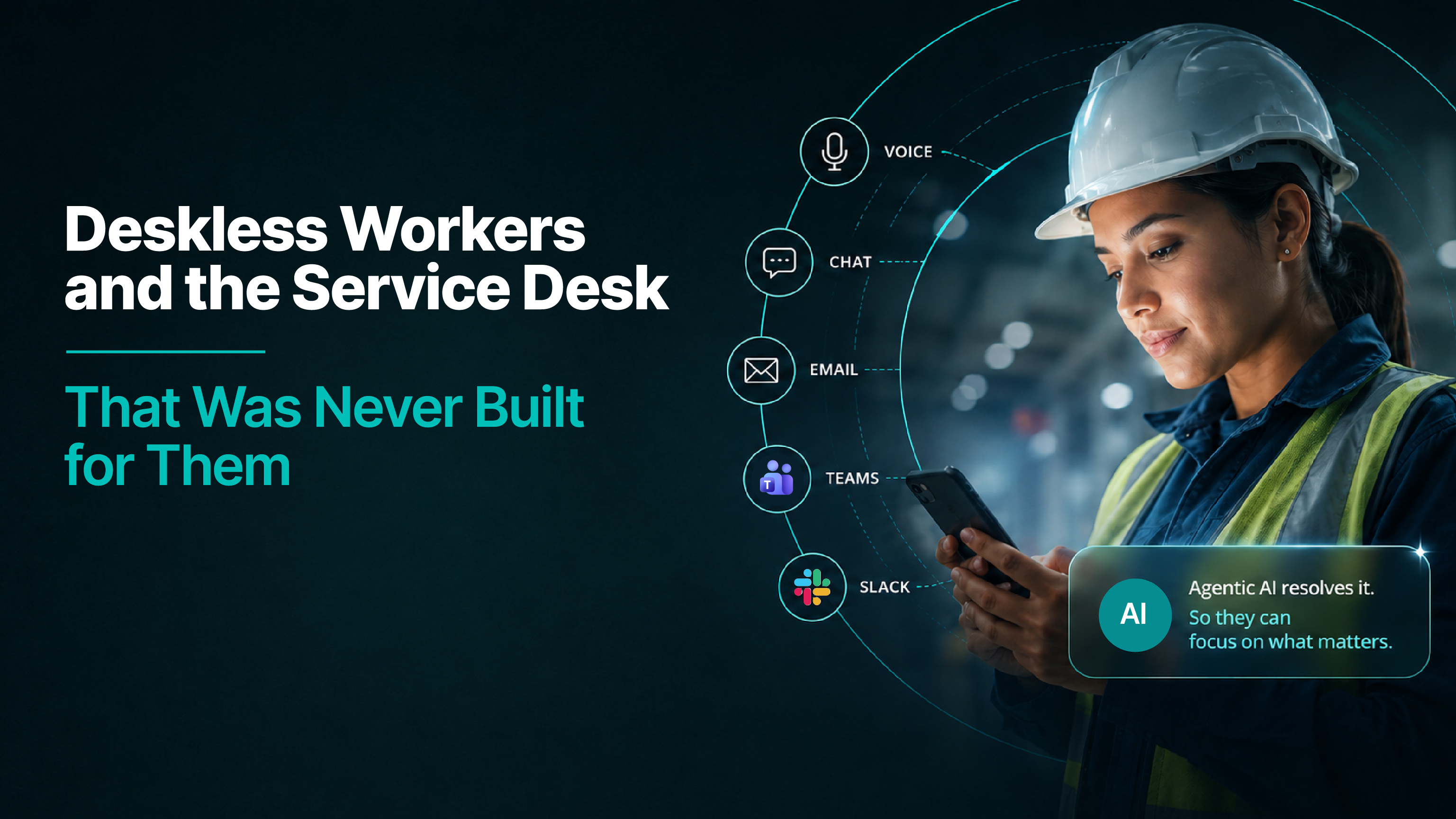
A shared screen on the floor. Our web widget deployed on a terminal in the break room, by the ward station, at the depot entrance, i.e. somewhere people already pass by. No personal device required, which matters for workers who do not carry one or are not permitted one on the floor. A worker can log in with their employee ID and get answers specific to them, or use it without logging in and get guest-level support: general policy, how to raise a request, where things are. Useful either way, and considerably more useful with an ID.
The mobile app, for workers who do carry a phone and are willing to use it. The app is where anything needing history belongs like checking the status of a request raised last week, viewing a payslip, completing a form properly. And it works on a break, off shift, and on a personal device.
Voice, for the situations where neither of the others is available. Hands full, gloves on, driving, or locked out of everything. VoiceIQ answers a phone line, and identity is inferred from the number the person is calling from, though we deliberately do not treat that as confirmed, because somebody else may be holding the phone.
The reason all three work is the same reason the portal argument works: they run on the same intelligence underneath. The answer to a question about shift allowance is the same whether it arrives at the break-room terminal, in the app, or over the phone, because all three are grounded in the same policy documents and take account of the same entitlements.
What the system does when it is not sure who it is talking to
Grading is the part that makes this safe, and it is worth spelling out because most products treat identity as a yes or no.
Confirmed identity — the worker has logged in with their employee ID. Full personalization: their entitlements, their location, their employment class, their requests.
Inferred identity — a call from a number registered to an employee. Enough to be useful, not enough to be trusted. General answers, help with a request, and the ability to start something that gets verified later.
No identity — the shared screen with nobody logged in. Guest-level support only: general policy, how things work, how to reach a person.
What never happens on an unconfirmed identity is anything privileged. No salary details, no personal records, nothing an employee would be upset to hear read out to somebody else standing at the same terminal.
The password reset case shows how the grading works in practice, and it is the request deskless workers make most often. Somebody locked out cannot verify themselves the usual way, because the usual way is the thing they are locked out of. So the system does not try. Instead it offers to send a verification link to the backup email address on their record, frequently a personal one, or an SMS to their registered mobile, depending on how the organisation is set up. The verification happens on a channel the lockout did not affect, and the system never has to guess.
That is the principle underneath all of it: the system knows what it does not know, and grades what it is willing to do accordingly.
Where this matters most?
Transportation. Drivers, depot staff and dispatchers, working shifts that start before any support team does, frequently away from any building at all.
Manufacturing. Plant floors where phones may be restricted, where the workforce turns over seasonally, and where a machine operator locked out of a scheduling system is a production problem within the hour.
Warehousing. High headcount, high churn, heavy shift patterns, and a support population that has historically routed everything through a supervisor.
Healthcare. Ward and clinical staff who cannot leave a floor to find a computer, whose access questions are urgent by definition, and where the requests carry patient-safety consequences.
What these four sectors have in common is not the work. The common thread is that the people doing it generate few tickets and a great deal of unmet need, and the gap between those two numbers never appears in a service desk report.
What to ask before you buy?
Ask how the product identifies an employee with no AD account. If the answer is that everybody has one, the vendor has not deployed into a deskless environment.
Ask what happens at a shared terminal when nobody logs in. You are looking for graded support rather than a login wall or, worse, full access.
Ask what a locked-out worker does at five in the morning. Specifically: how the product verifies somebody who cannot reach the system they are trying to verify against.
Ask whether the answer is the same across channels. If the phone gives a different answer from the app, you have three products rather than one.
Ask how HRIS synchronization works and how often it runs. Daily is usually fine; the question is whether it exists at all.
Where this leaves you
Go back to the supervisor at the distribution center, standing outside a door that will not open at five in the morning. Nothing about her situation was unusual, and nothing about it was her fault. The support model simply assumed she would be somebody else, i.e. somebody with a laptop, a corporate account, and a working day that started when the service desk did.
She was never going to file a ticket about it either, which is why the problem stays invisible. Deskless workers do not generate a backlog that shows up in a report. What they generate is workarounds like a call to a supervisor, a favor from a colleague, a problem solved eventually by somebody with the right access, and forty minutes gone.
If your ticket volume from the floor looks low, I would treat that as a question rather than a result. The work is making sure the people furthest from a desk can reach the same support as everybody else, in whatever way happens to be available to them at the time.
Last updated on September 16, 2026
Get summary with:
See the agentic service desk in action
Watch Rezolve.ai autonomously resolve real IT and HR tickets: governed, auditable, glass-box.
Frequently asked questions
1. Why do deskless workers get so little value from a traditional service desk?
Because of architecture rather than intent. Service desks were built for people with a corporate identity, a corporate device, and a working day that overlaps with the support team's. Deskless workers frequently have none of the three. A shift supervisor locked out at five in the morning has no laptop, no corporate email on her personal phone, and no reason to have ever opened the service portal. So she calls the depot manager, who calls someone else, and forty minutes later somebody with an AD account raises a ticket on her behalf. Calling somebody who can raise a ticket for you is how a large share of the workforce gets support today.
2. What is the identity problem, and why does it come before the channel question?
Almost everything written about deskless workers is about the channel: give them an app, meet them where they are, put support on their phone. But a large proportion of deskless workers do not have an Active Directory account at all. They were never issued one, because they do not use a corporate laptop or corporate email, and provisioning AD identities for a seasonal warehouse population or a fleet of drivers is expensive and rarely justified. Their only digital identity sits in the HRIS, attached to an employee ID. A product that authenticates only against AD cannot see them, not by policy but as a consequence of where it looks. The fix is to work with AD for knowledge workers and synchronize from the HRIS for everybody else. A scheduled sync, even once a day, is usually enough, because employment records do not change by the hour.
3. Which channels do deskless workers actually need?
Three, and they answer different situations rather than competing. A shared screen on the floor, deployed on a terminal in the break room, at the ward station or the depot entrance, so no personal device is required. A mobile app for workers who carry a phone, which is where anything needing history belongs: checking a request raised last week, viewing a payslip, completing a form properly. And voice, for when neither is available because hands are full, gloves are on, someone is driving, or they are locked out of everything. All three work because they run on the same intelligence underneath, so the answer to a shift allowance question is the same whether it arrives at the terminal, in the app, or over the phone.
4. How does the system handle someone it cannot fully identify?
By grading identity rather than treating it as a yes or no. Confirmed identity means the worker logged in with their employee ID, which unlocks full personalization: their entitlements, location, employment class and requests. Inferred identity, such as a call from a number registered to an employee, is enough to be useful but not enough to be trusted, because somebody else may be holding the phone. That gets general answers and the ability to start something verified later. No identity, such as a shared screen with nobody logged in, gets guest-level support only. What never happens on an unconfirmed identity is anything privileged: no salary details, no personal records, nothing an employee would be upset to hear read out to somebody else standing at the same terminal.
5. What happens when a worker is locked out and cannot verify themselves?
This is the request deskless workers make most often, and the usual verification route is exactly the thing they are locked out of. So the system does not try to guess. It offers to send a verification link to the backup email on their record, often a personal one, or an SMS to their registered mobile, depending on how the organisation is set up. Verification happens on a channel the lockout did not affect. That is the principle running through all of this: the system knows what it does not know, and grades what it is willing to do accordingly.