
Most teams don’t struggle with complex work; they struggle to find time for it. Password resets, access requests, status checks, how-to questions, scheduling these small, necessary chores silently drain hours every day. Agentic AI flips that script. Instead of people doing the busy work, software observes, decides, and completes tasks end-to-end so your team can focus on the work that moves the business.
Agentic AI boosts productivity by taking over repetitive, rule-based tasks across IT and HR, resolving them inside tools employees already use. In this blog, you’ll get a plain-English explainer, the highest-impact IT/HR use cases, and a rollout playbook—start with high-volume requests, connect systems, enforce permissions—plus the KPIs and security guardrails to track, and where Rezolve.ai fits when you’re ready to scale.
Why Mundane Work is Killing Productivity?
Even high performers get stuck in a loop of “quick” tasks that aren’t quick at scale:
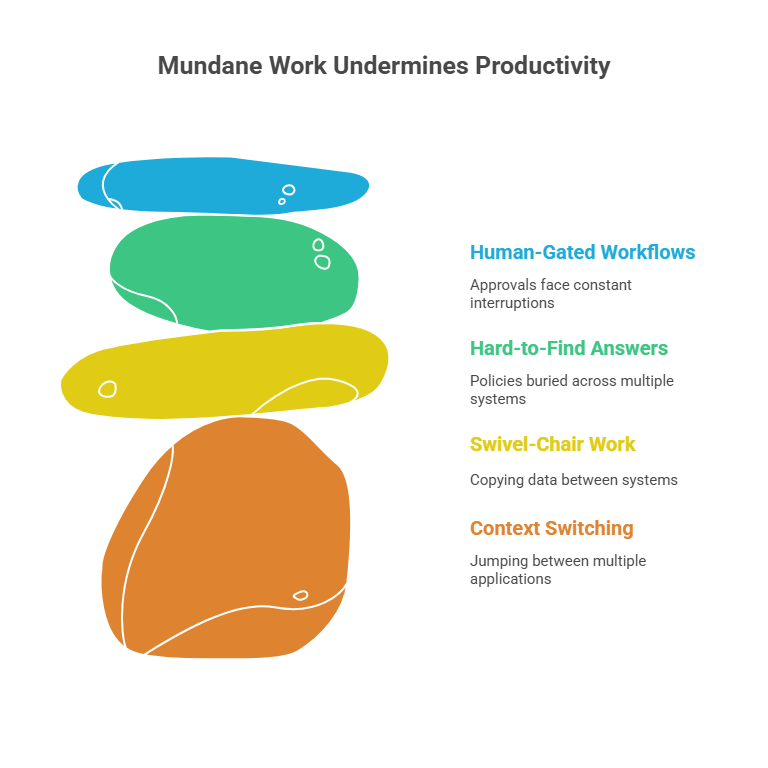
- Context switching: Jumping between chat, email, portals, and tickets.
- Swivel-chair work: Copying data from one system to another.
- Answers that exist but are hard to find: Policies, SOPs, and how-to’s buried across SharePoint, Confluence, Google Drive, and intranets.
- Human-gated workflows: Approvals, provisioning, badge access, distribution list updates that usually face interruptions.
The above challenges typically result in lower productivity, slower cycle times, and reduced morale. People feel busy but not effective.
From Busywork to Outcomes: Why Agentic AI Beats Chatbots and RPA?
You’ve just seen how “quick” tasks create constant interruptions and drag down productivity. The fix isn’t another portal or a FAQ bot but a system that can understand the request, take the right action, and close the loop without pulling a human into the middle. That’s where agentic AI differs from traditional chatbots and RPA and why it meaningfully lifts AI Productivity.
- Traditional chatbots (Q&A only): Good for canned answers, weak at nuance. When requests stray beyond predefined flows, they bounce to humans which adds-up steps without reducing work. The result is minimal impact on cycle times or L1 noise.
- RPA (single-system macros): Great at repeating deterministic steps in one application, brittle when context shifts (new form, exception paths, missing data). RPA doesn’t reason about policies, approvals, or identity; a human still has to orchestrate the workflow.
- Agentic AI (goal-driven execution):
- Understands intent in natural language (“Grant Figma to Priya, Viewer tier”).
- Plans the path (eligibility → approval → provisioning).
- Acts across systems (Okta/Azure AD, HRIS, ITSM, SaaS) using secure connectors.
- Verifies completion, posts proof, and updates the record/ticket.
- Learns from outcomes to improve next time.
Think of agentic AI as a reliable teammate, not a script. It reads the request, applies policy and permissions, executes the steps, confirms success, and writes back to the source of truth—all inside Teams/Slack—so employees stay in flow and specialists aren’t interrupted.
Quick contrast with a common task (MFA reset):
- Chatbot: shares a help article → user still waits on IT.
- RPA: runs a reset in one system → someone else must verify identity and update the ticket.
- Agentic AI: verifies identity per policy, resets MFA through the IdP, sends setup instructions, and closes the ticket with an audit trail—minutes, not hours.
Bottom line: chatbots answer, RPA repeats, agentic AI delivers outcomes. That shift—from replies to results—is what unlocks real, measurable AI Productivity.
High-Impact, Low-Risk Use Cases to Start with
IT (L1 depth):
- Password resets and MFA unlocks
- Software access (Okta/Azure AD/SaaS), license changes, DL updates
- Laptop troubleshooting playbooks (Wi-Fi, VPN, printer fixes)
- Knowledge answers: “How do I install VPN on Mac?” with in-chat steps
HR (employee self-service):
- PTO balance and requests, holiday calendars, policy questions
- Onboarding checklists (account creation, benefits enrollment nudges)
- Salary slip requests and tax document retrieval
- Travel & expense policy clarifications, status checks
Facilities & Ops:
- Badge access requests, seating changes
- Incident logging with guided forms (“coffee machine broken, floor 5”)
These represent 60–80% of employee interactions in many organizations and are perfect for agentic automation.
Examples: From “Ask” to “Done” in Minutes
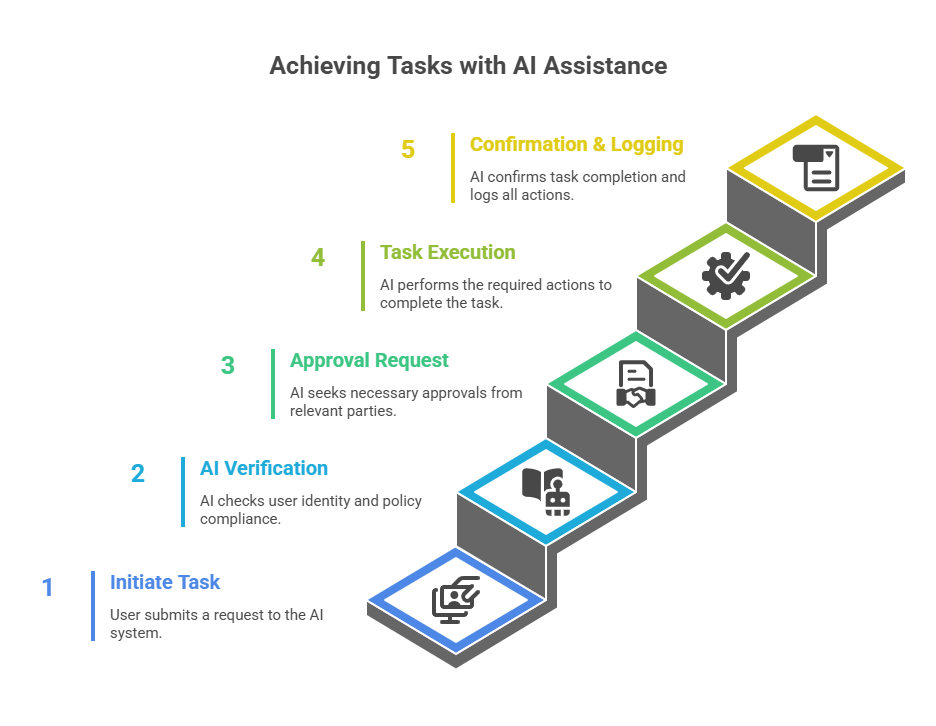
- “Give Sam edit access to the Marketing SharePoint.”
AI checks Sam’s role in HRIS, confirms policy, requests approval if needed, adds Sam to the right group, posts confirmation, and updates the ticket.
- “Reset MFA; I got a new phone.”
AI verifies identity via pre-configured steps, resets MFA in IdP, provides setup link, and logs every action.
- “What’s our expense policy for client dinners?”
AI pulls the latest policy text from the authoritative source, summarizes the relevant section, and cites the source link.
- “Where’s my laptop order?”
AI queries procurement or asset tool, returns status, and nudges the vendor or internal team if overdue.

Metrics that Prove AI Productivity
To show the real impact, measure before-and-after—not just anecdotes. Start with these service-desk metrics; they reveal time saved, quality lifted, and noise reduced.
- Auto-resolution rate (percentage resolved without human involvement)
- Deflection rate from email/portal to chat (and from chat to auto-resolve)
- Median Time to Resolution (MTTR) reduction
- First-Contact Resolution (FCR) increase
- Agent time saved per case (minutes you give back per interaction)
- ESAT/CSAT improvement (especially in chat channels)
- Policy answer accuracy (measured via thumbs-up/down + audits)
Implementation Checklist (What You Need to Prepare)
Strong outcomes start with good foundations. Use this checklist to line up systems, knowledge, and guardrails so your first automations land smoothly.
- Top 10 intents by volume and impact (IT + HR).
- System connectors: IdP (Okta/Azure AD), ITSM (ServiceNow/Jira), HRIS (Workday/SuccessFactors), collaboration (Microsoft Teams/Slack).
- Knowledge sources: SharePoint, Confluence, Google Drive—tagged and deduplicated.
- Access control: Permissions and data scopes, inherited from source systems.
- Guardrails: Human approval thresholds (e.g., license upgrades, sensitive group adds).
- Auditing: Full action logs, ticket updates, and analytics pipelines.
- Change management: Launch playbook, enablement, and comms.
Adoption Playbook that Actually Works
Great tech fails without habits that drive usage. These simple practices boost awareness, reduce friction, and build momentum from day one.
- Meet users where they work: Put the AI in Teams/Slack—not another portal.
- Just-in-time help: Inline guidance and examples.
- Win fast: Launch three high-volume automations in week one, then add two per sprint.
- Close the loop: Celebrate time saved; share monthly “busywork eliminated” stats in all-hands.
Security, Compliance, and Risk Controls
Speed is pointless if it breaks trust. Bake in these controls so automations stay permission-aware, auditable, and compliant as you scale.
- Zero-trust alignment: AI respects the source systems’ permissions; no shadow permissions.
- Data minimization: Retrieve only what’s needed for the task.
- PII handling: Redaction and role-based access in logs.
- E2E auditability: Every step stored, searchable, exportable.
- Human-in-the-loop: Mandatory approvals for high-risk actions.
- Change windows: Automations adhere to maintenance windows and blackout periods.
Common Pitfalls (and How to Avoid Them)
%20-%20visual%20selection.png)
Most failures are predictable—and avoidable. Watch for these traps early so your rollout stays focused, clean, and measurably effective.
- Trying to boil the ocean: Start with 8–12 intents; expand as you prove lift.
- Messy knowledge bases: Garbage in, garbage out—curate and label sources.
- Unclear ownership: Assign owners for each automation and knowledge domain.
- No feedback loop: Capture thumbs-up/down and retrain answer quality weekly.
- Skipping comms: Tell employees what the AI can do, not just that it exists.
Vendor Evaluation Checklist for AI Productivity
Demos impress; fundamentals endure. Use this checklist to separate nice-to-haves from must-haves and choose a platform that will scale with your needs.
- Agentic core: Can it plan multi-step actions, not just answer questions?
- Tool use: Does it integrate with your IdP, ITSM, HRIS, and collaboration hubs?
- Enterprise search: Unified retrieval with source-level permissioning.
- Governance: Audit logs, approvals, rate limits, change controls.
- Analytics: Built-in dashboards for auto-resolve, deflection, MTTR, ESAT.
- Time-to-value: Weeks, not quarters—prebuilt skills and templates.
- Security posture: SOC 2/ISO 27001 alignment, data residency options.
- Extensibility: SDKs, webhooks, custom actions, and prompt/skill versioning.
Where Rezolve.ai Fits?
If you’re exploring solutions, Rezolve.ai is a strong match for teams prioritizing AI Productivity with measurable results. It’s a comprehensive, intelligent, and purpose-built platform for employee support that combines:
- Agentic automation to eliminate a big chunk of L1 IT & HR work.
- Unified enterprise search that retrieves accurate, permission-aware answers across SharePoint, Confluence, Google Drive, Workday, and more right inside Teams or Slack.
- End-to-end workflows for access management, onboarding, software provisioning, and status checks executed via secure connectors to systems you already use.
- In-chat experiences: Employees request, the AI reasons and acts, and confirmation + evidence appear in the same thread.
- Governance & audits: Every step is logged, approvers are looped in when required, and admins get visibility into impact.
- Fast rollout: Prebuilt skills for the top IT/HR use cases plus low-code tools to add custom actions.
Teams typically use Rezolve.ai to:
- Auto-resolve a significant share of repetitive IT & HR requests (commonly 30–70% in suitable categories).
- Shrink MTTR for everyday issues from hours to minutes.
- Lift ESAT/CSAT with clear, cited answers and instant actions.
- Free specialists to focus on complex incidents, analytics, and strategic projects.
Step-by-step Rollout Plan for Agentic AI Enabled Productivity
You don’t need a massive transformation to see results—just a clear sequence. Follow this compact plan to move from discovery to measurable wins, then scale without getting stuck in pilot purgatory.
- Discover: Pull 90 days of ticket/chat history; shortlist the top 12 intents.
- Design: For each intent, define data sources, guardrails, fallbacks, and success criteria.
- Connect: Wire up IdP, ITSM, HRIS, and collaboration tools; enable enterprise search across your knowledge sources.
- Pilot: Launch in one department (e.g., IT L1). Measure auto-resolve, MTTR, ESAT.
- Expand: Add HR flows (PTO, letters, onboarding), then Facilities.
- Operationalize: Create a cadence—two new automations per sprint, monthly knowledge audits, quarterly security reviews.
- Broadcast wins: Publish time-saved and deflection metrics; celebrate “busywork eliminated.”
Closing Note
The fastest way to unlock AI Productivity isn’t a new portal or a bigger help desk—it’s removing the busy work that keeps people from doing their best work. Agentic AI excels at this because it understands goals, plans the steps, executes them across your stack, and learns from outcomes. Whether you assemble the pieces yourself or adopt a platform like Rezolve.ai, the playbook is the same: start where volume and effort are high, instrument everything, and scale what works. The payoff is immediate time back to your team—and compounding gains as more work shifts from “ask” to “done.”

Key Takeaways
- Agentic AI transforms AI Productivity by executing tasks—not just answering questions.
- Start with high-volume, rule-based requests in IT and HR; measure auto-resolve, MTTR, and ESAT.
- Put the AI in Teams/Slack, enforce permissions, and log everything for audit.
- Curate knowledge sources and keep a weekly feedback loop to improve accuracy.
- Evaluate vendors on agentic planning, enterprise search, governance, analytics, and time-to-value.
- Rezolve.ai delivers agentic automation + unified search with fast rollout and measurable impact.
FAQs
1) What exactly is “agentic” AI?
Agentic AI is goal oriented. It understands intent, decides how to achieve it, uses tools/APIs to act, verifies results, and learns over time. It goes beyond chat to complete multi-step tasks end-to-end.
2) How is this different from a knowledge bot?
A knowledge bot answers questions; agentic AI also takes action (e.g., grants access, resets MFA, updates records) under your policies and permissions.
3) What use cases deliver the biggest AI Productivity gains first?
Password/MFA workflows, software access requests, basic troubleshooting, PTO and policy FAQs, onboarding tasks, and status checks typically produce fast, measurable wins.
4) How do we keep the AI secure and compliant?
Inherit permissions from source systems (IdP, ITSM, HRIS), require human approvals for sensitive steps, redact PII in logs, and maintain full audit trails.
5) Where should the agent live - portal or chat?
Chat (Teams/Slack) wins for adoption and speed. Employees already live there, so requests are resolved where they arise, reducing context switching.
6) How do we measure success beyond “it feels faster”?
Track auto-resolution, deflection, MTTR, FCR, ESAT, and minutes saved per interaction. Publish monthly rollups so business leaders see compounding impact.
7) When should we consider Rezolve.ai specifically?
When you want an agentic platform purpose-built for employee support with in-chat experiences, enterprise search across your knowledge sources, secure action execution, fast time-to-value, and analytics that prove ROI.


.webp)

.png)









.webp)