
Quick summary of what this guide covers:
Why Microsoft Teams-native ITSM delivers 40-65% faster resolution times than standalone portals
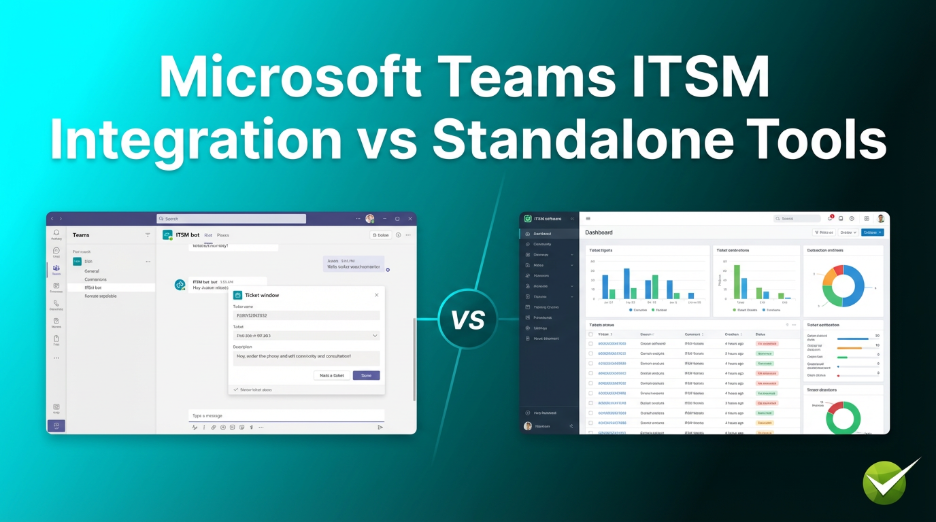
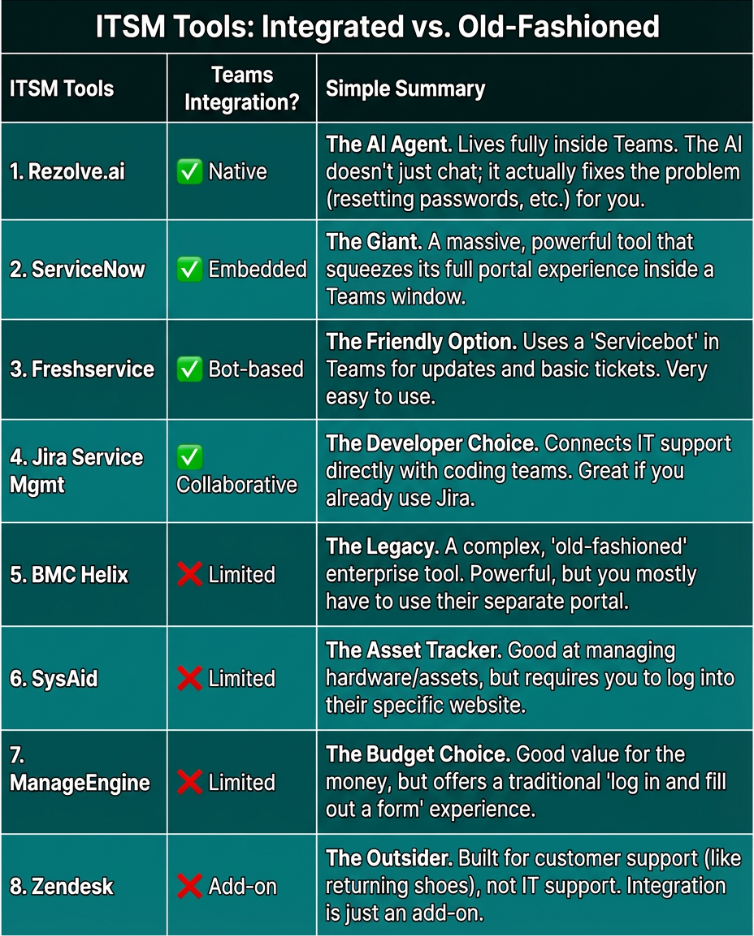
Head-to-head comparison of 8 ITSM tools: 4 with Teams integration vs 4 standalone solutions
How agentic AI (not just generative AI) transforms IT support from reactive ticketing to autonomous resolution
Real ROI metrics: ticket deflection rates, cost per resolution, and employee satisfaction benchmarks
Implementation roadmap with expected benefits timeline for both employee experience and ROI
Why Rezolve.ai with Agentic Sidekick 3.0 represents the next evolution in enterprise IT support
Introduction: The Hidden Cost of Tool-Hopping
Here's a scenario that plays out thousands of times daily in enterprises worldwide: An employee's laptop freezes during an important presentation. They alt-tab to their browser, navigate to the IT portal (if they can remember the URL), log in, fill out a ticket form, wait for an automated acknowledgment, and hope someone responds before their next meeting.
Meanwhile, they're already in Microsoft Teams—the same place where they're messaging colleagues, joining meetings, and collaborating on documents. Why should getting IT help require leaving that environment?
This isn't just an inconvenience. It's a productivity leak that costs enterprises millions annually. Research shows knowledge workers lose up to 30% of their time searching for information and navigating disconnected systems. When IT support lives outside your primary work environment, every support interaction becomes friction.
The question isn't whether you need ITSM software—it's whether your ITSM meets employees where they already work. In 2026, that place is Microsoft Teams for over 320 million monthly active users worldwide.
Why Modern ITSM Needs Microsoft Teams Integration in 2026
The Shift from Portal-Centric to Conversation-Centric Support
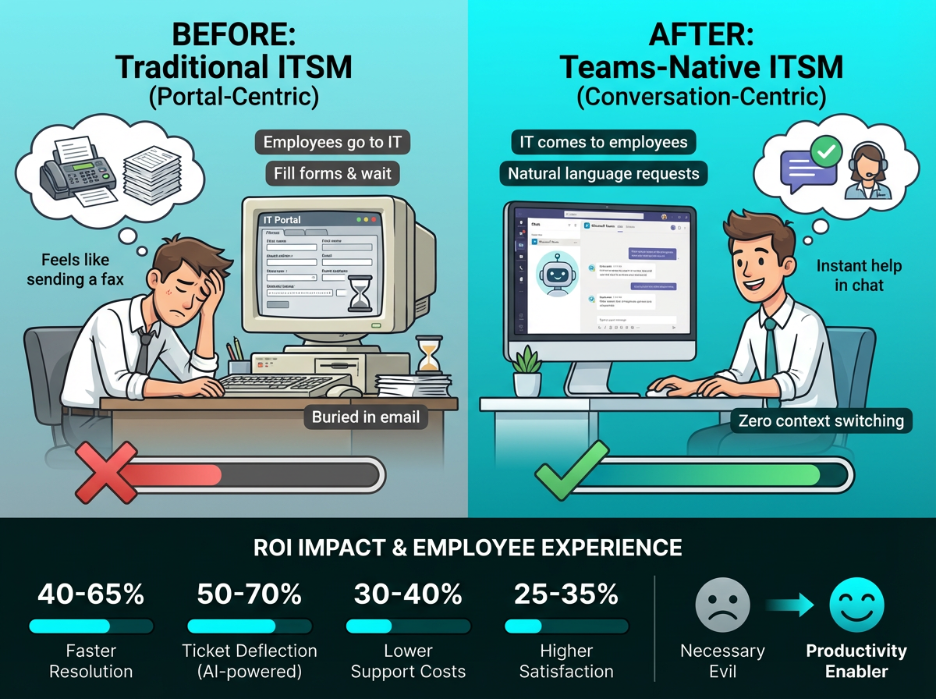
Traditional ITSM platforms were built around a simple premise: employees come to IT. They visit a portal, submit a ticket, and wait. This model made sense when IT was a back-office function and employees had limited technology expectations.
But 2026 employees have consumer-grade expectations. They use Alexa, Siri, and ChatGPT daily. They expect instant responses, conversational interactions, and zero friction. Asking them to bookmark an IT portal and fill out forms feels like asking them to send a fax.
On Reddit, an employee forced to use an old-fashioned ITSM laments,
“"Not sure if it's just our org, but it feels like most traditional ITSM tools are still built for a world where employees live in email, fill out forms, and go log into some portal when they need help..."”
Source: Reddit
Microsoft Teams integration flips this model. Instead of employees going to IT, IT comes to employees—right inside the collaboration hub where they spend their workday. The result is transformative:
- Zero context switching: Employees get help without leaving their workflow
- Conversational requests: Natural language replaces form-filling
- Instant visibility: Ticket status updates appear in chat, not buried in email
- Seamless escalation: Live agent handoff happens in the same conversation
The ROI Impact of Teams-Native ITSM
The financial case for Microsoft Teams ITSM integration is compelling. Organizations report:
- 40-65% faster resolution times when employees can describe issues conversationally rather than selecting from dropdown menus
- 50-70% ticket deflection rates through AI-powered self-service that actually works because it's accessible
- 30-40% reduction in support costs by automating L1 queries that previously required human intervention
- 25-35% improvement in employee satisfaction scores for IT support interactions
The Employee Experience Advantage
Beyond ROI metrics, Teams integration fundamentally changes how employees perceive IT support. When help is a chat message away—and when that chat message actually resolves issues instantly—IT transforms from a necessary evil into a productivity enabler.
This perception shift matters. Gartner predicts that by 2026, over 80% of enterprises will have deployed generative AI APIs or models, up from less than 5% in 2023. But the enterprises seeing real value aren't just deploying AI—they're embedding it where employees already work.
8 ITSM Tools Compared: Teams-Integrated vs Standalone
We've evaluated eight leading ITSM platforms, divided into two categories: those with native or deep Microsoft Teams integration, and those that operate primarily as standalone portal-based solutions. Here's how they stack up.
Part 1: ITSM Solutions with Microsoft Teams Integration
1. Rezolve.ai — Agentic AI Service Desk
Rezolve.ai represents the next generation of ITSM: an agentic AI platform that lives natively inside Microsoft Teams and Slack. Unlike traditional ticketing systems that manage tickets, Rezolve.ai's Agentic Sidekick 3.0 actually resolves issues autonomously—up to 70% without human intervention.
The platform goes beyond generative AI (which only generates responses) to agentic AI (which takes action). When an employee reports a password issue, Agentic Sidekick 3.0 doesn't just suggest solutions—it interprets intent, evaluates context, and executes the resolution workflow automatically.
Core Features:
- Agentic Sidekick 3.0: Specialized AI agents that autonomously resolve IT and HR issues using proprietary Reasoning RAG technology
- Rezolve DeskIQ: Analytics platform that reveals hidden insights from ticketing data, identifies knowledge gaps, and surfaces automation opportunities
- Rezolve VoiceIQ: AI voice agents that answer calls naturally with human-like conversations, delivering 24/7 phone support
- Rezolve SearchIQ: AI-powered enterprise search that delivers contextual answers (not just links) from any knowledge source with full traceability
- No-code Creator Studio for building custom automations and integrations
- Omnichannel support across Teams, Slack, email, phone, web, and mobile
- Multilingual conversational AI with live agent handoff
- GenAI-powered email management and dynamic service catalog
Pros:
- True agentic AI that resolves (not just routes) up to 70% of tickets autonomously
- Native Teams integration—the AI lives inside Teams, not bolted on
- 65% faster resolution times compared to legacy ITSM systems
- White-glove implementation
Potential Considerations:
- Best suited for organizations ready to embrace AI-first support (may require change management)
- Premium positioning—designed for enterprises seeking transformation, not just ticketing
Best For:
Enterprises seeking to modernize IT support with autonomous resolution, particularly those already invested in Microsoft Teams.
Pricing:
Custom enterprise pricing. Contact for demo and complimentary Rezolve DeskIQ assessment.
See a demo video:
Rezolve.ai Compared to other ITSM Platforms
2. ServiceNow ITSM
ServiceNow is the enterprise ITSM heavyweight, offering comprehensive IT service management with extensive Microsoft Teams integration capabilities. The platform embeds Employee Center within Teams, allowing employees to access the full ServiceNow portal experience without leaving their collaboration hub.
Core Features:
- Employee Center embedded in Microsoft Teams
- Virtual Agent for conversational interactions
- Comprehensive ITIL-aligned workflows (incident, problem, change management)
- AI-powered ticket classification and routing
- Extensive enterprise integrations and CMDB
Pros:
- Industry-leading enterprise capabilities and scalability
- Mature Teams integration with Employee Center
- Extensive ecosystem of integrations and modules
Potential Considerations:
- High total cost of ownership (licensing, implementation, maintenance)
- Complex implementation requiring specialized expertise
- Teams integration embeds portal rather than providing native conversational experience
Best For:
Large enterprises with complex ITSM requirements, dedicated ServiceNow admin teams, and substantial budgets.
Pricing:
Custom enterprise pricing. Typically $100+ per user/month for full ITSM suite.
3. Freshservice
Freshservice from Freshworks offers a modern, user-friendly ITSM platform with solid Microsoft Teams integration through its Servicebot. The platform balances ITIL compliance with ease of use, making it accessible for mid-market organizations.
Core Features:
- Servicebot for Microsoft Teams with ticket creation and updates
- Freddy AI Agent for automated responses (Enterprise plan)
- ITIL-aligned incident, problem, and change management
- Asset management and CMDB
- Workflow automation and orchestration
Pros:
- Intuitive interface with quick deployment
- Competitive pricing for mid-market organizations
- Solid Teams integration for notifications and basic ticket management
Potential Considerations:
- Full AI capabilities (Freddy AI Agent) only available on Enterprise plan
- Teams integration focuses on notifications rather than conversational resolution
- Add-on fees for advanced AI features can increase costs
Best For:
Mid-market IT teams seeking ITIL-aligned ITSM with good usability and reasonable pricing.
Pricing:
Starts at $19/agent/month (Starter). Pro plan at $49/agent/month. Enterprise plan at $95/agent/month.
4. Jira Service Management
Jira Service Management (JSM) from Atlassian brings ITSM capabilities to teams already embedded in the Atlassian ecosystem. The platform offers Microsoft Teams integration for incident collaboration and virtual agent capabilities.
Core Features:
- Microsoft Teams integration for incident management and collaboration
- Virtual Agent powered by Atlassian Intelligence (Premium/Enterprise)
- Deep integration with Jira Software, Confluence, and Bitbucket
- ITIL workflows with DevOps integration
- Assets and CMDB (Premium and above)
Pros:
- Excellent for teams already using Atlassian products
- Strong DevOps and development team integration
- Free tier available for small teams (up to 3 agents)
Potential Considerations:
- Steep learning curve for non-technical teams
- AI and Virtual Agent features require Premium ($47+/agent/month) or Enterprise
- Interface can feel cluttered for straightforward ITSM needs
Best For:
Development-centric IT teams already invested in Atlassian ecosystem seeking ITSM with DevOps alignment.
Pricing:
Free for up to 3 agents. Standard at ~$20/agent/month. Premium at ~$47/agent/month. Enterprise pricing is custom.
Part 2: Standalone ITSM Solutions (Limited or No Native Teams Integration)
5. BMC Helix ITSM
BMC Helix ITSM (formerly Remedy) is an enterprise-grade platform with comprehensive ITIL coverage. While it offers some integration capabilities, it primarily operates as a standalone portal-based system designed for large organizations with complex requirements.
Core Features:
- Comprehensive ITIL service management (incident, problem, change, asset)
- AI and ML for workflow automation and predictive analytics
- Cloud-native architecture with on-premises options
- Integration with BMC ecosystem (Discovery, AIOps)
- DevOps integration and change collision detection
Pros:
- Enterprise-grade capabilities for complex environments
- Strong ITIL compliance and certification
- Robust security and compliance features
Potential Considerations:
- Premium pricing (18-21% above ITSM market average)
- Limited native Microsoft Teams integration
- Complex implementation requiring specialized skills
- Interface can feel dated compared to modern alternatives
Best For:
Large enterprises with complex, mature ITSM requirements and existing BMC investments.
Pricing:
~$115/named user/month. Enterprise contracts typically start around $30,000/year.
6. SysAid
SysAid offers a modular ITSM platform combining help desk, asset management, and automation. While it provides basic integrations, the platform operates primarily as a standalone solution with its own portal interface.
Core Features:
- Ticketing system with automation capabilities
- Integrated IT asset management
- Copilot AI for task automation
- Self-service portal and knowledge base
- Remote control and patch management
Pros:
- Combined ITSM and IT asset management in single platform
- Modular design allows selective feature adoption
- Strong automation capabilities
Potential Considerations:
- Limited Microsoft Teams integration (basic at best)
- Interface described as dated by users
Portal-centric approach requires employees to leave work environment
Best For:
Mid-sized organizations seeking combined ITSM and asset management without extensive integrations.
Pricing:
Tiered pricing based on users and features. Contact for quote.
7. ManageEngine ServiceDesk Plus
ManageEngine ServiceDesk Plus from Zoho offers a cost-effective ITSM solution with strong asset management. The platform provides value-focused functionality but operates primarily through its own portal rather than embedded collaboration tools.
Core Features:
- ITIL-based incident, problem, and change management
- Integrated IT asset management and CMDB
- Project management capabilities
- Self-service portal with knowledge base
- On-premises and cloud deployment options
Pros:
- Competitive pricing with good feature coverage
- User-friendly interface
- Strong asset management integration
Potential Considerations:
- Microsoft Teams integration is limited
- Customization can require technical expertise
- AI capabilities less advanced than modern alternatives
Best For:
Budget-conscious organizations seeking solid ITSM fundamentals with asset management.
Pricing:
Standard at ~$13/technician/month. Professional at ~$27/technician/month. Enterprise at ~$67/technician/month.
8. Zendesk
Zendesk is primarily a customer service platform that has expanded into internal IT support. While it offers some integrations, its DNA is customer-facing support rather than employee ITSM.
Core Features:
- Omnichannel ticketing system
- AI-powered automation and Answer Bot
- Knowledge base and self-service portal
- SLA management and reporting
- Extensive third-party integrations
Pros:
- Intuitive interface with quick setup
- Strong analytics and reporting
- Large marketplace of integrations
Potential Considerations:
- Designed for customer support, not enterprise ITSM
- Limited ITIL alignment and change management
- Microsoft Teams integration is add-on based, not native
Best For:
Organizations with light ITSM needs or those already using Zendesk for customer support.
Pricing:
Team at $55/agent/month. Growth at $89/agent/month. Professional at $115/agent/month.
Why Rezolve.ai with Microsoft Teams Integration and Agentic AI Leads in 2026
After comparing eight ITSM platforms, a clear pattern emerges: most solutions treat Microsoft Teams integration as an add-on rather than a foundation. They embed portals, send notifications, or offer basic ticket creation—but the fundamental experience remains portal-centric.
Rezolve.ai takes a fundamentally different approach. The platform was built Teams-first, not Teams-compatible. Here's why this distinction matters:
Agentic AI vs. Generative AI: The Critical Difference
Most "AI-powered" ITSM tools use generative AI—they can generate responses, suggest articles, or draft replies. But they still require humans to take action.
Rezolve.ai's Agentic Sidekick 3.0 operates differently. Agentic AI doesn't just generate—it acts. When an employee reports an issue, the system:
- Interprets intent: Understanding what the employee actually needs, not just what they typed
- Evaluates context: Considering user role, history, and system state
- Selects action: Deciding whether to answer directly, guide a workflow, or escalate
- Executes resolution: Taking action autonomously when appropriate
This is why Rezolve.ai achieves up to 70% autonomous resolution—not just deflection through self-service articles, but actual resolution without human intervention.
Native Teams Experience, Not Embedded Portal
When ServiceNow or Freshservice "integrates" with Teams, they typically embed their portal interface within Teams or send notifications. Employees still interact with the same forms and workflows—just in a different frame.
Rezolve.ai's approach is conversational from the ground up. Employees chat naturally, and the AI handles translation to structured actions. No forms to fill. No portal to navigate. Just a conversation that gets problems solved.
Complete Product Suite for Modern IT
Rezolve.ai provides a comprehensive suite designed for today's distributed workforce:
- Agentic Sidekick 3.0: The conversational AI engine that lives in Teams and Slack
- Rezolve DeskIQ: Analytics that reveal what's really happening in your service desk—knowledge gaps, automation opportunities, hidden patterns
- Rezolve VoiceIQ: AI voice agents for employees who prefer phone support, with natural conversations and 24/7 availability
- Rezolve SearchIQ: Enterprise search that delivers answers, not links—with full source traceability
- No-Code Creator Studio: Build custom automations without developer resources
Proven Enterprise Results
Organizations across industries have transformed their IT support with Rezolve.ai:
- Black Angus: Reduced after-hours support from 90% to 10% with endpoint automation
- AC Transit: Enhanced connectivity with GenAI chatbot 'IT Aimee'
- Patelco Credit Union: Evolved to AI-powered service desk with measurable efficiency gains
- NYC Department of Buildings: Elevated support experience with AI chatbot deployment
How to Implement Teams-Integrated ITSM: Roadmap and Expected Benefits
Implementing a Teams-native ITSM like Rezolve.ai follows a structured approach designed to deliver quick wins while building toward full transformation.
Implementation Phases
Phase 1: Foundation (Weeks 1-4)
- Deploy Agentic Sidekick 3.0 within Microsoft Teams/Slack
- Connect existing knowledge sources (SharePoint, Confluence, etc.)
- Configure initial FAQ handling and password reset automation
- Train AI on organization-specific terminology and policies
Phase 2: Expansion (Weeks 5-8)
- Integrate with ITSM backend (or deploy Rezolve.ai's native ITSM)
- Enable automated ticket creation, routing, and resolution workflows
- Deploy Rezolve SearchIQ for enterprise-wide knowledge access
- Configure live agent handoff and escalation paths
Phase 3: Optimization (Weeks 9-12)
- Analyze Rezolve DeskIQ insights to identify automation opportunities
- Build custom automations using Creator Studio
- Deploy Rezolve VoiceIQ for phone channel coverage
- Expand to HR and shared services support
Expected Benefits Timeline
Employee Experience Improvements
- Week 1-2: Employees can get instant answers to common questions directly in Teams
- Week 3-4: Password resets and basic requests handled automatically (20-30% of tickets)
- Month 2: 50%+ of L1 queries resolved without human intervention
- Month 3: Full conversational support with 40-60% faster resolution times
- Month 6: 25-35% improvement in employee satisfaction scores for IT support
ROI Milestones
- Month 1: Measurable reduction in L1 ticket volume (15-25%)
- Month 3: 30-40% reduction in cost per ticket through automation
- Month 6: 50-70% ticket deflection rate achieved
- Month 12: Full ROI realization with transformed IT support operations
Conclusion
The choice between Teams-integrated and standalone ITSM isn't just a technical decision—it's a strategic one about how you want employees to experience IT support.
Standalone portals served their purpose when IT was a back-office function. But in 2026, employees expect consumer-grade experiences at work. They expect instant responses, conversational interfaces, and zero friction.
Microsoft Teams-native ITSM delivers on those expectations—and Rezolve.ai takes it further with agentic AI that doesn't just respond but actually resolves.
The enterprises winning in employee experience aren't just implementing AI—they're embedding intelligent support where employees already work. For organizations ready to make that leap, Rezolve.ai offers a path from legacy ticketing to autonomous resolution.
Ready to see the difference? Schedule a demo.
Frequently Asked Questions
1. What is the difference between agentic AI and generative AI in ITSM?
Generative AI creates content—it can write responses, suggest articles, or draft emails. Agentic AI goes further by taking action autonomously. In ITSM context, generative AI might suggest how to reset a password, while agentic AI actually executes the password reset workflow. Rezolve.ai's Agentic Sidekick 3.0 is built on agentic AI principles, enabling up to 70% of tickets to be resolved without human intervention.
2. Can Rezolve.ai integrate with our existing ITSM (like ServiceNow)?
Yes. Rezolve.ai offers flexible deployment options. You can use it as a front-end AI layer that integrates with your existing ITSM backend, or you can adopt Rezolve.ai's complete AITSM platform. Many enterprises start by adding Rezolve.ai as a Teams-native interface to their current system before deciding on full migration.
3. How long does implementation typically take?
Most organizations achieve initial deployment within 2-4 weeks, with employees seeing value from day one. Full optimization typically occurs over 2-3 months as the system learns from interactions and custom automations are built. Rezolve.ai provides white-glove implementation support to ensure rapid time-to-value.
4. What is Rezolve DeskIQ and how does it help with ROI?
Rezolve DeskIQ is an analytics platform that analyzes your ticketing data to reveal hidden insights. It identifies knowledge gaps, surfaces automation opportunities, and pinpoints patterns that human analysis might miss. A complimentary Rezolve DeskIQ assessment (valued at $25,000) is available for qualifying organizations.
5. Does Rezolve.ai support channels beyond Microsoft Teams?
Yes. While Teams is a primary channel, Rezolve.ai provides omnichannel support across Slack, email, phone (via Rezolve VoiceIQ), web portals, and mobile applications. Employees can reach out through whatever channel is most convenient, and the AI maintains context across all interactions.
6. What makes Microsoft Teams integration important for ITSM in 2026?
With over 320 million monthly active users, Microsoft Teams is the primary work hub for most enterprise employees. Teams-native ITSM eliminates context switching, enables conversational support, and meets employees where they already spend their workday. Organizations report 40-65% faster resolution times when support is accessible directly in Teams.


.webp)

.png)









.webp)