
.png)
TL; DR
AI copilots are gen-AI-powered assistants that work inside the apps you already use — understanding language, surfacing context, and increasingly taking action. The 2026 question isn’t whether to deploy one; it’s whether you pick a chat-only assistant or an agentic copilot that resolves work end-to-end. For employee support, that distinction is the difference between marginal productivity lift and 50–85% ticket deflection.
Introduction: Why Everyone’s Suddenly Talking About AI Copilots
Two years ago, “copilot” was a Microsoft product name. Today it’s a category — and a strategic line item. Walk into almost any IT, HR, or operations leadership meeting in 2026 and someone is asking the same question: do we need an AI copilot, and if we do, which one?
The pressure is real. A Gartner survey of 321 customer service and support leaders conducted in October 2025 found that 91% reported direct executive pressure to deploy AI in 2026. An earlier 2025 Gartner survey found 75% of service leaders had increased AI budgets year-over-year. Forrester reports 91% of global technology decision-makers plan to increase IT spending in 2026, with AI initiatives leading the charge. And Capgemini’s Rise of Agentic AI report finds 93% of leaders believe organizations that successfully scale AI agents in the next 12 months will gain a competitive edge.
But beneath the hype, there’s confusion. People use “copilot,” “AI assistant,” and “AI agent” interchangeably. They’re not the same thing — and the difference matters more than ever as the technology shifts from passive helpers to autonomous workers.
This guide cuts through the noise. We’ll define what an AI copilot actually is, how it works, where it shows up across the enterprise, and — most importantly — what it looks like when applied to the highest-value use case most organizations are building toward right now: employee support powered by agentic AI.
What Is an AI Copilot?
An AI copilot is a generative-AI-powered assistant that works alongside you inside the applications you already use. It can understand natural-language requests, draft content, surface relevant information from across your knowledge sources, and increasingly — execute tasks on your behalf.
The “copilot” framing is deliberate. Unlike full automation, a copilot doesn’t replace the human pilot. It augments them — handling the routine, accelerating the complex, and freeing people to focus on judgment-heavy work.
That framing is also why “copilot” stuck as a category name. The first wave of generative AI tools — public AI chatbots and autocomplete plugins — felt like novelties. Copilots are different because they’re embedded where work happens: inside the service desk, the HR portal, the IDE, the CRM, and the email client. They have context. And in 2026, they’re starting to have real autonomy.
Key Characteristics of an AI Copilot
Strip away the marketing layer and a true AI copilot has four defining traits.
Productivity-focused. It exists to make a specific job faster or better — resolving a ticket, drafting a contract, fixing a bug, onboarding an employee. It’s measured on outcomes, not on how clever it sounds.
Context-aware. A copilot knows who the user is, what app they’re in, what they were doing five minutes ago, and what data they’re allowed to see. Without context, you don’t have a copilot — you have a search bar with better grammar.
Conversational. Users interact in plain language. No prompt engineering, no syntax, no training. If the user has to learn how to talk to it, the copilot has already failed.
Generative. Beyond retrieving information, a copilot creates — summaries, drafts, code, replies, plans, recommendations. This is the line that separates copilots from the legacy chatbots that came before them.
The best copilots add a fifth: agentic capability — the ability not just to suggest a next step but to actually execute it. That’s where the category is heading, and it’s the dividing line between today’s leaders and tomorrow’s also-rans.
How AI Copilots Work Under the Hood
The technical stack is straightforward in concept, harder in execution. Three layers matter.
Large language models (LLMs) provide the reasoning and language generation engine. These are the same families of models — GPT, Claude, Gemini, Llama and others — that power public chatbots, but in enterprise copilots they’re tuned, grounded, and constrained for the specific job.
Retrieval and grounding connect the LLM to your organization’s actual knowledge — policy documents, knowledge base articles, ticket history, HR handbooks, product specs. This is what stops the copilot from making things up. When you hear “RAG” (retrieval-augmented generation), this is the layer being described.
Application integration is where copilots earn their keep. A copilot that can only chat is a parlor trick. A copilot that can read a Jira ticket, check ServiceNow, look up an employee in Workday, reset an Active Directory password, and post a confirmation in Microsoft Teams — that is an enterprise copilot. This is also where standards like the Model Context Protocol (MCP) are reshaping the category, by making it easier for copilots to act safely across dozens of enterprise systems without custom plumbing for each.
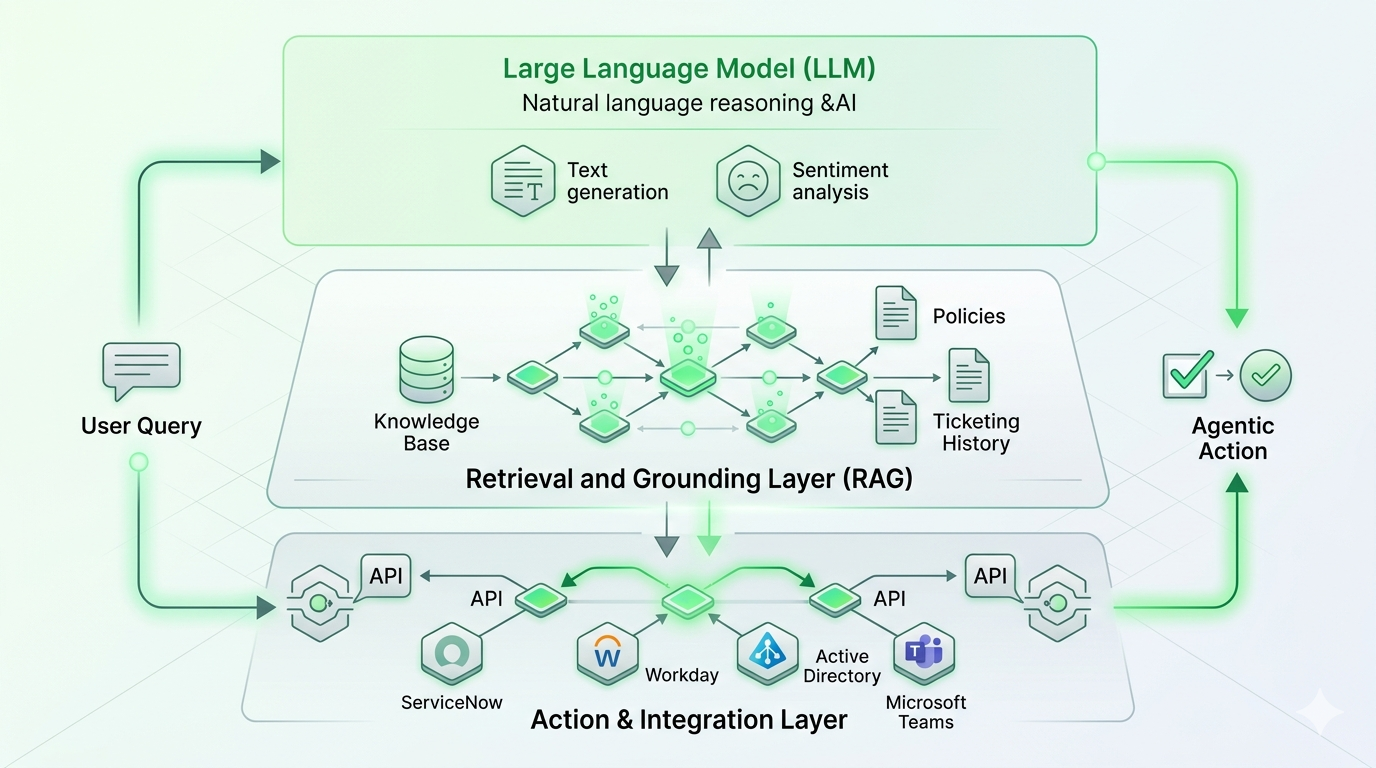
The leap from “chat copilot” to “agentic copilot” happens in this third layer. When the copilot can take action across systems — not just retrieve information — it stops being a faster way to read documentation and starts being a way to actually finish work.
Copilot vs. Assistant vs. Agent: The Distinction That Matters
This is the conversation that derails most AI buying processes. Vendors use the terms interchangeably; they aren’t. The most useful way to think about it is as a four-stage evolution of enterprise AI, where each stage layers more capability — and more autonomy — on top of the last.
Most products marketed as “AI copilots” today sit somewhere in the AI Assistant stage. The leading enterprise platforms are pushing into agentic territory. That’s the question to ask any vendor: where on this curve does your product actually live?
Where You’ll Encounter AI Copilots in the Enterprise
Copilots are now embedded almost everywhere knowledge work happens. The most common surfaces:
Productivity suites. Microsoft 365 Copilot, Google Workspace’s Gemini, and similar tools live inside email, documents, slides, and spreadsheets — drafting, summarizing, and analyzing.
IDEs and developer tools. GitHub Copilot crossed 20 million users in mid-2025, and Gartner pegs the AI code assistant market at $3.0–$3.5 billion in 2025. Controlled studies show developers complete tasks roughly 55% faster with these tools.
Customer service platforms. Agent-assist copilots draft replies, suggest knowledge articles, and summarize cases for live Intelligent agents — while autonomous copilots handle tier-one queries directly.
CRM and sales tools. Copilots draft outreach, summarize accounts, and prep call notes inside Salesforce, HubSpot, and similar platforms.
ITSM and HR service desks. This is where the agentic shift is most visible — copilots that don’t just answer “how do I reset my password” but actually reset the password, then close the ticket, then post a confirmation. It’s also where most of the measurable ROI in the category is now being booked, which is why purpose-built agentic service desk platforms are growing faster than horizontal productivity copilots. We go deeper on this in the next section.
The breadth of deployment surfaces is also why measurement is hard. According to Gartner’s 2025 Microsoft 365 Copilot survey, 40% of organizations are piloting Copilot but only 5% have moved to large-scale deployment, with ROI being the most common blocker. Productivity copilots are real, but they’re easier to deploy than to monetize. That’s part of why employee support has emerged as the highest-conviction first use case.
Real-World Use Cases by Function
Different functions get value from copilots in different shapes. The highest-ROI patterns we see across enterprise deployments:
IT support. Password resets, software requests, access provisioning, incident triage, knowledge retrieval. The unit economics are unforgiving without AI — Forrester pegs the cost of a single password reset at roughly $70 — and modern AI handles them at over 98% accuracy.
HR support. Leave requests, policy questions, benefits enrollment, onboarding workflows, payroll queries. The agent can not only answer the question but execute the workflow in Workday, SuccessFactors, or whatever HRIS sits behind it.
Finance and operations. Expense queries, vendor lookups, invoice status, approval routing. Automated invoicing and forecasting are accelerating financial close processes by 30–50% in current deployments.
Customer service. Tier-one query handling, agent-assist for live cases, post-call summarization. Modern AI deflection drops cost per support interaction by 68% on average, from roughly $4.60 to $1.45.
Sales and marketing. Outreach drafting, lead qualification, content generation, account research. Lead generation and qualification copilots are producing 2–3x improvements in pipeline velocity in benchmarked deployments.
Software development. 91% of developers in Stack Overflow’s 2025 survey now report using AI coding tools.
.png)
AI Copilots in Employee Support: Where Agentic AI Earns Its Keep
If you want the clearest view of why the AI copilot category exists — and where it’s heading — look at internal employee support.
The economics here are punishing without AI. A single password reset costs IT around $70 by Forrester’s benchmark. Industry data places the average cost per support ticket between $15 and $35. Multiply that by tens of thousands of tickets per quarter, factor in the agent burnout from repetitive tier-one work, and you have a function that has been begging for intelligent automation for a decade.
The numbers on what AI is now delivering are striking:
- AI agents are reaching 92% intent-recognition accuracy on support queries, according to 2026 benchmarks.
- AI deflection drops cost per support interaction by 68% on average, from roughly $4.60 to $1.45.
- Brands using AI-driven support report 25–45% ticket deflection and ROI of 2–5x within the first year.
- By 2027, 50% of service cases are expected to be resolved by AI, up from about 30% in 2025.
- Gartner’s headline forecast: by 2029, agentic AI will autonomously resolve 80% of common service issues without human intervention, driving a 30% reduction in operational costs.
But here’s the catch — and the reason a lot of “AI copilot” deployments are stalling out. Most of these tools were built in the AI Assistant era. They can answer “what’s our PTO policy” beautifully. They can’t actually file your time-off request, update Workday, notify your manager, and adjust the team calendar. That gap is what the agentic shift is closing.
What an Agentic Employee Support Copilot Actually Does
An agentic copilot for employee support handles the entire request lifecycle, not just the conversation. It understands the request in plain language across whatever channel the employee already uses — Microsoft Teams, Slack, email, voice, web portal. It pulls context across systems before responding: identity, role, location, prior tickets, entitlements, the relevant slice of the knowledge base. When it can resolve the request directly — and for the long tail of tier-one work, it usually can — it does, with no ticket created because the work is already done. When human help is genuinely needed, it routes intelligently, handing the agent the full context, the suggested next step, and the user’s history, so the human starts from minute thirty rather than minute one. And every resolution feeds back into the system, so deflection rates compound over time without manual retraining.
This is the operating model Rezolve.ai Agentic SideKick is built around. In production deployments across IT and HR service management, customers consistently see ticket deflection in the 50–85% range on routine, high-volume request types, with first-response time dropping to seconds rather than minutes or hours. The headline isn’t the platform’s surface area — it’s what doesn’t happen anymore: tickets that don’t get filed, escalations that don’t need a human, and weeks of agent time that get returned to higher-value work.
Benefits: Why Enterprises Are Investing Now
The business case for an AI copilot — particularly an agentic one — clusters around five outcomes.
Productivity at scale. The State of AI in ITSM 2025 report from ITSM.tools and HCLSoftware found that 65% of organizations expected AI to improve end-user experience, 54% to optimize ITSM operations, and 50% to increase employee productivity.
Faster decisions and faster cycles. Copilots compress the time between “I have a question” and “I have an answer.” For service desks, that means SLAs hit consistently. For knowledge workers, fewer interruptions and shorter deliberation cycles.
Better employee and customer experience. When tier-one issues resolve instantly and human agents only handle the cases worth handling, both sides of the interaction improve — employees get faster help, agents do more meaningful work, and burnout drops.
Creative and analytical leverage. Generative AI lets one person produce drafts, summaries, and analyses that used to need a team. The copilot doesn’t replace the writer or the analyst — it lets them ship more, faster.
Cost-to-serve compression. This is the line item executives care about. When AI handles 50%+ of routine requests at a fraction of the cost per interaction, the support function transforms from a linear cost center into one that scales without scaling headcount.
Risks and Considerations
Treating an AI copilot like a magic box is the fastest way to end up in Gartner’s failure column — and that column is large. Gartner forecasts that more than 40% of agent projects will fail by 2027, primarily because of poor risk management, weak governance, and unclear ROI definitions. The risks worth managing carefully:
Hallucinations. Live customer-service deployments still see AI hallucination rates between 15% and 27%, depending on the use case. Grounding the copilot in your real knowledge base and constraining its answer space is non-negotiable.
Security and data governance. A copilot is only as safe as the permissions it inherits. According to Gartner research, 47% of IT leaders say they are not very confident — or have no confidence at all — in their ability to manage Copilot’s security and access risks. Information governance has to come before the rollout, not after.
Privacy and compliance. Especially in regulated industries, what data the copilot can see, where it sends prompts, where logs are stored, and how outputs are audited all need explicit answers. “It uses GPT” is not a security architecture.
Bias and fairness. Generative models reflect their training data. For HR use cases especially — performance feedback, hiring assistance, policy interpretation — bias testing and human review on sensitive flows are essential.
Adoption fatigue and value measurement. Gartner’s 2024 Microsoft 365 Copilot survey found that 72% of employees struggle to integrate the tool into their daily routines and 57% report engagement declines quickly. Without clear use cases and structured enablement, copilots get bought, deployed, and forgotten.
The honest takeaway: a copilot is a system, not a product. Treat it like one.
How to Evaluate an AI Copilot
When you’re sitting across the table from a vendor, the questions worth asking are concrete.
Does it actually take action, or does it only suggest? This is the agentic test. If the answer is “it surfaces the right knowledge article so the user can resolve it themselves,” you’re buying an AI Assistant, not an Agent.
How does it integrate with the systems you already run? Look for breadth of pre-built connectors, support for emerging standards like MCP, and the ability to call APIs your team owns. Integration debt is where copilot ROI goes to die.
How is knowledge grounded? Where does the model get its context from, how is it kept current, and what’s the answer space when the knowledge base doesn’t have one?
What’s the security and governance model? Permission inheritance, data residency, prompt logging, audit trails, role-based controls, sensitive-data handling — get this in writing before signing.
How is success measured? Deflection rate, resolution rate, CSAT, cost per interaction, time to resolution. If the vendor’s only KPI is “engagement,” ask harder questions.
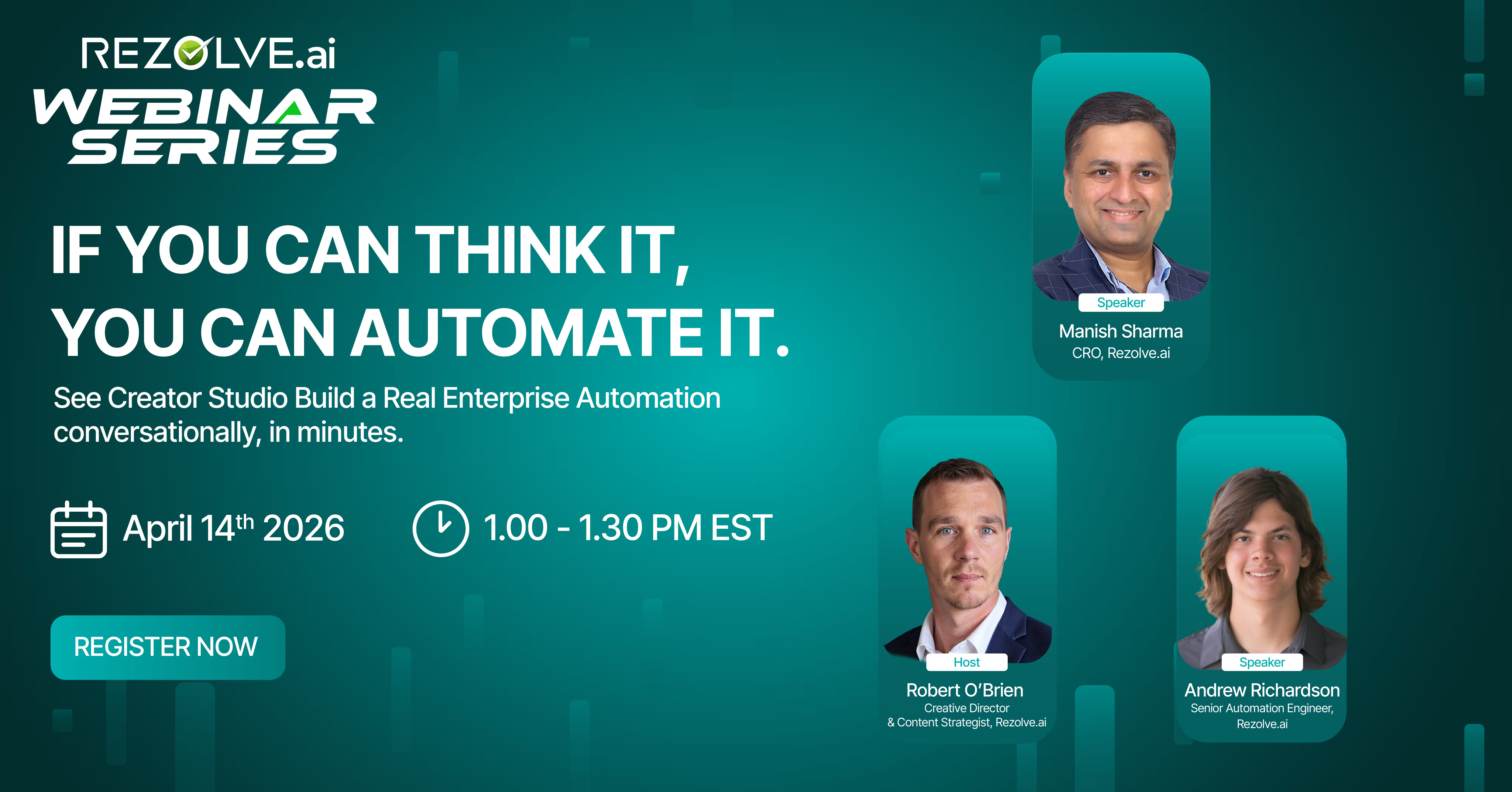
Can business users extend it? A copilot that requires a developer for every new flow is one that won’t grow with your team. Look for serious low-code or no-code authoring — Rezolve.ai Creator Studio is one example of what this looks like done well.
What’s the migration path to agentic capability? Even if you start with assistant-level use cases, the platform you choose should make the move to agentic AI a configuration change, not a re-platform.
Where This Is Heading
The copilot category is on a fast trajectory toward agentic AI. Gartner forecasts that 40% of enterprise applications will integrate task-specific AI agents by the end of 2026, up from less than 5% today. By 2027, one-third of agentic AI implementations will combine multiple agents with different skills to manage complex tasks. By 2028, 33% of enterprise software applications will include agentic AI, enabling 15% of day-to-day work decisions to be made autonomously. By 2029, at least half of knowledge workers will be expected to create, govern, and deploy agents on demand.
The economic stakes are enormous. Gartner’s best-case scenario projects agentic AI driving roughly 30% of enterprise application software revenue by 2035 — surpassing $450 billion, up from 2% in 2025. IDC pegs year-over-year growth in AI spending at 31.9% between 2025 and 2029.
What this means in practice: the conversational AI copilot you buy in 2026 isn’t just a productivity tool. It’s the entry point to an agentic operating model — one where employees increasingly delegate tasks to AI rather than simply consult it, and where the front door to most enterprise applications becomes conversational, autonomous, and action-oriented rather than menu-driven and manual.
Organizations that pick a platform built for that future spend the next three years compounding capability. Organizations that pick a chat-only assistant spend the next three years migrating off it.
Conclusion: From Curious to Ready
An AI copilot, at its best, is a force multiplier — a teammate that handles the routine, accelerates the complex, and lets the humans in your organization do more of the work only humans can do. The category is real, the ROI is increasingly measurable, and the analysts are unanimous that the window for adoption is closing.
But the right question isn’t should we get an AI copilot. It’s should we get one that just talks, or one that actually finishes the work? The difference between those two choices is the difference between a productivity tool and an operating model. For employee support specifically — IT, HR, and the long tail of internal service requests — the agentic answer is the only one that holds up against the 2026–2029 trajectory.
If you want to see what an agentic copilot looks like running against a real service desk workload, Book a demo — we’ll walk you through it on a use case from your own environment.
See What an Agentic AI Copilot Looks Like in Action. Watch Now!
FAQs
What’s the difference between an AI copilot and a chatbot?
Chatbots follow scripts. AI copilots use LLMs to understand language, generate original responses, and increasingly take action across systems.
Is an AI copilot the same as an AI agent?
Not quite — copilots assist humans, agents act autonomously. The line is blurring fast, which is why modern enterprise platforms are described as agentic copilots: they assist when a human is in the loop and act when they aren’t.
How quickly do AI copilots show ROI in employee support?
Most enterprise deployments hit ROI in 6–12 months, with 25–45% ticket deflection and roughly two-thirds lower cost per interaction in the first year.
Will an AI copilot replace my IT or HR team?
No. AI handles tier-one volume; humans handle complex, sensitive work. Deployments typically deliver lower costs and higher employee satisfaction together.
What about hallucinations and accuracy?
Grounding matters. Enterprise copilots use retrieval-augmented generation against your real knowledge base plus guardrails — modern agents now hit roughly 92% intent accuracy when properly grounded.
Do I need a separate AI copilot for IT and HR?
No — the workflows overlap heavily. A unified agentic enterprise service management platform handles both within the same architecture, which simplifies governance and compounds value.
How do I avoid being part of the 40% of failed AI projects?
Define success metrics upfront, ground the copilot in clean knowledge, get permissions right before launch, start with high-volume narrow use cases, and pick a platform that’s already operating at agentic depth.
What role does Model Context Protocol (MCP) play?
MCP is an open standard that lets AI agents safely connect to enterprise systems without bespoke integrations for each one. As agentic copilots become multi-system by default, MCP-native platforms scale where bespoke integration stacks don’t.


.webp)

.png)









.webp)