
The IT service desk powers every organization, yet teams are buried under repetitive tickets and limited developer capacity. With the low-code/no-code market set to hit $45.5B and drive 70% of enterprise apps by 2026, no-code automation is no longer optional—it’s urgent. Rezolve.ai’s Creator Studio puts automation directly in the hands of IT teams, enabling them to design and launch workflows in days instead of months.
- Low-code/no-code is surging (projected to power ~70% of enterprise apps by 2026) while IT teams drown in routine tickets.
- This blog shows how Rezolve.ai’s no-code Creator Studio builds end-to-end automations in days—speeding resolutions, reducing escalations, and cutting device provisioning from days to minutes.
What Is Low-Code/No-Code?
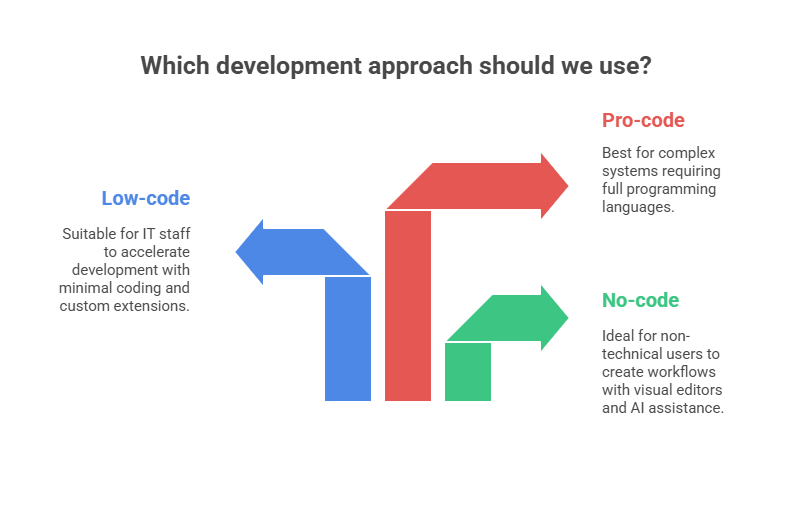
Low-code and no-code (LCNC) platforms are development environments that simplify how applications and automations are built. Instead of writing extensive lines of code, users design workflows through drag-and-drop interfaces, pre-built connectors, and plain-language prompts.
- No-code: Built for non-technical users (“citizen developers”). These tools rely on visual editors and AI assistance, so anyone familiar with business processes can create workflows.
- Low-code: Designed for IT and technical staff who want to move faster. They reduce manual coding but allow custom scripts or extensions where needed.
- Pro-code: Traditional software development using full programming languages—best suited for highly complex or specialized systems.
LCNC tools bridge the gap between business needs and developer bandwidth. By empowering non-developers to create apps and automations, they help organizations respond faster to changing demands, reduce backlogs, and improve time-to-value.
The Rise of Low‑code/No‑code Automation
Low‑code and no‑code platforms allow people without formal programming backgrounds to build and deploy applications. Several market trends explain their rapid adoption:
- Market growth: Research notes that the LCNC ecosystem is now worth US$45.5 billion.
- Citizen development: Empowering “citizen developers” inside business units removes IT bottlenecks. Many organizations now encourage non‑technical employees to build their own automations under IT governance.
- Resource constraints: As digital transformation accelerates, demand for applications outpaces the supply of professional developers. LCNC platforms help fill this gap by enabling more people to build solutions quickly.
Trends to watch
- AI‑assisted automation: Modern no‑code platforms integrate generative AI that can suggest actions, generate workflow logic and test automations. This further lowers the barrier for non‑technical users.
- Hybrid development models: Some organizations combine no‑code tools with traditional code to balance agility and control. For instance, complex logic may be developed in code, while citizen developers handle simpler tasks.
- Compliance‑aware platforms: As adoption grows, regulators expect LCNC solutions to enforce data privacy, permission models and auditability. Vendors must build governance into their platforms.
- Cross‑departmental uptake: Originally used for simple departmental apps, no‑code platforms increasingly handle mission‑critical workflows such as supply chain management and service‑desk operations.
Benefits of No‑code for IT Service Desks
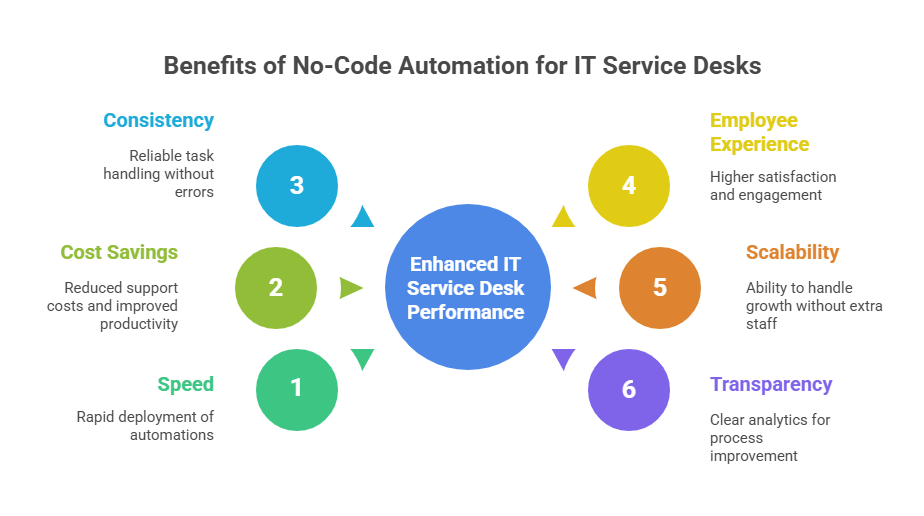
IT teams traditionally rely on scripts and manual procedures. Automating these processes with no‑code delivers multiple advantages:
- Speed: Deploy automations in days instead of months. Rezolve.ai’s Creator Studio allows IT staff to drag‑and‑drop steps without writing code, dramatically shortening delivery cycles.
- Cost savings: Reducing the number of tickets that require human intervention frees engineers to focus on strategic projects. Over time, this lowers support costs and improves employee productivity.
- Consistency and accuracy: Automated workflows handle repetitive tasks the same way every time, reducing errors caused by fatigue or miscommunication.
- Improved employee experience: When routine issues are resolved instantly, employees can work uninterrupted, leading to higher satisfaction and engagement.
- Scalability: As the organization grows, automations can handle higher volumes without additional headcount.
- Transparency: Modern LCNC platforms often provide analytics dashboards that track workflow performance, ticket volumes and resolution times, helping IT leaders identify bottlenecks and improve processes.
Why IT Teams Need Automation?
The burden of repetitive tasks
Service desks face two types of requests: standard requests (e.g., password resets, new software installations, access provisioning) and complex issues (bugs, security incidents). Standard requests can consume a surprising amount of time. Each ticket requires someone to validate the requester’s identity, update multiple systems and communicate status. Because these tasks follow predictable patterns, they are excellent candidates for automation. Yet many service desks still handle them manually due to legacy processes or lack of resources.
Growing expectations for instant support
Employees expect the same immediacy from internal support as they do from consumer apps. When someone cannot access a system or is waiting on hardware, every minute of delay affects their productivity. Waiting for a human to pick up a ticket, assign it and complete the work can take hours or days. Automated workflows can execute instantly and 24/7, providing resolutions in seconds.
Security and compliance pressures
Many IT tasks—especially provisioning accounts or granting access—have strict compliance requirements. Manual processes are prone to human error, which can expose sensitive data or violate policy. Automated workflows enforce consistent procedures, log every action and integrate with identity management systems to ensure proper approvals.
Introducing Rezolve.ai’s Creator Studio
Rezolve.ai operates within collaboration hubs like Microsoft Teams and Slack and uses generative AI to automate repetitive tasks and resolve employee issues instantly. The Creator Studio is the heart of the platform—a no‑code builder that allows IT teams to design sophisticated workflows without writing scripts.
Main features of Rezolve.ai’s Creator Studio
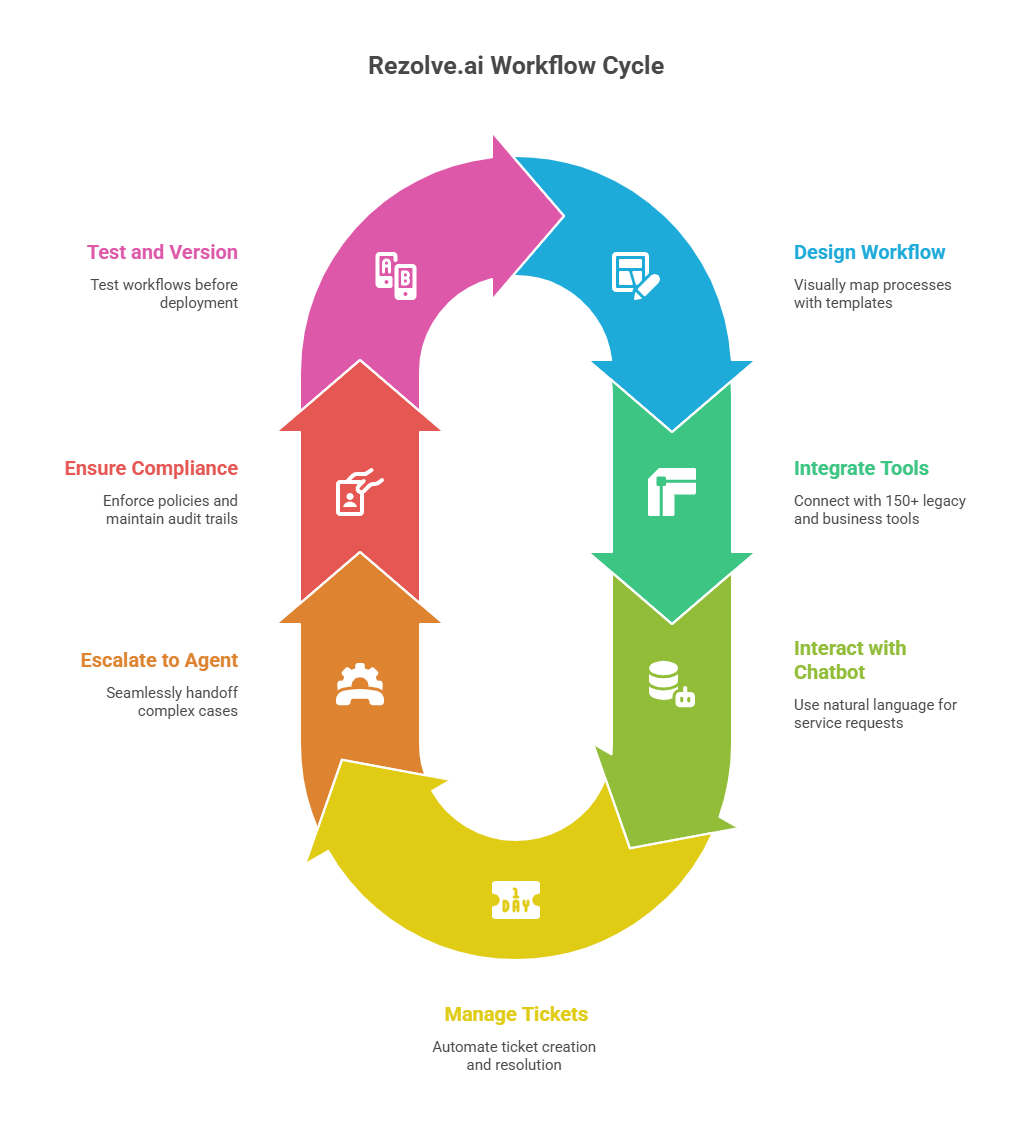
- Drag‑and‑drop workflow canvas: Designers can visually map out each step of a process, including triggers, conditions, tasks and approvals. Pre‑built templates for common IT and HR workflows accelerate design.
- Deep integrations: Rezolve.ai integrates with over 150 legacy and business tools, including Active Directory, Workday, Salesforce, ServiceNow, Google Workspace, Okta and custom APIs. This enables end‑to‑end automation across different systems.
- Embedded conversational assistant: A chatbot embedded in Microsoft Teams or Slack provides the front‑end experience. Employees interact with the bot in natural language to request services, and the bot triggers the appropriate workflow.
- Smart ticketing and analytics: Rezolve.ai automatically creates, updates and resolves tickets as part of the workflow. Real‑time dashboards show resolution times, common requests and other operational metrics.
- Real‑time agent handoff: For complex cases, the automation seamlessly escalates to a human agent while preserving context. Agents can see the chat history and workflow state.
- Security and compliance: Workflow steps enforce organizational policies, maintain audit trails and require approvals when necessary.
- Version control and testing: Creator Studio supports staging environments, versioning and testing to ensure workflows behave as expected before they go live.
Use Cases for IT Workflow Automation with Rezolve.ai
Rezolve.ai can automate a wide range of service‑desk and IT operations tasks. Below are some high‑impact examples with brief explanations and potential benefits.
1. Password resets and account unlocks
Scenario: Employees frequently forget their passwords or lock themselves out of accounts. Traditionally, an agent verifies identity, resets the password in Active Directory and communicates the new credentials.
Automation: The chatbot can verify the user’s identity via multi‑factor authentication and then trigger a password reset workflow that integrates with Active Directory or Azure AD. The employee receives a secure link to set a new password.
Benefits: Instant resolution reduces frustration and eliminates the need for human intervention for a high‑volume ticket type.
2. Software provisioning and license management
Scenario: A new employee needs access to productivity software or a cloud tool. Provisioning typically requires multiple steps: approvals, license assignment, installation and documentation.
Automation: Creator Studio builds a workflow that gathers the manager’s approval, checks available licenses, assigns a seat in the relevant system and sends the installer link. It can also update IT asset management tools and ticket systems.
Benefits: Onboarding new hires becomes faster and more consistent; license compliance improves; and IT knows exactly who has what software.
3. Device provisioning and replacement
Scenario: When a laptop breaks, the service desk must coordinate with procurement, inventory management and shipping departments.
Automation: Rezolve.ai can detect device failure via a user request. The workflow triggers a pre‑approved replacement process: it checks inventory, creates a shipment, updates asset records and notifies the user.
Benefits: Reduced downtime for employees and fewer manual handoffs between departments.
4. Access requests and approvals
Scenario: An employee requests access to a finance system or sensitive database. Approvals must follow a strict chain, and provisioning must be logged.
Automation: A workflow collects details (why access is needed, duration, manager approval), triggers the appropriate approval chain and provisions access automatically upon approval. The process logs all actions for audit purposes.
Benefits: Consistent enforcement of least‑privilege policies and faster onboarding to critical systems.
Steps to Build Automations with Rezolve.ai
Building a workflow in Creator Studio typically involves the following steps:
- Define the use case: Identify the repetitive task you want to automate and gather all stakeholders. Document the steps, approvals and systems involved.
- Design the workflow: In Creator Studio, drag and drop triggers (e.g., a user saying “reset my password”), actions (e.g., call the Active Directory API), conditions and approvals. Use generative AI suggestions to accelerate design.
- Integrate systems: Connect the workflow to the necessary systems via Rezolve.ai’s integration library or custom API connectors. Test the connections to ensure data flows correctly.
- Configure approvals and notifications: Set up notifications for users, managers and agents. Define approval chains, escalation rules and fallback options.
- Test in staging: Use test accounts or sandbox environments to run the automation end‑to‑end. Validate that each branch behaves as expected.
- Deploy and monitor: Move the workflow to production. Monitor performance through the analytics dashboard and gather feedback from users.
- Iterate: Based on metrics and feedback, refine the workflow. Creator Studio supports version control so changes can be rolled out without disrupting live operations.
Closing Note
No‑code platforms are not just for hobbyists or simple apps. As the market for LCNC tools accelerates, more enterprises are embracing them for mission‑critical operations. The statistics speak for themselves: the LCNC market is already worth US$45.5 billion with an annual growth rate of 28.1 %, and 70 % of enterprise applications will use LCNC tools by 2026.
For IT service desks, this translates into faster automation, lower costs and happier employees. Rezolve.ai’s Creator Studio exemplifies what no‑code automation should look like: intuitive design, deep integrations, generative AI assistance and enterprise‑grade security. Organizations that adopt such tools can transform their service desks from reactive ticket queues into proactive enablers of productivity.

Key takeaways
- LCNC is now mainstream: Rapid growth and analyst forecasts show no-code will dominate enterprise app development.
- Automate the routine: Free IT from repetitive tasks so they can focus on higher-value work.
- Citizen developers empowered: Rezolve.ai’s Creator Studio lets non-technical staff build end-to-end workflows with GenAI and 150+ integrations.
- Faster, consistent ROI: Automation cuts ticket resolution times and reduces manual effort.
- Governance is key: Strong approval flows, permissions, and audit trails ensure compliance and security.
FAQs
Q1. What differentiates Rezolve.ai’s Creator Studio from other no‑code platforms?
A: While many no‑code tools help build apps, Creator Studio is purpose‑built for service‑desk automation. It combines a generative AI workflow designer with deep ITSM integrations (Active Directory, ServiceNow, Workday and more). The embedded chatbot in Teams or Slack allows users to trigger workflows conversationally, and real‑time analytics provide visibility.
Q2. Do I need coding knowledge to use Creator Studio?
A: No. The platform is designed for non‑developers, though understanding your processes and systems is important. For complex integrations, IT teams can augment the workflow with custom code via Rezolve.ai’s integration frameworks.
Q3. How long does it take to deploy an automation?
A: Implementation time varies with complexity, but many customers build and deploy their first workflows within a few days. Pre‑built templates and AI suggestions accelerate the process.
Q4. How does Rezolve.ai handle security?
A: Rezolve.ai enforces role‑based access control, multi‑factor authentication and detailed audit trails. Workflow steps require appropriate approvals, and integrations respect existing permission models.


.webp)

.png)










.webp)