

Imagine this: you need to build an application that solves a critical business problem for your company. It might take hours, even days, just to conceptualize the solution—should you create a Google form? Build a custom bot? Design a full application? After all that creative thinking and brainstorming, you finally land on a solution and feel a sense of victory. But then reality sets in: now you have to write all the code and handle the programming to bring your idea to life.
This sounds like a long, tedious task. You'll need to repeat code throughout the process, pay attention to every single detail, and invest significant time debugging and refining. For many developers, this bottleneck slows down innovation and productivity.
Enter Vibe Coding—a revolutionary software development approach that uses large language models (LLMs) and AI tools to generate code based on natural language instructions. Introduced by Andrej Karpathy in February 2025, vibe coding is rapidly gaining popularity across industries. The concept is simple yet powerful: developers tell the AI tool exactly what they want in everyday language, and the AI generates the necessary code to execute the task.
This approach is a game-changer for developers at all skill levels. For those without extensive programming experience, it eliminates the stress of mastering complex coding languages. For experienced developers, it accelerates the development process, removes repetitive coding tasks, and allows them to focus on higher-level design and logic.
Vibe coding is an emerging AI-assisted development approach where natural language instructions generate code, accelerating workflows for beginners and professionals alike.
Comparing the Top 5 Vibe Coding Tools
Today, multiple AI-powered coding tools help programmers work more efficiently. Each tool has unique features that make it suitable for different purposes. Let's compare the most popular and widely used tools: Cursor, Qodo, Replit, Lovable, and Bolt.
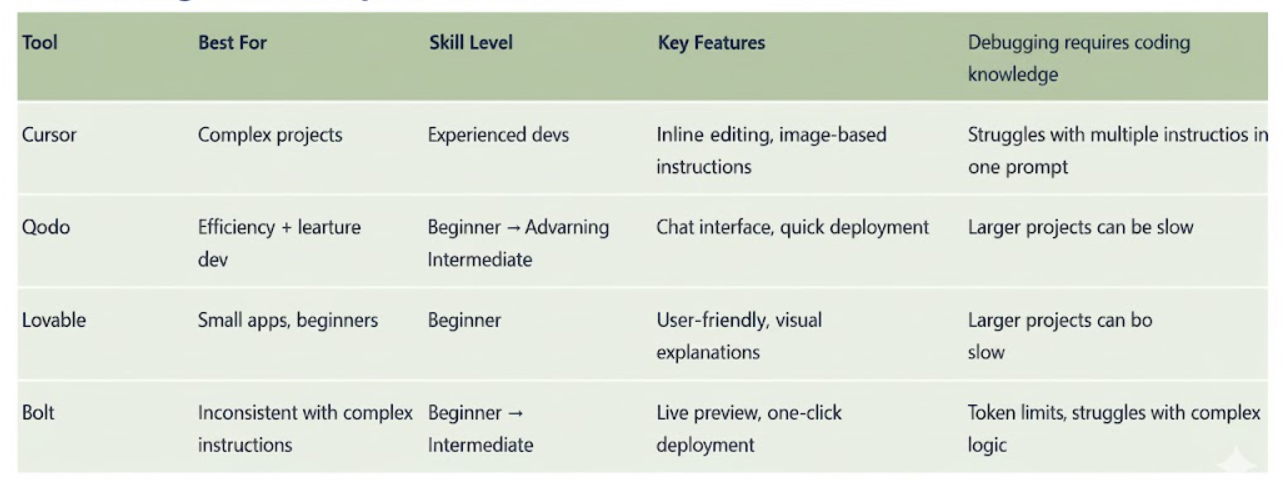
1. Cursor: For Experienced Developers Handling Complex Projects
Cursor is one of the most commonly used vibe coding tools among developers with a solid coding background. While it handles most of the code generation, developers still need some programming knowledge to understand what the AI is doing. AI tools can make mistakes, and with Cursor, debugging becomes more time-consuming without coding experience.
For experienced developers, Cursor excels at handling complicated projects with several standout features:
Inline Editing: Developers can manually modify code instead of instructing the AI for every minor change. This is useful for simple adjustments like changing a website's background color without significantly altering the codebase.
Image-Based Instructions: Rather than explaining every detail in words, developers can provide an image of what they want and instruct Cursor to replicate it in code.
Best Practices for Cursor:
- Avoid over-reliance on AI—always double-check its output to ensure everything works as intended.
- Preplan your project by defining components and features before starting. Clear, concise directions from the beginning lead to a smoother development process.
- Avoid changing plans mid-project, as this confuses the AI and causes programming issues.
2. Replit: Step-by-Step Development with Quick Deployment
Replit features a chat interface where users describe their needs in everyday language, and Replit generates the corresponding code. Unlike Cursor, which handles complex prompts well, Replit performs best with detailed, step-by-step instructions for individual features. Multiple instructions in one prompt can confuse Replit and produce errors.
Key Features:
- Assistant Tool: Explains code sections and details what's happening behind the scenes.
- Quick Deployment: Unlike other tools requiring GitHub repositories and manual link generation, Replit simplifies publishing. Simply go to the Deployments section, click Deploy, and receive a public link to share online.
3. Qodo: Boosting Efficiency with Built-In Debugging
Qodo (formerly Codium) is designed to boost project efficiency and enhance programming knowledge. Its interface resembles VS Code and is highly user-friendly. When users explain their goals, Qodo provides detailed explanations of the development process before generating code. This transparency helps users understand how the AI executes complex tasks without asking multiple questions.
Debugging Excellence:
- Qodo Gen: Tests specific code portions for errors.
- Enhance Button: Provides suggestions to improve projects further.
Build enterprise automations without writing code—try Rezolve.ai Creator Studio.
4. Lovable: User-Friendly Tool for Smaller Applications
Lovable stands out with its colorful layout, informal language, and charming details—like a little heart appearing on screen while code generates. This tool is particularly helpful for those without extensive computer science experience.
Considerations:
- Bugs can arise, and developers have limited control over deeper program aspects.
- Precision is crucial when writing prompts, especially the initial one.
- Be concise yet precise—avoid overwhelming Lovable with excessive information.
- Provide attachment or reference images to save time and give the AI clearer direction.
While Lovable can be inconsistent with complex instructions or larger projects, it excels at smaller applications, saving time and producing professional-looking results with minimal effort.
5. Bolt: Fast Full-Stack Development with Live Preview
Bolt is an intuitive AI-powered coding tool that makes building full-stack applications feel fast and effortless. With its clean layout, live preview panel, and simple prompt-based interface, Bolt enables users to generate complete web or mobile apps without writing much code. This makes it especially appealing for beginners, designers, and entrepreneurs who want to bring ideas to life quickly.
As soon as a prompt is entered, Bolt spins up a working project using tools like React, Supabase, and Stripe, and offers one-click deployment to platforms like Netlify or Expo.
Limitations:
- Struggles with complex logic or large-scale applications.
- Can generate buggy or incomplete code inconsistently.
- Token-based system means debugging or revisions can become expensive over time.
Best Practices:
- Start with a clear, detailed prompt.
- Build step-by-step rather than overwhelming the AI with too much information at once.
- Provide visual references, such as Figma designs, to guide output.
Explore how AI-powered automation can transform your organization. Read our Blog!
No-Code Automation for Enterprise: Beyond Development Tools
While vibe coding tools revolutionize software development, enterprise organizations often need automation solutions that empower non-technical professionals—like HR teams, operations staff, and business analysts—to build workflows without writing code. This is where no-code automation platforms bridge the gap between technical development and business process automation.
Rezolve.ai's Creator Studio exemplifies this approach with a generative AI-powered, no-code automation platform designed specifically for enterprise IT and HR teams. Unlike development-focused vibe coding tools, Creator Studio enables non-technical professionals to build and deploy custom automations for employee support, service desk operations, and cross-departmental workflows—all without writing a single line of code.
Key Features of Rezolve.ai Creator Studio:
Drag-and-Drop Workflow Builder: IT and HR professionals can design automations visually, connecting systems and defining logic through an intuitive interface—no programming knowledge required.
Agentic AI Integration: The platform leverages Agentic AI to understand natural language requests, automatically suggest workflow optimizations, and execute complex multi-step processes autonomously.
Pre-Built Templates: Out-of-the-box automation templates for common IT and HR tasks (onboarding, password resets, access provisioning, ticket routing) allow teams to launch quickly.
1000+ System Integrations: Connect to existing tools like ServiceNow, Jira, Workday, UKG, Microsoft 365, and more through REST APIs without custom coding.
Collaborative Development: Built-in change management tools enable team collaboration with version control and easy rollback capabilities.
Deploy in Days, Not Months: What traditionally required developer resources and months of work can now be built, tested, and deployed by business teams in days or weeks.
This democratization of automation is particularly valuable for:
- HR teams building employee onboarding workflows, benefits enrollment automations, and policy delivery systems
- IT service desks creating custom ticket routing, automated troubleshooting, and self-service resolution workflows
- Operations teams designing approval processes, resource allocation systems, and cross-departmental coordination workflows
By combining the accessibility of no-code development with the intelligence of Agentic AI, platforms like Rezolve.ai Creator Studio extend the vibe coding philosophy beyond software development into enterprise process automation—empowering business professionals to build the solutions they need without waiting for developer resources.
Streamline your development and enterprise workflows—schedule a demo with Rezolve.ai.
The Future of Development in 2026 and Beyond
Vibe coding isn't just a passing social media trend—it's a pragmatic approach that professional developers incorporate into their daily workflows. Thanks to its versatility, vibe coding streamlines development by allowing users to build functional applications without writing every line of code from scratch.
Each tool offers unique strengths, making them well-suited for different tasks. With the right combination of these tools, developers can bring their ideas to life more efficiently and with far less overwhelm.
As organizations adopt vibe coding tools, IT teams can focus on strategic initiatives rather than repetitive coding tasks. The result is faster innovation, reduced development cycles, and applications that better serve business needs.
Key Takeaways
- Vibe coding uses AI to generate code from natural language instructions, revolutionizing software development.
- Tools like Cursor, Replit, Qodo, Lovable, and Bolt each offer unique strengths for different project types.
- Experienced developers benefit from faster workflows; beginners can build applications without extensive coding knowledge.
- Preplanning projects and providing clear instructions maximize AI tool effectiveness.
- Vibe coding is a pragmatic approach increasingly adopted by professional developers worldwide.
FAQs
1. What is vibe coding?
Vibe coding is a software development approach where developers use natural language to instruct AI tools to generate code, eliminating the need to write every line manually.
2. Who introduced vibe coding?
Andrej Karpathy introduced vibe coding in February 2025, and it has since gained rapid adoption across various industries.
3. Do I need coding experience to use vibe coding tools?
Not necessarily. Tools like Lovable and Bolt are designed for beginners, while Cursor and Qodo are better suited for developers with programming backgrounds.
4. What are the most popular vibe coding tools?
The most widely used tools are Cursor, Qodo, Replit, Lovable, and Bolt, each with distinct features for different use cases.
5. Can vibe coding replace traditional programming?
No, vibe coding augments traditional programming by handling repetitive tasks and accelerating development. Developers still need to review, debug, and refine AI-generated code.
6. What's the best way to get started with vibe coding?
Start by preplanning your project, choosing the right tool for your skill level and project complexity, and providing clear, detailed instructions to the AI.


.webp)

.png)











.webp)