
.png)

The debate between Jira Service Management and Freshdesk continues to captivate businesses. While Jira dominates the technical/DevOps space, Freshdesk is a powerhouse for customer experience. But which is right for your team?
TL;DR — Quick Software Shortlist
- Jira Service Management – Best for agile & DevOps teams; integrates seamlessly with software development workflows (Rating: 4.4/5)
- Freshdesk – Ideal for customer support teams; intuitive, multi-channel service management (Rating: 4.4/5)
How We Selected These Tools for this Guide: We analyzed user reviews, feature sets, automation capabilities, and integration flexibility to bring you the top contenders for both internal IT service and external customer support.
Jira: A Brief Overview
Jira, developed by Atlassian, is a robust project management and issue-tracking platform widely used by software development teams. It offers advanced tools for tracking bugs, managing tasks, and overseeing agile workflows. With its emphasis on customization, Jira allows users to create tailored workflows, dashboards, and reports to suit specific project requirements. The platform excels in supporting methodologies like Scrum and Kanban, making it a go-to solution for teams focused on agile development. Its extensive integration options with other Atlassian products and third-party tools further enhance its functionality, making it a comprehensive choice for technical teams.
Freshdesk: A Brief Overview
Freshdesk, a product of Freshworks, is a customer support and helpdesk platform designed to streamline customer service operations. It enables businesses to manage support tickets, engage with customers across multiple channels, and automate repetitive tasks. Freshdesk's user-friendly interface and powerful automation capabilities make it ideal for teams aiming to deliver exceptional customer experiences. The platform supports features like ticket prioritization, SLA management, and a built-in knowledge base, ensuring quick and effective issue resolution. With its ability to integrate with various third-party applications, Freshdesk is a versatile choice for businesses looking to enhance their customer support processes.
Key Features Comparison
Jira: Plan, Track, and Collaborate with Precision
Jira is designed for teams aiming to streamline workflows and deliver high-quality results. Its robust features cater to software developers, project managers, and agile teams, enabling efficient planning, tracking, and execution of tasks.
Planning Tools
Jira facilitates efficient project initiation by helping teams align their objectives, allocate resources, and define goals. This ensures projects are launched with a clear roadmap and strong foundation. With features like timeline views and customizable workflows, it provides an adaptable structure for planning projects of any size.
Project Boards
Visualize your team's workflow and tasks using Kanban, Scrum, or custom boards. These boards allow you to monitor the progress of each task, identify bottlenecks, and make real-time adjustments to optimize delivery.
Sprints and Backlogs
Agile teams can use Jira’s sprint planning and backlog features to prioritize tasks and maintain focus on actionable goals. By organizing tasks into manageable iterations, teams can achieve consistent progress while accommodating dynamic changes.
Dependency Management
Prevent project delays by identifying dependencies between tasks and resolving potential bottlenecks before they escalate. This feature is essential for maintaining seamless progress in complex projects.
Customizable Workflows
Jira offers unparalleled flexibility in creating workflows tailored to specific team needs. Whether you need simple task tracking or complex multi-step approval processes, Jira adapts to your requirements.
Advanced Integrations
With over 3,000 integrations available in the Atlassian Marketplace, Jira connects seamlessly with popular tools like Slack, GitHub, and Figma. This ensures that data and workflows are consolidated for better team collaboration and visibility.
AI-Driven Insights
Atlassian Intelligence empowers teams to generate user stories, detect trends, and streamline workflows. These intelligent prompts save time and enable teams to focus on strategic goals.
Freshdesk: Elevating Customer Support with Intelligent Solutions
Freshdesk, developed by Freshworks, is a comprehensive customer support platform designed to enhance productivity and deliver superior customer experiences. It simplifies support processes with intuitive tools and AI-driven automation, making it ideal for businesses of all sizes.
Streamlined Ticketing
Freshdesk centralizes all customer interactions in a shared inbox, ensuring no query goes unanswered. Agents can collaborate through internal notes, link tasks for context, and auto-assign tickets to the right team members, enabling faster resolutions and improved productivity.
Multilingual Support
With the ability to communicate in multiple languages, Freshdesk ensures customers from diverse regions feel understood and valued. This feature enhances the overall customer experience by breaking language barriers.
Self-Service Options
Freshdesk makes self-service simple and effective for customers.
- Knowledge Base: Provide helpful articles and guides to enable quick, independent issue resolution.
- Community Forums: Create a space where customers can connect, share solutions, and exchange ideas.
- Customizable Portals: Tailor portals to reflect your brand with unique colors, logos, and designs.
Freddy AI
Freshdesk’s AI capabilities transform customer support into a streamlined, automated process.
- Agent Copilot: Freddy AI automates repetitive tasks, prioritizes tickets, and suggests relevant knowledge base articles, enabling agents to handle more tickets with less effort.
- Customer Chatbots: Provide instant, conversational support with chatbots that can answer queries, guide customers, and escalate complex issues when needed.
Automation Tools
Freshdesk allows businesses to automate routine processes like ticket routing, SLA compliance, and follow-ups. With features like skill-based ticket assignment and round-robin distribution, support teams can focus on complex queries while ensuring timely responses.
Analytics and Reporting
Gain deep insights into support operations through customizable dashboards and pre-defined reports. Measure agent performance, response times, and customer satisfaction to continuously optimize processes.
Robust Security
Freshdesk prioritizes customer data protection with role-based access controls, IP whitelisting, and JWT authentication. Teams can also schedule shifts and manage out-of-office timelines to ensure uninterrupted support.
What Users Are Saying (Feedback Snippet)
Real feedback from G2 and Capterra users to give you the ground truth.
Jira Reviews from Real Users
"Quick, Complete, and Easy to Use"
5/5
What do you like best about Jira Service Management?
I really enjoy using Jira Service Management as it is an extremely comprehensive and easy-to-use tool. The ability to easily clone tickets allows me to work on the same project with different cases effectively. Additionally, I highlight that the platform is extremely fast, which is a great differentiator compared to other ticket management platforms that tend to be slow. Appreciating the speed and efficiency in ticket handling is key to my daily performance. I also value that it allows me to have all the tickets in one place, which helps to keep track of what is being worked on and what has already been resolved. The ability to generate reports on the SLAs managed by each ticket is also very useful.
Read more on G2.
Freshdesk Reviews from Real Users
"A Developer-Friendly Help desk with Powerful Integration"
5/5
What do you like best about Freshdesk?
Freshdesk offers an intuitive interface and excellent api support, making it easy to integrate with other tools in our workflow. I really like how customizable the automation and workflows are from ticket routing to SLA setup, everything can be tailored to fit our exact needs. the ability to connect with Slack, Jira and CRM tools save tons of time for our support team.
Read more on G2.
Use Case Scenarios
When to Use Jira?
Jira is an ideal choice for teams involved in project management, software development, and agile workflows. It shines in scenarios that require detailed task tracking, complex workflows, and seamless team collaboration.
- Agile Software Development: Jira is built to support agile methodologies like Scrum and Kanban. It enables teams to create sprints, manage backlogs, and track progress through visual boards and customizable workflows.
- Bug and Issue Tracking: Development teams can rely on Jira to log, prioritize, and resolve bugs or issues efficiently, ensuring high-quality software delivery.
- Cross-Functional Project Management: Jira’s ability to customize workflows and integrate with tools like Confluence and GitHub makes it ideal for managing projects involving multiple teams and stakeholders.
- Complex Dependency Management: When tasks or projects have interdependencies, Jira helps identify bottlenecks and streamline execution by providing clear visibility into task relationships.
- Reporting and Analytics for Agile Teams: Teams can generate detailed reports, such as velocity charts and burndown charts, to analyze performance and optimize their processes.
- Highly Regulated Industries: With its robust security features and audit logs, Jira is well-suited for industries requiring strict compliance and data security measures.
When to Use Freshdesk?
Freshdesk is the go-to solution for businesses looking to enhance customer support, streamline ticket management, and provide a superior customer experience. It works exceptionally well in scenarios focused on customer engagement and service optimization.
- Customer Support Operations: Freshdesk centralizes customer queries across multiple channels, including email, chat, and social media, into a unified inbox, making it easier for support teams to respond quickly and efficiently.
- Small to Medium Businesses: Its intuitive interface and cost-effective pricing plans make it accessible to smaller teams looking to deliver exceptional customer service without a steep learning curve.
- Global Support Teams: With multilingual support and customer portals, Freshdesk caters to businesses with a global customer base, ensuring localized and effective communication.
- AI-Driven Automation: Businesses can leverage Freddy AI to automate repetitive tasks like ticket routing, prioritization, and follow-ups, freeing up agents to focus on complex issues.
- Self-Service Empowerment: Organizations looking to reduce dependency on support teams can implement self-service options such as knowledge bases, FAQs, and community forums.
- Service Level Agreements (SLAs): Companies that manage multiple customer segments or product lines can benefit from Freshdesk’s customizable SLA policies and advanced automation features to ensure timely responses.
- E-commerce and Retail: Freshdesk excels in managing customer inquiries about orders, returns, and complaints, offering a seamless experience that improves customer satisfaction.
Pricing Models

Pros and Cons
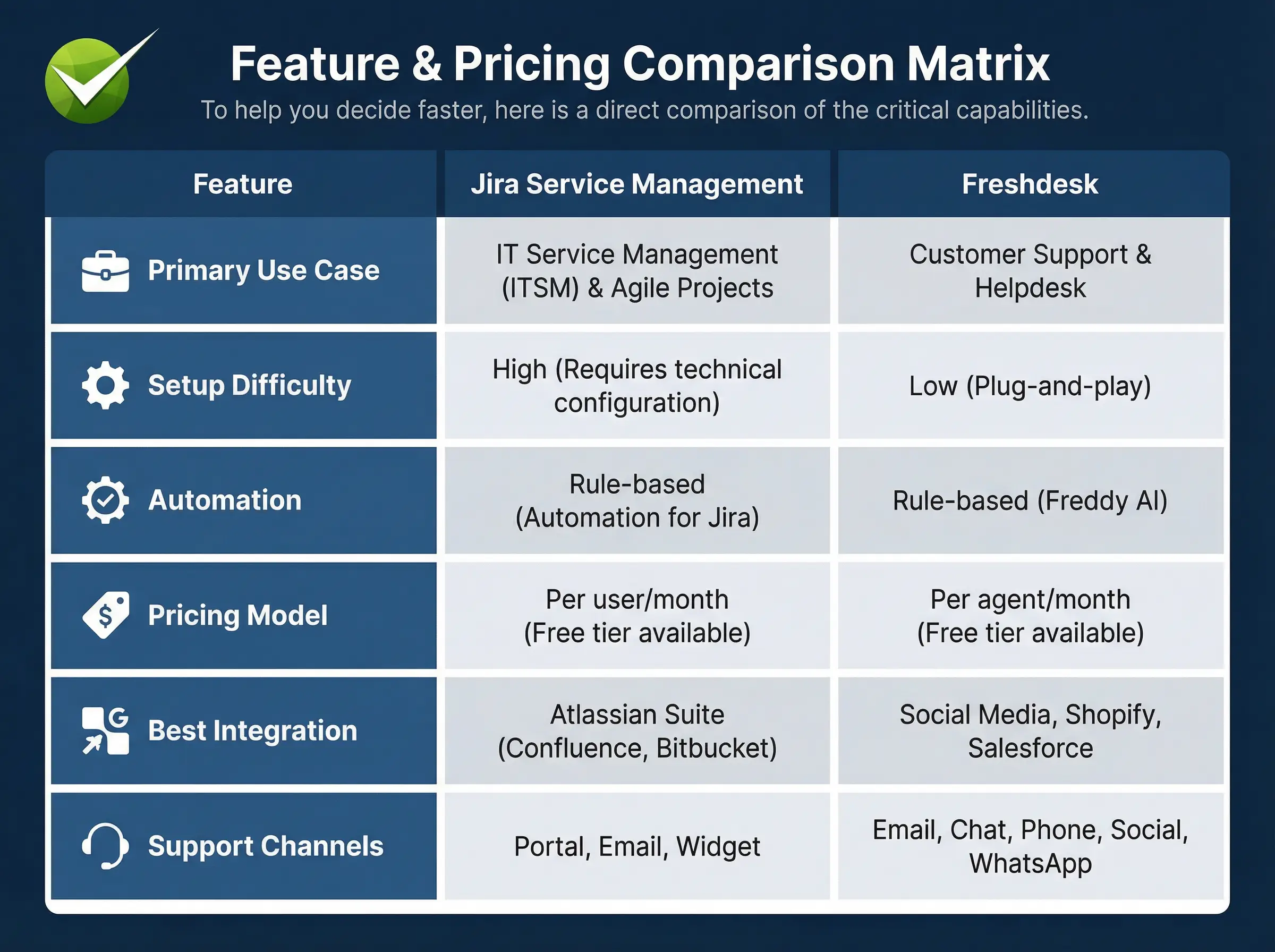
When evaluating Jira Service Management (formerly Jira Service Desk) against Freshdesk, it’s essential to consider factors like user interface, performance, navigation ease, supported languages, and other functionalities. Here's a current breakdown of their respective pros and cons:
Jira Service Management
Pros:
- Intuitive user interface that simplifies tasks such as updating statuses, attaching screenshots, and rerouting cases.
- Ideal for Agile frameworks like Scrum and Kanban, making it a strong choice for teams using these methodologies.
- Highly customizable, enabling businesses to tailor workflows and processes to specific needs.
- Automatic email notifications ensure efficient tracking of changes in individual and group projects.
- Robust filtering capabilities, although setting up filters initially can be time-intensive.
Cons:
- The search functionality requires precise queries; vague inputs can lead to irrelevant results.
- Limited scalability may not be ideal for enterprises with over 6,000 users.
- Requires the purchase of Confluence for an integrated knowledge base.
- Case sensitivity can cause issues when creating labels, tags, and other identifiers.
- Performance can be slow, particularly in the service desk module.
Freshdesk
Pros:
- Clean and sleek user interface enhanced with animations for a modern experience.
- Powerful search functionality that efficiently organizes, prioritizes, and filters data.
- Supports ticket submissions from social media platforms like Facebook and X (formerly Twitter). Instagram queries are also supported through third-party integrations.
- Includes a fully-functional mobile app seamlessly connected to its cloud version.
- Strong ticket organization capabilities streamline workflows.
Cons:
- Offers fewer automation options compared to Jira Service Management.
- API documentation can be counterintuitive, complicating integrations.
- Loading tickets over mobile data can be slow, affecting responsiveness.
- Integrating third-party apps can occasionally be challenging due to error-prone processes.
Which One is Right for You?
Selecting the right platform between Jira Service Management and Freshdesk depends on your organizational needs, team structure, and goals. Both tools excel in their respective domains, but understanding their strengths in context will help you make an informed decision.
Factors to Consider
Primary Purpose
- Jira: Designed for project management, issue tracking, and agile workflows, it is ideal for software development teams or organizations managing complex internal processes.
- Freshdesk: Tailored for customer support, Freshdesk is best suited for businesses focused on enhancing customer satisfaction and streamlining service delivery.
Team Size and Scalability
- Jira: Works well for small to mid-sized teams but may face scalability challenges with very large organizations.
- Freshdesk: Its flexible pricing plans and scalability make it suitable for businesses ranging from startups to enterprises.
Ease of Use
- Jira: Offers robust features, but its complexity may require a learning curve, especially for non-technical teams.
- Freshdesk: User-friendly and intuitive, Freshdesk is easier to adopt and implement, even for teams with minimal technical expertise.
Integration Needs
- Jira: Integrates seamlessly with development tools like GitHub, Bitbucket, and Confluence, making it perfect for tech-focused environments.
- Freshdesk: Excels in customer-facing integrations with social media platforms, CRM systems, and AI-driven tools for support automation.
Customization and Automation
- Jira: Highly customizable workflows, advanced filtering, and automation features make it adaptable to diverse project requirements.
- Freshdesk: Offers robust automation for ticketing and workflows but is somewhat limited compared to Jira in handling complex operations.
Budget Constraints
- Jira: Additional features like Confluence and third-party integrations may increase overall costs.
- Freshdesk: Provides cost-effective solutions with multiple pricing tiers to accommodate various business sizes and budgets.
Service Desks in 2026 (Data Snapshot)
The 2026 Alternative: Why Rezolve.ai?
Moving Beyond "Ticket Management"While Jira and Freshdesk are excellent at organizing queues, the 2026 standard for Employee Service Management is auto-resolution. Modern employees don't want to log a ticket in a portal and wait 4 hours; they want an instant fix in Microsoft Teams.
Why Rezolve.ai is Different:
- GenAI-First Architecture: Unlike legacy tools that bolted on AI later, Rezolve.ai was built to solve issues via chat. It can troubleshoot printer issues, reset passwords, or onboard employees without human intervention.
- Invisible Ticketing: Interactions happen in MS Teams. If the AI solves it, no ticket is ever "managed" by a human—it’s just resolved.
- Dynamic Knowledge Management: It ingests your dusty SharePoint documents and turns them into instant answers, preventing the "search fatigue" common in Jira/Freshdesk portals.
Best For:
- CIOs and IT Directors who want to reduce service desk costs by 40% and eliminate Level 1 support.
"The traditional service desk model is broken. We are still asking employees to fill out forms like it's 1999. In 2026, the metric of success isn't 'Ticket Volume' or 'Response Time'—it is 'Auto-Resolution Rate.' If your AI isn't fixing the problem instantly, it's just a glorified answering machine."
— Saurabh Kumar, CEO, Rezolve.ai
How to Choose the Right Software in 2026?
Decision Matrix: Which Tool Fits Your 2026 Strategy?
- Choose Jira Service Management if:
- Your primary users are developers.
- You need strict adherence to ITIL change management processes.
- You are already deep in the Atlassian ecosystem (Bitbucket/Confluence).
- Choose Freshdesk if:
- Your primary users are external customers (B2C).
- You need a "plug-and-play" solution with zero training time.
- Social media (Facebook/WhatsApp) is a key support channel.
- Choose Rezolve.ai if:
- Your primary users are internal employees using Microsoft Teams.
- Your goal is to reduce ticket volume, not just organize it.
- You want to automate employee onboarding and Level 1 troubleshooting.
Rezolve.ai Case Study Snippet
The Challenge:Patelco Credit Union struggled with a high volume of repetitive IT support calls that overwhelmed their service desk, forcing skilled staff to handle mundane password resets and access requests.
The Solution:They deployed Rezolve.ai’s GenAI Digital Assistant to automate Level 1 support directly within their communication channels.
The Result:
- Automated repetitive IT support issues.
- Significantly reduced call volumes within four months.
- Freed up IT staff to focus on complex banking infrastructure projects.
Conclusion
In 2026, the choice between Jira and Freshdesk boils down to whether your focus is on internal team collaboration and project management or enhancing customer support experiences. Evaluate your team’s workflows, goals, and integration requirements to select the platform that aligns best with your organizational needs. If your business demands both internal collaboration and external customer support, integrating Jira and Freshdesk could offer a comprehensive solution.
Frequently Asked Questions (FAQ)
1. Can Jira be used for customer support like Freshdesk?Yes, Jira Service Management can be configured for external customer support, but it is generally more complex to set up than Freshdesk. It lacks native social media integrations out of the box, which Freshdesk specializes in.
2. Is Freshdesk cheaper than Jira?Freshdesk offers a robust free tier and generally lower entry-level pricing for small support teams. Jira’s pricing scales with users and can become costly if you require advanced addons and Confluence access for knowledge management.
3. Which tool is better for non-technical teams?Freshdesk is significantly better for non-technical teams (like HR or Customer Service) due to its intuitive, email-like interface. Jira is built with developers in mind and uses technical terminology that can confuse business users.
4. Can I migrate from Freshdesk to Jira later?Yes, migration tools exist for both platforms. However, moving data (ticket history, knowledge base articles) is complex. It is best to choose the platform that aligns with your 3-year growth plan to avoid migration headaches.
Ready to Future-Proof Your Service Desk?
Don't settle for software that just logs your problems. Switch to a platform that solves them with Rezolve.ai.



.webp)

.png)













.webp)